Generator G11 14
Generator G11 Operator’s Manual
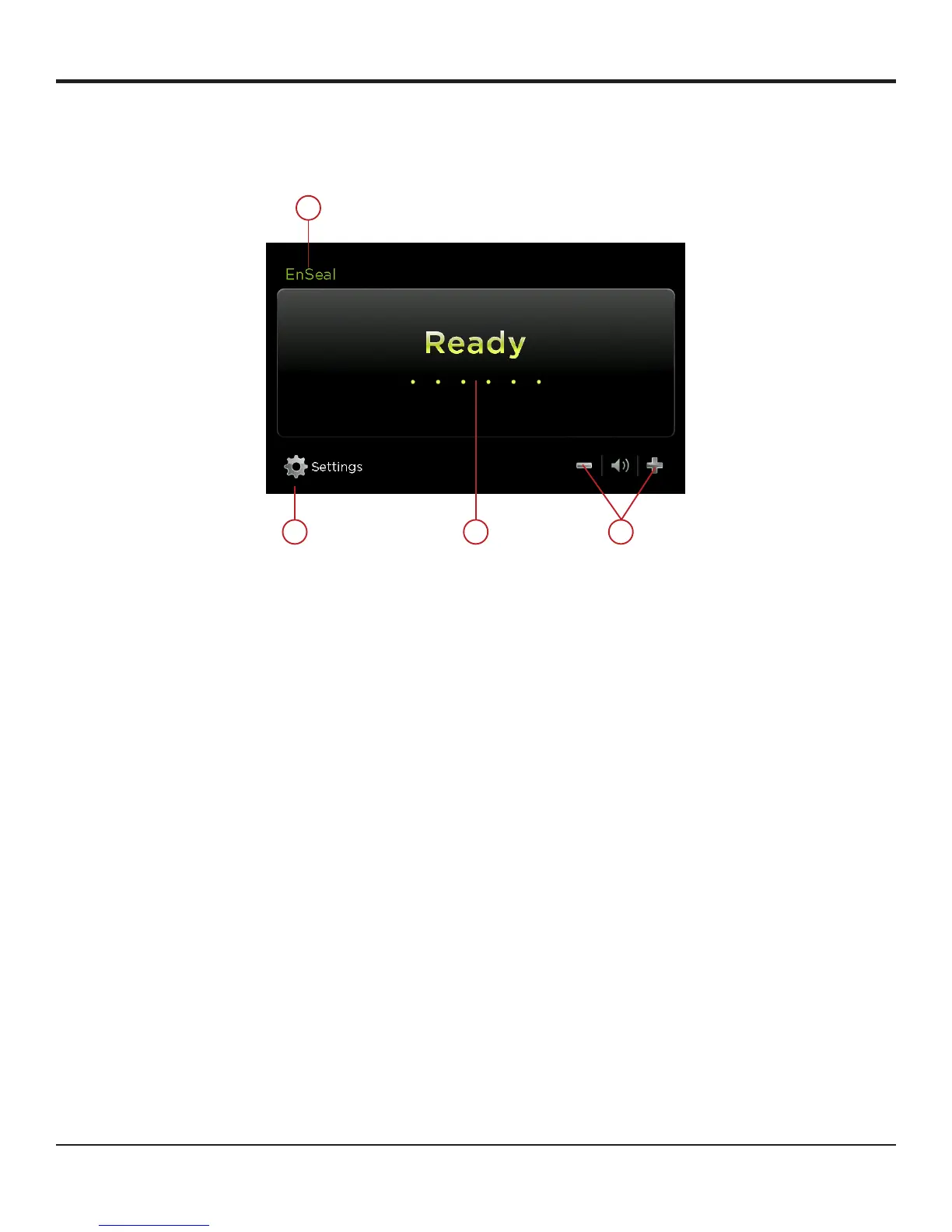
Ready Screen Features
The ENSEAL ready screen has the following features:
1 3 4
2
Figure 11
1 SETTINGS Used to go to the system settings�
2 INSTRUMENT
SPECIFICATION
Indicates the instrument in use�
3 READY System ready display�
4 VOLUME Touch the plus or minus button to adjust the volume of the activation tones� A tone is heard to indicate the
volume level selected�
Operation
Power is activated from the ENSEAL instrument or from the left pedal of the footswitch� The ENSEAL instrument has only one mode of
operation� There are no power level settings� When power is activated, audio feedback is initiated� When the upper impedance threshold is
reached and before the knife has been fully advanced, the audio feedback changes into a higher pitch tone� When both the upper impedance
threshold has been reached and the knife has been fully advanced (handle is fully closed), a single tone sounds, indicating a complete cycle�
Always advance the knife under power� The single tone for a complete cycle is the only indication of a complete cycle and cut�
Volume
Adjust the volume using the plus or minus button� Default volume setting is 5�
Shutdown
Turn off the generator using the On/Off switch on the front panel of the unit�
The shutdown sequence cannot be initiated during power activation� During shutdown, the generator clears content from the screen and
displays the shutdown animation�


 To Next Page