Generator G11 8
Generator G11 Operator’s Manual
Ready Screen Features
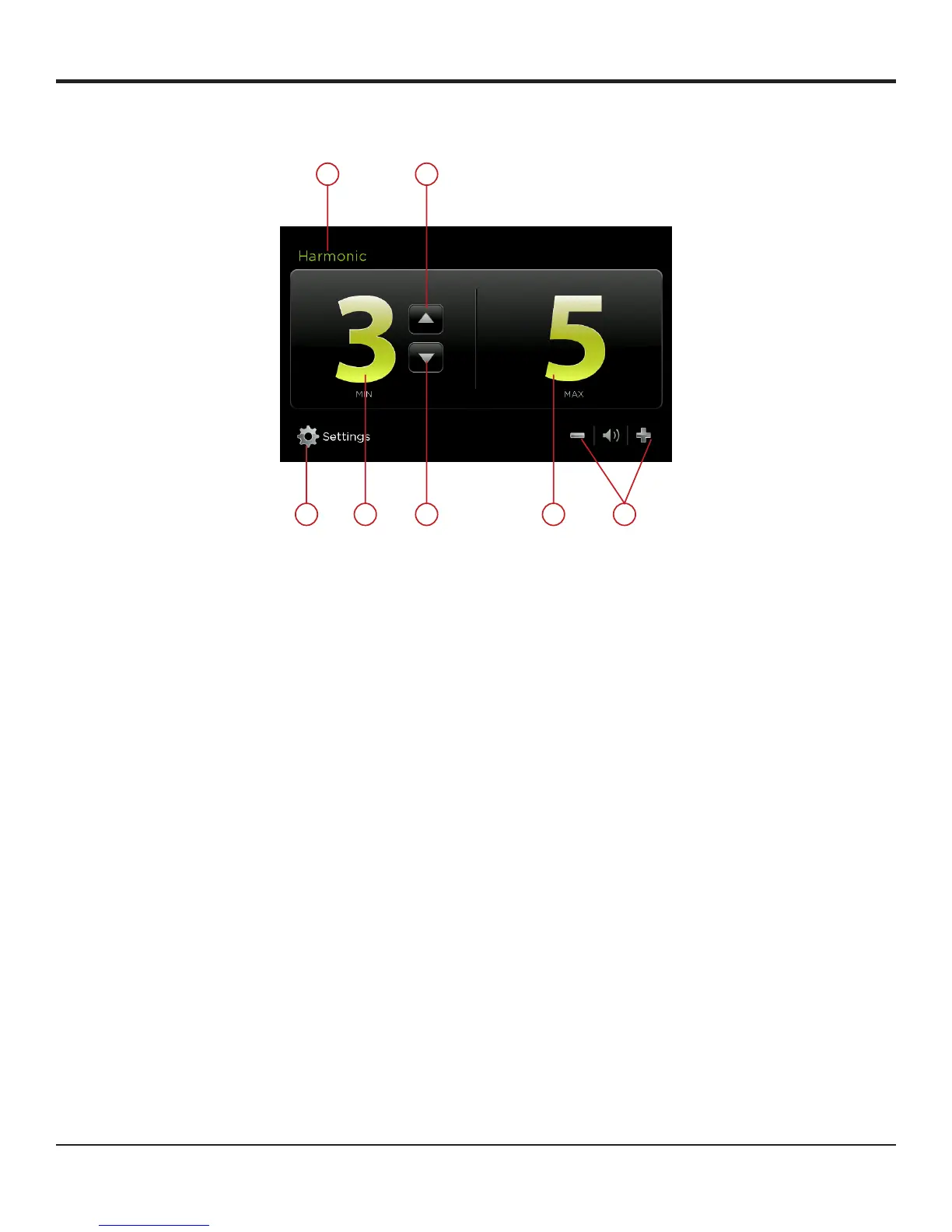
The HARMONIC ready screen has the following features:
Figure 6A
1 SETTINGS Touch this button to go to the system settings�
2 INSTRUMENT
SPECIFICATION
Indicates the instrument in use�
3 MIN Indicates the user-adjustable minimum power level setting� When this power level is activated (by footswitch or
handswitch), the ‘MIN’ indicator will flash� The system defaults to ‘MIN’ power level 3� Refer to the individual
instrument package inserts for the recommended minimum power level�
4 MAX Indicates the maximum power level setting� This setting is always 5� When this power level is activated (by
footswitch or handswitch) the ‘MAX’ indicator will flash�
5 POWER LEVEL
INCREASE
Touch this button to increase the minimum (MIN) power setting to the desired level (from 1 to 5)� The level
chosen will be shown on the screen� The power level may be adjusted when the generator is ready�
6 POWER LEVEL
DECREASE
Touch this button to decrease the minimum (MIN) power setting to the desired level (from 1 to 5)� The level
chosen will be shown on the screen� The power level may be adjusted when the generator is ready�
7 VOLUME Touch the plus or minus button to adjust the volume of the activation tones� A tone is heard to indicate the
volume level selected�
Operation
Minimum or maximum power is activated from the HARMONIC instrument or from the footswitch�
Use the left pedal on the footswitch for activating minimum power and use the right pedal for maximum power�
During minimum activation, the MIN area on the generator screen will glow green and pulse� During maximum activation the MAX area will
glow green and pulse� As the power is activated, audio feedback is initiated�
The default power level value is 3 for the minimum� Touch the power level increase or the power level decrease button to increase or decrease
the level of power to be generated in this mode�
52
463


 To Next Page