23 Generator G11
Generator G11 Operator’s Manual
ENSEAL Troubleshooting
Note: The following alarms are specific to ENSEAL instrument used with the Generator G11�
Alarms
The Generator G11 supports the following alarms to help in the identification and troubleshooting of component problems when using an
ENSEAL tissue sealing instrument� The following list is meant as an adjunct to, but not a substitute for clinical judgment and observation�
Other than fuses the Generator G11 contains no operator-serviceable parts� For replacement or service contact the Ethicon Customer Service
Department or your local representative�
Caution: When an alarm sounds, the generator output stops� If the jaws are closed on tissue and an alarm sounds, do not advance the knife�
If the knife is advanced, do not release the instrument� Add additional clamping as necessary to prevent blood loss before releasing the
instrument�
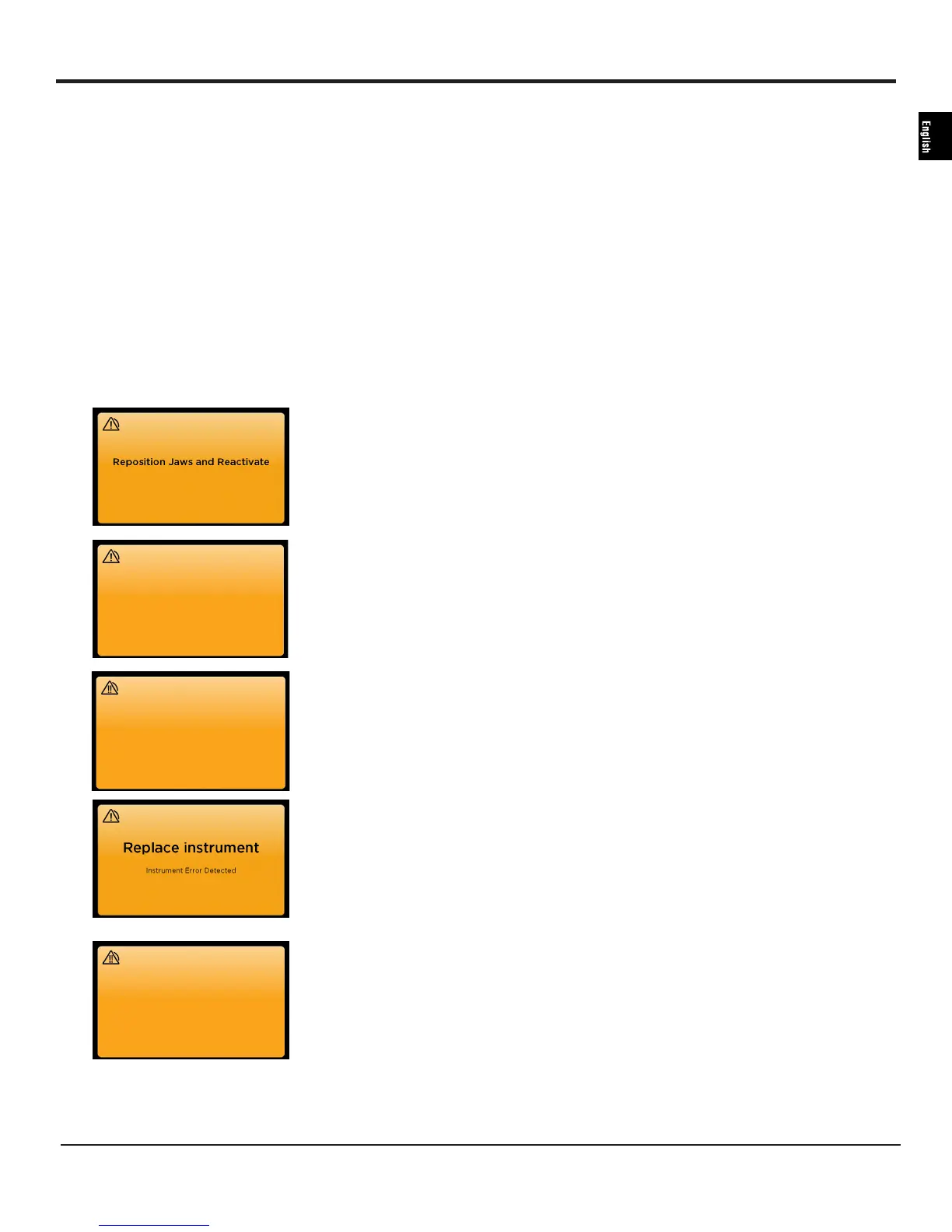
Visual Alarms Description Troubleshooting Steps
Instrument is being activated on low
impedance (thin) tissue or metal (such as
staples, clips, retractors, or clamps)�
Reposition the instrument jaws and reactivate�
The same alarm has triggered three times
in a row� There may be an issue in the
instrument�
Replace the instrument�
Indicates an internal issue with the
identification circuitry in the instrument�
Special circuitry is installed on certain
advanced instruments to identify the
instrument to the generator and tailor the
generator’s output to the instrument�
Replace the instrument�
This is a medium priority alarm�
The generator cannot deliver energy� (The
instrument may cut tissue without a seal if
the surgeon advances the knife�)
If the instrument jaws are open, close jaws on
tissue and reactivate�
If the jaws are closed on tissue and this alarm
sounds, do not advance the knife� If the knife
is advanced, do not release the instrument�
Add additional clamping as necessary to
prevent blood loss before releasing the
instrument�
Replace instrument
Replace instrument
Close jaws on tissue and reactivate.


 To Next Page