Generator G11 18
Generator G11 Operator’s Manual
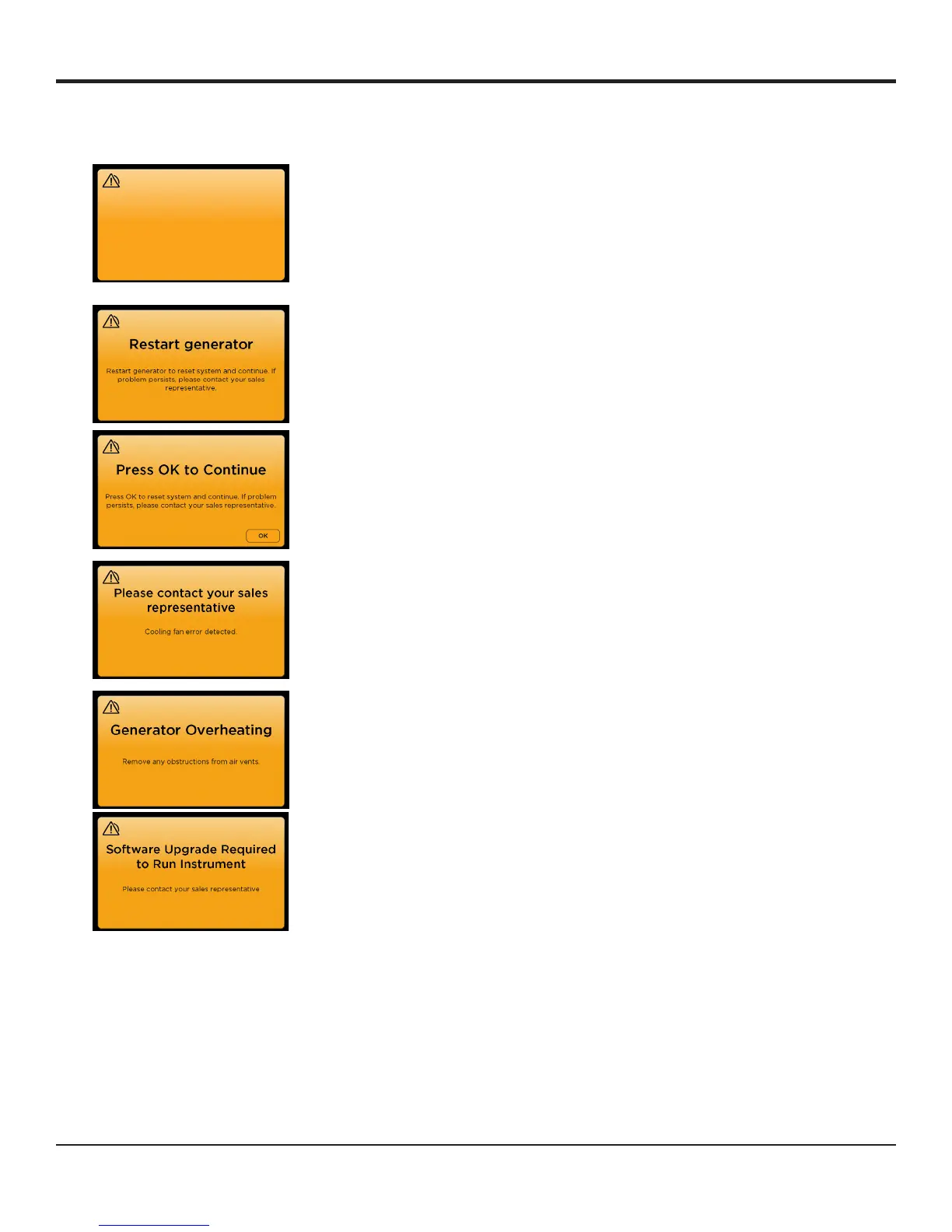
The following are the general low priority alarms:
Visual Alarms Description Troubleshooting Steps
Two activation switches are closed in the
system� This may be due to a stuck switch
or the inadvertent closure of an additional
switch�
Reactivate instrument to continue� If the surgical
staff has activated only one switch, replace the
instrument or footswitch that may have the stuck
switch�
A system reset is required� Remove the instrument from the incision and
cycle the generator power using the Power
On/Off switch on the front of the panel� If the
problem persists, please send the generator to an
authorized Ethicon service center�
A system reset is required� Press OK to return to the state the system was
in when the error occurred� If problem persists,
please send the generator to an authorized
Ethicon service center�
A general issue with the system
(This screen indicates an internal error
with the cooling fans of the generator)
Contact your Ethicon sales representative OR
Please send the generator to an authorized
Ethicon service center�
The generator is overheating� Remove any obstructions from the air vents at
the back and bottom of the generator� If the air
vents are not blocked and the problem persists
return the generator to an authorized Ethicon
service facility�
The instrument requires a generator
software upgrade�
Contact your Ethicon sales representative for a
software upgrade�
Reactivate
Two switch activations detected:
HANDSWITCH
FOOTSWITCH
Reactivate instrument to continue.


 To Next Page