EN 14
Setting the cooking timer /alarm
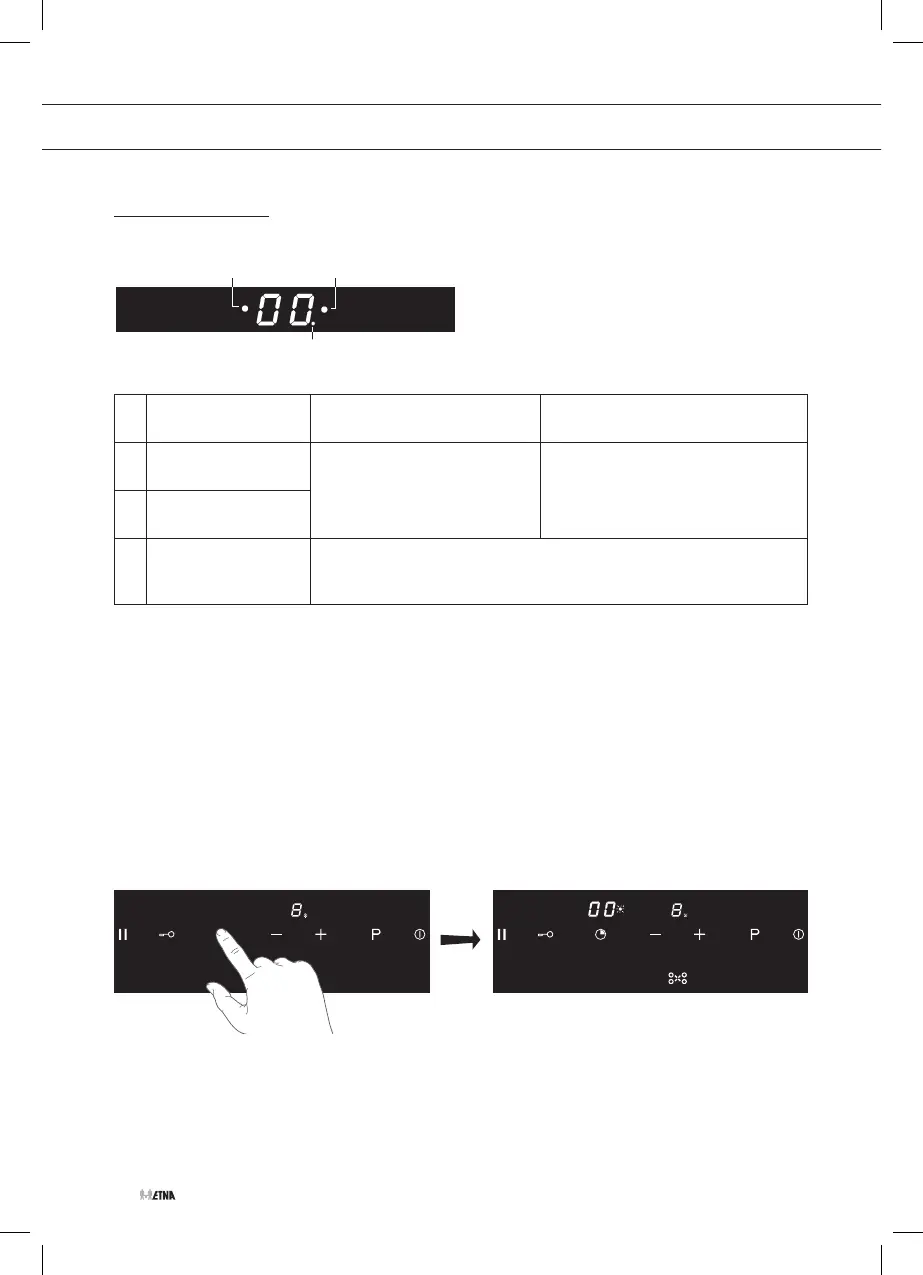
Timer display description
1
3
2
Flashing indicator: Indicator flashing within
10 sec. after Timer key use
Indicator flashing longer than
10 sec. after Timer key use
1
for active left
Cooking zone
• set switch off time or
change switch off time.
• check remaining switch off
time
2
for active right
Cooking zone
3
for timer alarm
setting (no zone
switch off).
• Setting a kitchen timer (can only be set with the timer from the
middle cooking zone).
1. Start the hob.
▷ For use as a cooking timer; select a cooking zone and power level.
▷ For use as a alarm; do not select a cooking zone and power level.
▷ See chapter: Cooking-timer/alarm
2. Touch the timer key to start the timer.
▷ Touch the timer key one or two times, to select the front or rear cooking zone (except for
the middle cooking zone).
▷ A flashing point adjacent to the timer display indicates the cooking zone to which the
timer is linked.
▷ The timer display shows double zero (00).
3. Within 10 seconds select a cooking time with the plus (+) and minus (-) keys.
OPERATION



 To Next Page