22
English
No Date Explanation and Intended Use
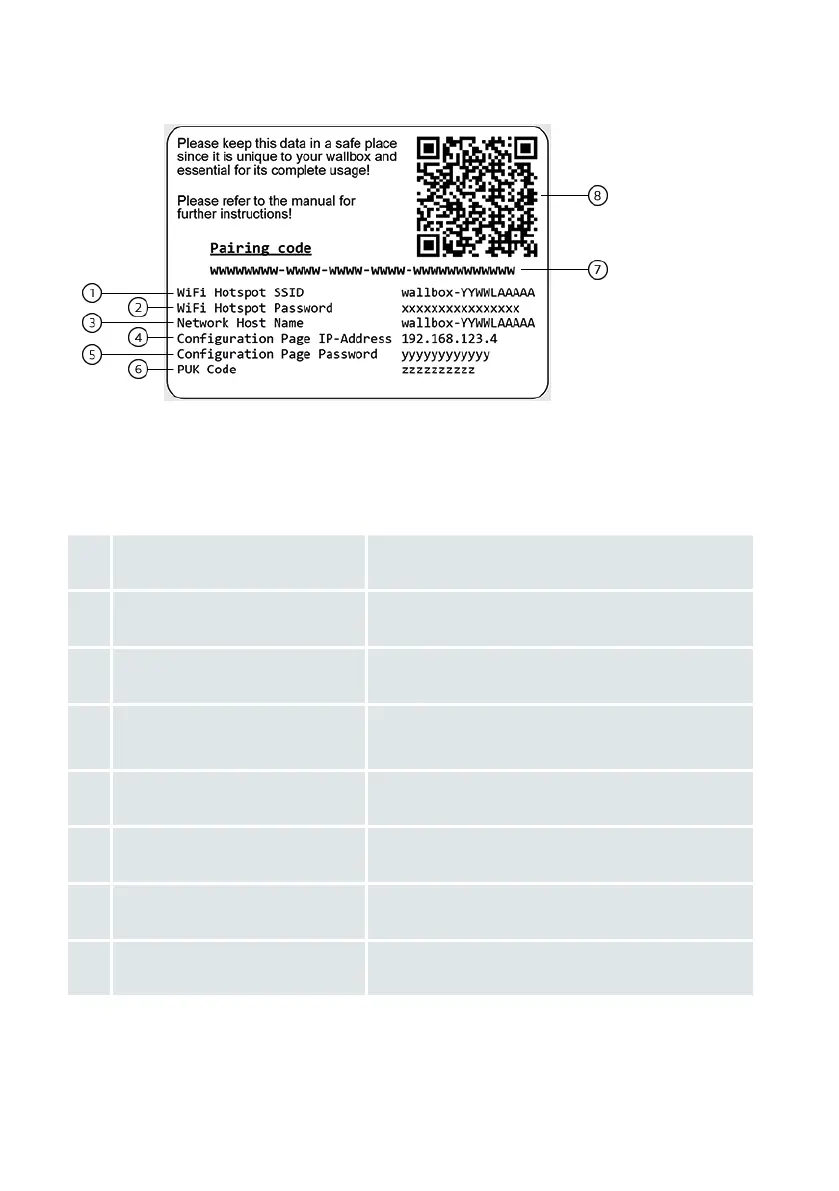
1 WiFi Hotspot SSID
SSID of the Audi Walbox’s local conguration
hotspot (Active upon power on)
2 WiFi Hotspot Password
Password to connect to the Audi Walbox’s local
conguration hotspot
3 Network Host Name
Unique name of the Audi Walbox to access it
within the local network
4 Conguration Page IP-Address
IP-Address to access the Conguration Manager
using a browser while connected to the WiFi
Hotspot
5 Conguration Page Password
Initial password to log into the Conguration
Manager
6 PUK Code
Code to reset a changed Conguration Page
Password to the initial one
7 Pairing Code
Manual identication of the individual Audi
Walbox during pairing process in the myAudi app
8 QR Code
Automatic identication of the individual Audi
Walbox during pairing process in the myAudi app
The Pairing Code and QR Code are for explicit identication of the individual Audi Wallbox
within the myAudi app. This code is not needed to use the Conguration Manager


 To Next Page