Decommissioning
1. Turn o the input power of the wallbox
and make sure that the power stays o by
adding warning signs to avoid accidental
restart of power. Subsequently please
check that there is no voltage.
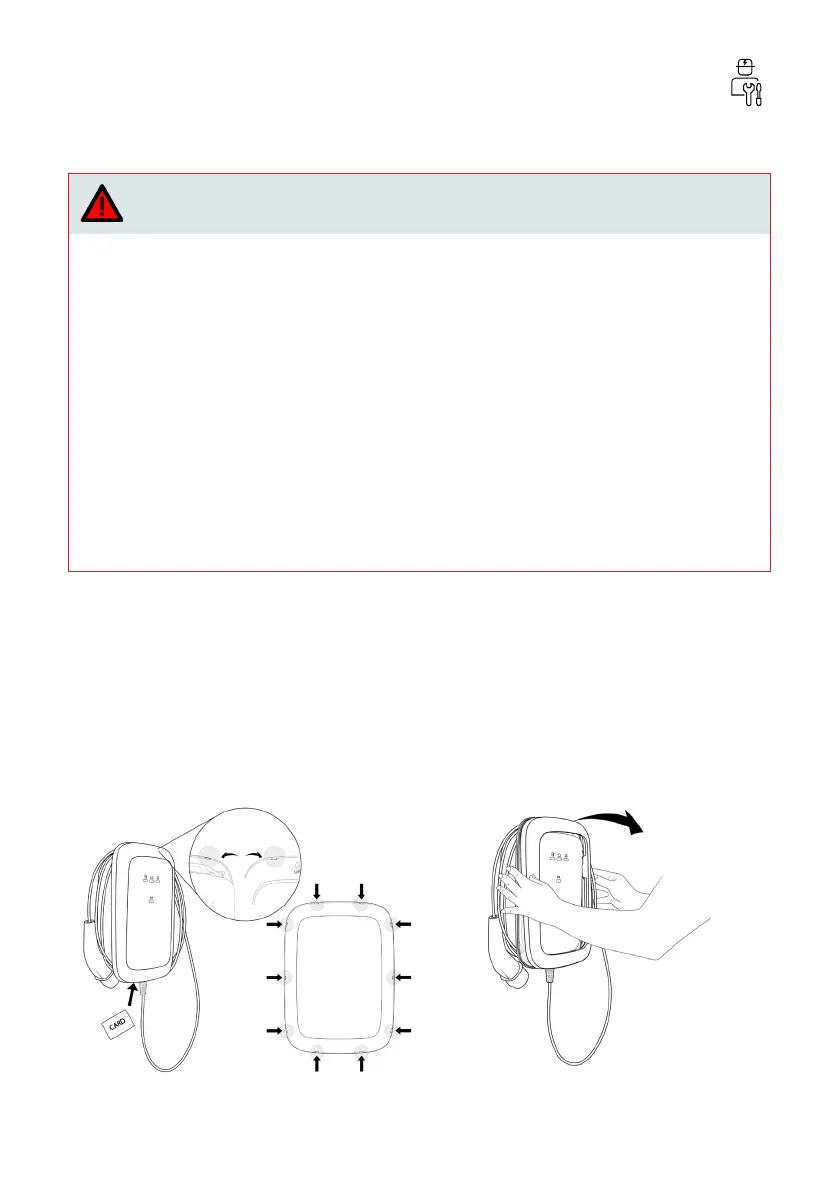
2. Use a plastic card or similar plastic tool
for removing the bezel in a gentle way,
without damaging it.
3. Dismount the screws of the front cover.
Remove the front cover and hold it close
to the main assembly while disconnecting
the HMI cable and, optionally, if present,
the RFID cable.
4. To continue dismounting the wallbox,
follow the installation steps from chapter
Install wallbox in reverse order.
Danger
Working on electric installations without proper precautions will result in the risk of elect-
ric shock, which will cause injury or death.
› Make sure that connection of the electrical power cannot occur during installation.
› Put up caution tape and warning signs to mark the working areas. Make sure no unautho-
rized persons enter the working areas.
Installation, maintenance, repair and relocation of this wallbox by a non-certied electrici-
an will result in the risk of electric shock, which will cause severe injury or death.
› Only a certied electrician is permitted to install, maintain, repair, and relocate the wall-
box.
› The user must not attempt to maintain or repair the wallbox as it does not contain user-
serviceable parts.
› Local regulations may be applicable and may vary depending on your region or country of
use. The certied electrician must always ensure that the wallbox is installed according to
the local regulations.
69


 To Next Page