24
Audi Wallbox's IP-Address
Alternatively, the Conguration Manager can
be accessed using the Audi Wallbox's IP-Ad-
dress. This address is assigned by the local
network. Reference the local networks con-
guration page to identify the Audi Wallbox's
local network IP-Address.
Connecting the Audi Wallbox to the
Internet
After having connected to the Audi Wallbox
and navigated to the Conguration Manager
according to section Accessing the Congura-
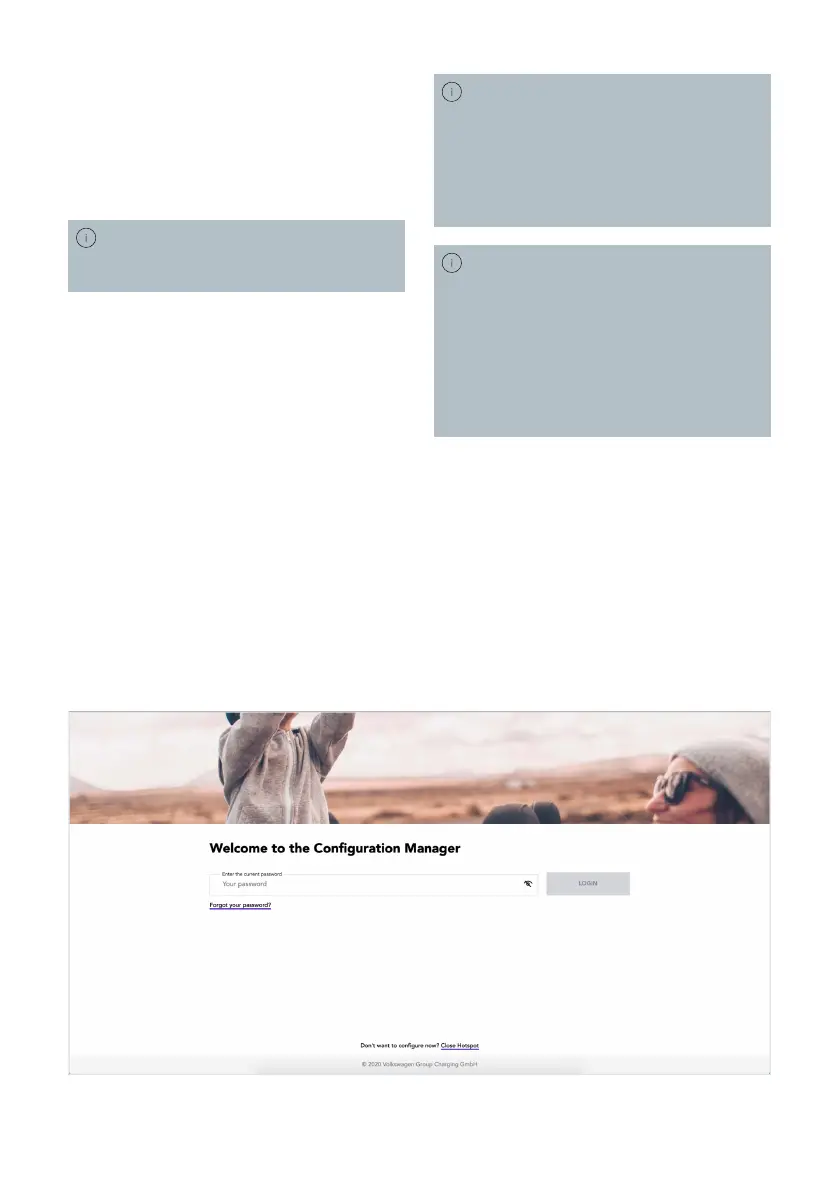
tion Manager, the login screen illustrated in
the gure below is shown in the browser.
If the login screen looks dierently, see
section Connecting the Audi Wallbox to an
Energy Management System for further
instructions.
1. Enter the Conguration Page Password to
log in.
2. Navigate through the Conguration Mana-
ger’s menu Connectivity.
3. Choose and set up the desired connection
interface.
After the connection has been established,
please log out and wait a few minutes so the
Audi Wallbox has time to update and reboot.
The Audi Wallbox's local IP-Address will
not be the same as the Conguration Page
IP-Address.
For the Wi-Fi and Ethernet interface,
the Audi Wallbox uses automatic network
settings (DHCP) by default but can be
set to static for self-managed settings.
Be aware of possible address conicts on
the local network if the Audi Wallbox is
assigned to an already used IP-Address.
If you do nd the Login screen of the
Conguration Manager to look dierently,
the Audi Wallbox is still equipped with
an outdated software version. This might
imply, that connecting the Audi Wallbox to
local network will only be possible after a
software update. To make sure the update
can be installed please connect the Audi
Wallbox to the internet as described.
English


 To Next Page