EVCO S.p.A. EV3 CHIL & EVD CHIL | Installer manual ver. 1.2 | Code 1443DCHILE124
page 26 of 46
5.4 Menu
5.4.1 Access levels
There are three access levels for navigating within the menus, two of which require a password:
U User: always visible
S Servicer: visible if the servicer password (parameter CF09, default -12) or the manufacturer password (parameter CF10,
default -123) have been entered
M Manufacturer: visible if the manufacturer password (parameter CF10, default -123) has been entered.
5.4.2 Menu list
The following menus are available:
SEtP For rapid access to the adjustment set-points
Prob Shows the temperature or pressure values for the inputs configured as probes
ALAr Shows the list of alarms underway
di Shows the status of the inputs configured as digital inputs
Ao Shows the status of the outputs configured as analogue outputs or as triac/open collector
do Shows the status of the outputs configured as digital outputs
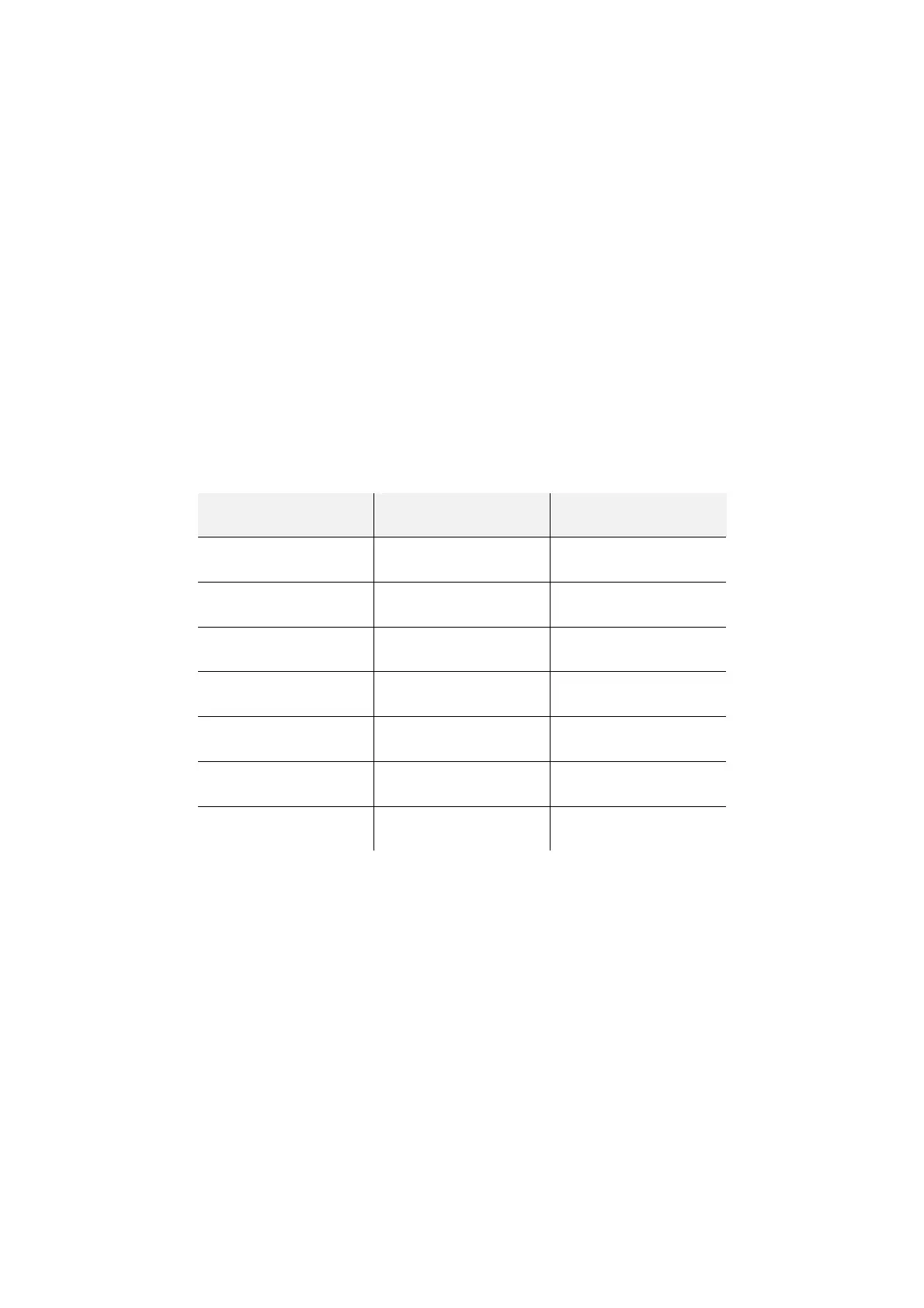
PAr Shows and allows the device parameters to be altered. The parameters are grouped according to their function, identified
on the display by a label. Each parameter has an alphabetic code followed by two numbers, as shown in the table below.
GROUP IDENTIFICATION LABEL PARAMETER CODE
Configuration ConF CF
Compressor CoMP CP
Fan FAn Fn
Alarms ALAr AL
Adjustment rEGL rL
Pump PUMP PM
Offset OFF oF
OHr Shows the time the compressors (OH1 and OH2) and the pump (OHP) have been functioning.
HiSt In devices fitted with a clock, up to 20 alarm events can be stored in the memory. The history and details of these are
shown on the lower display in the following sequence.
y xx year
M xx month
d xx day
hh:mm hours:minutes
rtC The time can be set on devices fitted with a clock.
inFo Shows the FW version (project, variation and revision)
PASS The password is entered for access to the desired level: parameter Cf09 for servicer level, Cf10 for manufacturer level.



 To Next Page