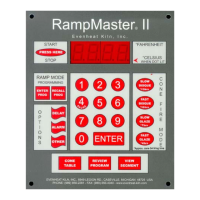
Set-Pro Control Operating Manual
Metal Clay version – Nov. 2014
Page 15 of 21
Use your Smart-phone to scan this QR code to watch Set-Pro how-to Programming Videos!
Preset Drying Program
You may choose to dry your metal clay using our Preset Drying Program. This preset drying program can be used for any brand of metal clay material. The
drying program will take your metal clay to 200°F and hold it there for 1 hour, then shut off.
1. Throw the power switch on the kiln control panel to the On position.
2. The Set-Pro begins its initialization process and the display will illuminate.
3. The Set-Pro will finish its initialization process and then display IdLE (Idle).
4. Press the Enter key one time to begin the programming process. The display will read GLAS, ALAr, bEAd, M-C, CEr or CUSt.
5. Use the Up or Down arrow keys to make the display read M-C (Metal Clay Express Mode) if it does not already.
6. Press the Enter key. The display will read either M A, ArtC, PMC, PC or drY. These represent Metal Adventures, Art Clay, PMC, and
Prometheus Clay metal clay brands along with the Drying Program that can be used with all brands.
7. Use the Up or Down arrows to select drY (Drying).
8. Press the Enter key. The display will read rEdI which stands for Ready.
13. Press the Enter key to begin the drying process. The Set-Pro is now running your Metal Clay Express Mode Drying Program.
When the drying program is complete the display alternates between CPLt and total firing time. Press the Start/Stop key at this point will cause
the display to briefly read StOP and then IdLE.
You may stop the firing at any time by pressing the Enter key. Doing so will cause the firing to stop and StOP will briefly be displayed.
The Set-Pro allows
Program Review
It’s always best to review your program before starting it. When the controller is reading IdLE just press the REVIEW key and the display will automatically
show you what’s programmed. Just watch. When it’s done reviewing rEdI will be displayed. Press Start/Stop key to start the program. If it’s not what you
want, Press the Start/Stop key again to get to IdLE and enter a new program.
Fine-Tuning Preset Metal Adventures BRONZclay™, COPPRclay™, WHITE COPPRclay™, Art Clay, PMC and Prometheus Clay Programs
As mentioned in the detailed Metal Clay Express Mode programming instructions, it is possible to modify the preset programs. These preset programs
were developed using suggested manufacturer firing instructions, however that doesn’t mean you shouldn’t be able to tweak and fine-tune them to better
fit your needs! We all like to adjust and tweak things to give us the exact performance we’re looking for and the Set-Pro allows you to do just that.
As you program and enter through the Metal Adventures, Art Clay, PMC and Prometheus Clay preset programs you will always see the final temperature
and hold time used for that particular clay style. As these temperatures and hold times are displayed you are welcome to use the Up and Down arrow keys
to change these values. Want to fire cooler? Lower the final temperature a bit. Want to hold for just a little more time? Go for it, add a couple of minutes.
Once you fine-tune a particular preset program your changes stay. This means you don’t have to make the changes every time you want to run that
particular program. We have included a copy of the original factory presets if you ever feel the need to start back at the factory settings. These can be
found on page 20 of this manual.
Start Now
For you brave souls out there who want to skip the program review you can get to the rEdI command quickly by pressing the REVIEW key twice (when IdLE
is displayed). This bypasses the review process and gets you directly to rEdI. Just press the Start/Stop to start the program.



 To Next Page