Home
EverFocus
Keyboard
EKB500
Page 11 (5.2 EPTZ Speed Dome Camera Connection)
EverFocus EKB500 - 5.2 EPTZ Speed Dome Camera Connection; 5.3 Samsung ED2200;2250, SCC-641;643;6405 Connection
40 pages
Manual
Save Page as PDF
To Next Page
To Next Page
To Previous Page
To Previous Page
Loading...
EKB500_ma_en_r
ev1.5_3.doc
11
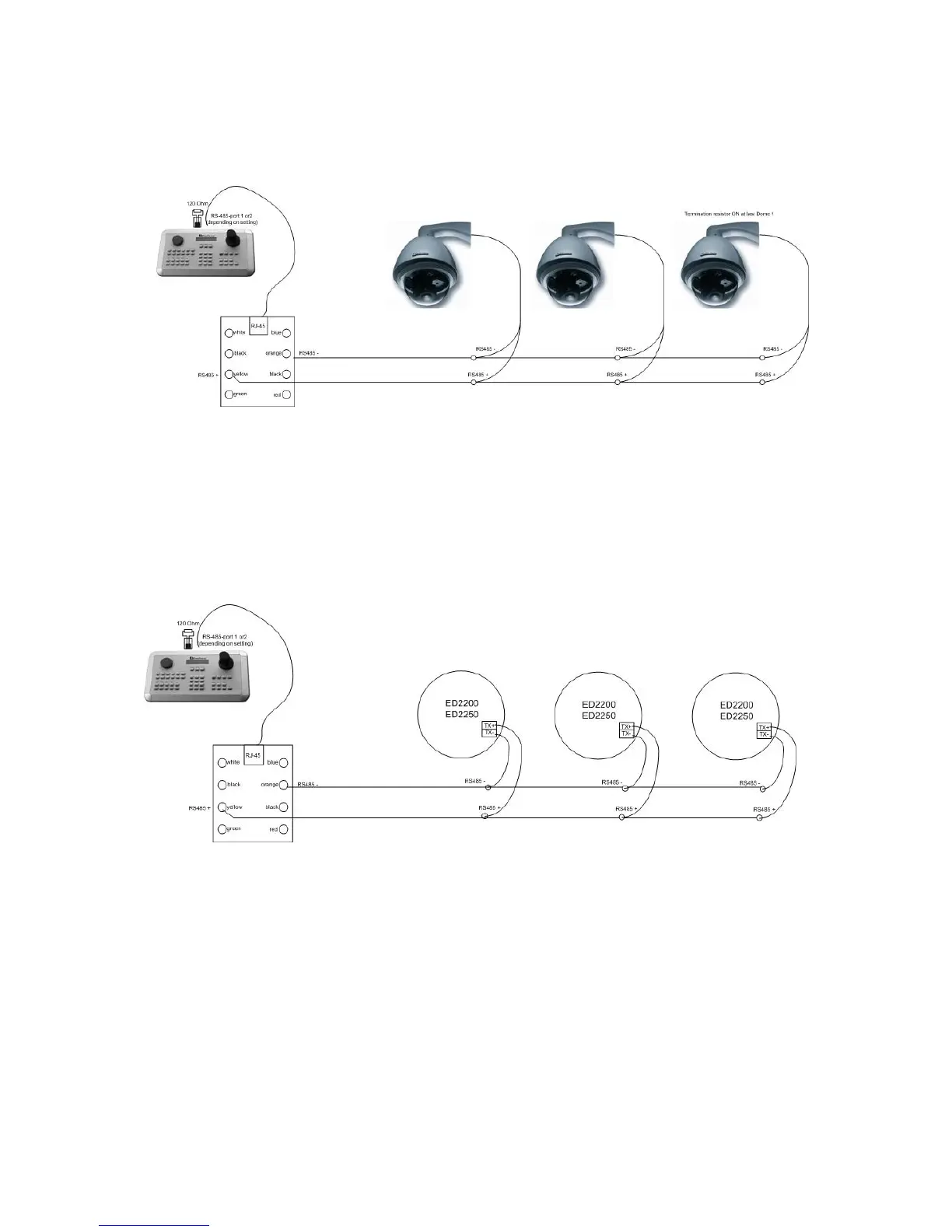
5.2
EPTZ 500 / 1000 / 3000 / 3500 SPEED
DOME CAMERA CONNECTION
Applied protocol type: EVF2 (standard)
5.3
ED-2200, ED-2250, SAMSUN
G SCC-641, SCC-643 , SCC-6405
CONNECTION
Applied protocol type: A-Type
10
12
Table of Contents
Main Page
1 Safety Warnings
2
Table of Contents
3
2 Introduction
5
Features
5
Changes from FIRMWARE 1.5 Compared to Former Versions
5
Compatible Devices
5
Delivery Scope
6
3 Operating Elements
7
4 Keyboard Connectors
8
RS-485 Ports
8
RS-232 Connector
8
Power Connector
8
5 Installation
9
General RS-485 Bus Installation
9
EPTZ 500 / 1000 / 3000 / 3500 Speed Dome Camera Connection
11
ED-2200, ED-2250, Samsung SCC-641, SCC-643 , SCC-6405 Connection
11
Connection of Pelco-D / -P Protocol-Compatible Devices
12
Everfocus DVR Connection
13
Connection of Several Keyboards
15
Start-Up
15
6 Menu Settings
16
Menu Structure
16
COM PORT SETTING - RS-485 Interface Setting
17
Device Setting
17
Camera Setting (Changed from FW 1.5)
17
Monitor Setting (Changed from FW 1.5)
18
DVR Setting
19
Camera List & Delete
19
Monitor List & Delete
19
DVR List & Delete
20
Non-Listed Devices
20
Keyboard Setting
21
Sub Keyboard Setting
21
MENU Password
21
Lock Password
22
Buzzer ON/OFF
22
Joystick Calibration
22
Keypad Test
23
Jog & Shuttle Test
23
Load Default Setting
23
Firmware Update
23
7 Operation
24
New EKB-500 Operation Concept (from Firmware 1.5)
24
Monitor Selection
24
Camera Selection
24
DVR Password Input
25
Dvr Main Monitor Operation
25
Ptz Operation / Setup
27
Everfocus EPTZ Series
28
Preset Tours
31
Everfocus ED 2200/2250, Samsung El. SCC-641/643/6405 Operation
33
Pelco-D / -P Protocol Compatible Devices' Operation
34
LG Protocol Compatible Devices' Operation
36
Panasonic Protocol Compatible Devices' Operation
36
8 Specifications
37
9 Appendix A: Factory Settings
38
Other manuals for EverFocus EKB500
User Manual
38 pages
Related product manuals
EverFocus EKB200
17 pages



 To Next Page