EKB500_ma_en_rev1.5_3.doc 8
4 KEYBOARD CONNECTORS
4.1 RS-485 PORTS
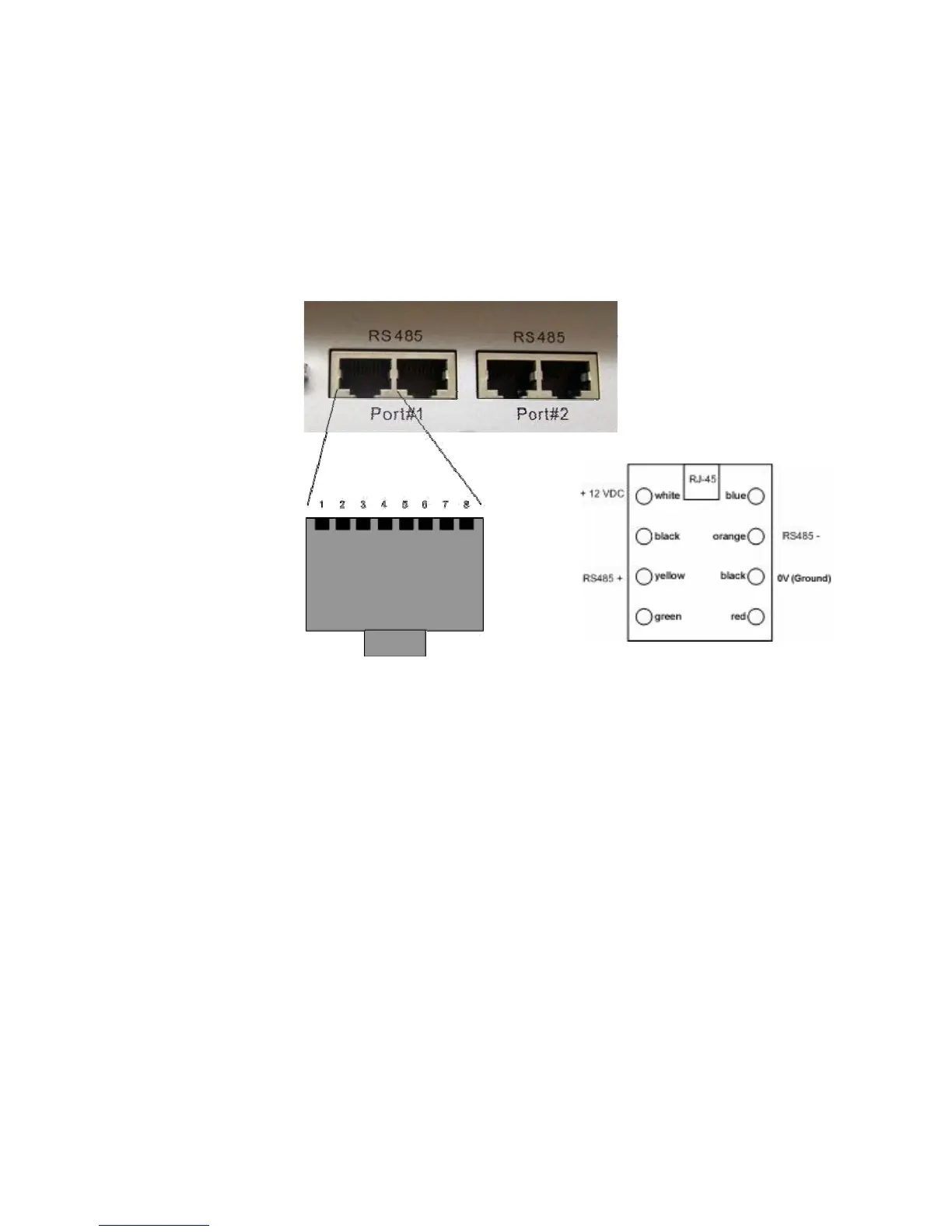
EKB-500 provides two independent RS-485 ports with 2 RJ-45 plugs each (loop-through).
Pin assignment:
Pin 1: 12 VDC
Pin 3: RS-485 +
Pin 6: RS-485 -
Pin 7: Ground
Pin assignment RJ-45 connector
connector box
Delivery comprises a connector box for RS-485 and 12 VDC power supply connection enabling power
supply connection either directly to the EKB 500 keyboard or through the connector box.
4.2 RS-232 CONNECTOR
The 9-pin Sub-D connector is used for service purposes, e.g. keyboard update with new firmware.
4.3 POWER CONNECTOR
Use the 5,5 mm socket for connecting the 12 VDC power supply. Centre pin is + 12 VDC. The power
supply may be installed either through this socket or through the included connector box.



 To Next Page