EKB500_ma_en_rev1.5_3.doc 15
Keyboard
Version 1.5
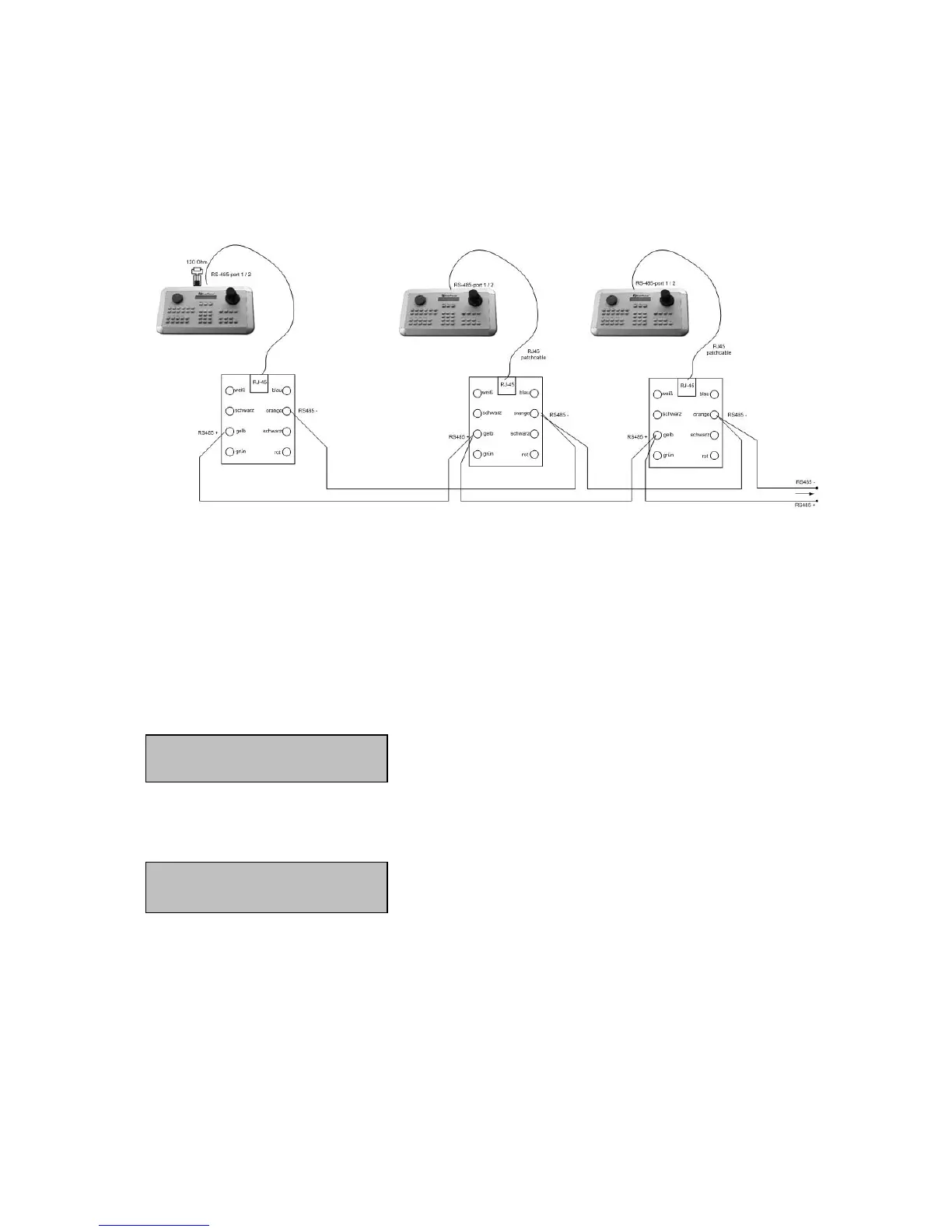
5.6 CONNECTION OF SEVERAL KEYBOARDS
If several keyboards (max. 8) are used in a system, the RS-485 bus has to be looped through from
keyboard to keyboard.
Using both RS-485 interfaces (port 1 and 2), the 2nd bus connection must be effected separately as
illustrated above by means of EDA-998 connection kits.
Power supply can be installed either directly at the keyboard or with the included connection box.
5.7 START-UP
After having finished the installation work, switch on the power.
During initialisation (approx. 3 sec.), the firmware version is displayed.
After initialisation, the following message is displayed:
CAM:0001 MON:0001 > DVR
____ [ CAM / MON ] > PTZ



 To Next Page