EKB500_ma_en_rev1.5_3.doc 14
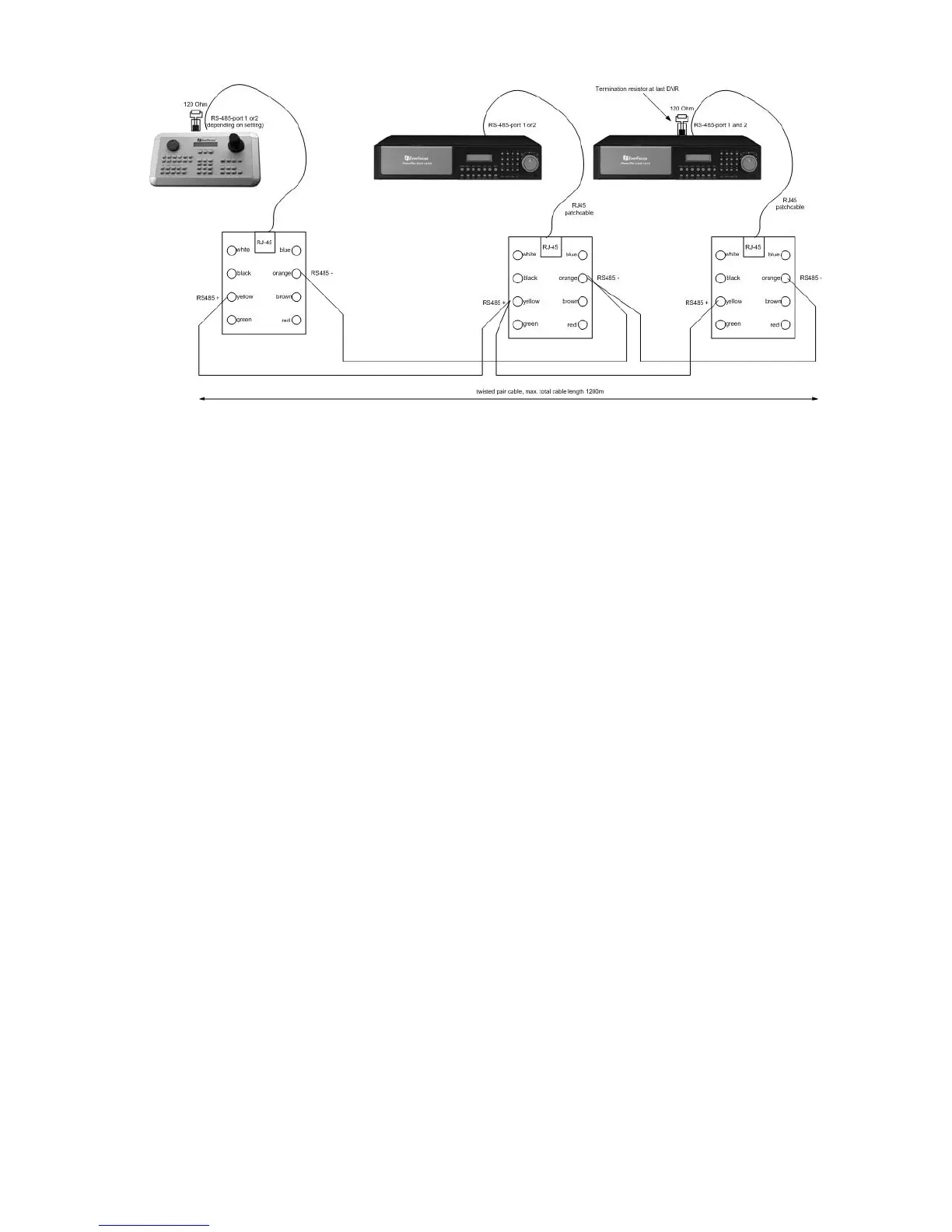
System settings required for start-up:
DVR:
MENU > RS232/RS485:
RS485
BAUD RATE 9600 BPS > Baud rate must be the same as baud rate of
the respective EKB 500 port (default setting
or both keyboard and DVR is 9600)
STOP BIT 1
PARITY NONE
DATA BIT 8
RS232/RS485 ID 1 > RS-485 address must correspond to
DVR setting in EKB 500 menu
EKB-500: (for details, please refer to "6. MENU SETTINGS")
DVR setting:
M
M
M
E
E
E
N
N
N
U
U
U
(
S
S
S
H
H
H
I
I
I
F
F
F
T
T
T
+
M
M
M
E
E
E
N
N
N
U
U
U
key) > DEVICE SETTING > DVR SETTING >
E
E
E
N
N
N
T
T
T
E
E
E
R
R
R
:
DVR NAME: Selectable DVR number (independent of RS-485 address)
RS485 CONNECTED TO PORT: _ : RS-485 port to which the DVR is connected (1 or 2)
RS485 Address: DVR RS-485 address
(Complies with DVR menu "RS232/RS485 ID")
Must be in accordance with DVR setting
DVR xxxx changed
[ENT] to save Press
E
E
E
N
N
N
T
T
T
E
E
E
R
R
R
key to confirm the settings
M
M
M
E
E
E
N
N
N
U
U
U
> COM PORT SETTING >
E
E
E
N
N
N
T
T
T
E
E
E
R
R
R
:
Port:_ (1 or 2) Enter the RS-485 port to which the DVR is connected
Input the Port (1 or 2 )
BAUD: 9600< Baud rate setting (according to DVR)
Protocol: EFV1 Protocol type, setting irrelevant for DVR control> ENTER
Port: 1 Changed
[ENT] to save Press
E
E
E
N
N
N
T
T
T
E
E
E
R
R
R
key to confirm the settings
For details and further settings (e.g. matrix monitor setup), please refer to menu description.



 To Next Page