197
Symbols on the Eversense CGM Mobile App
Symbol Explanation
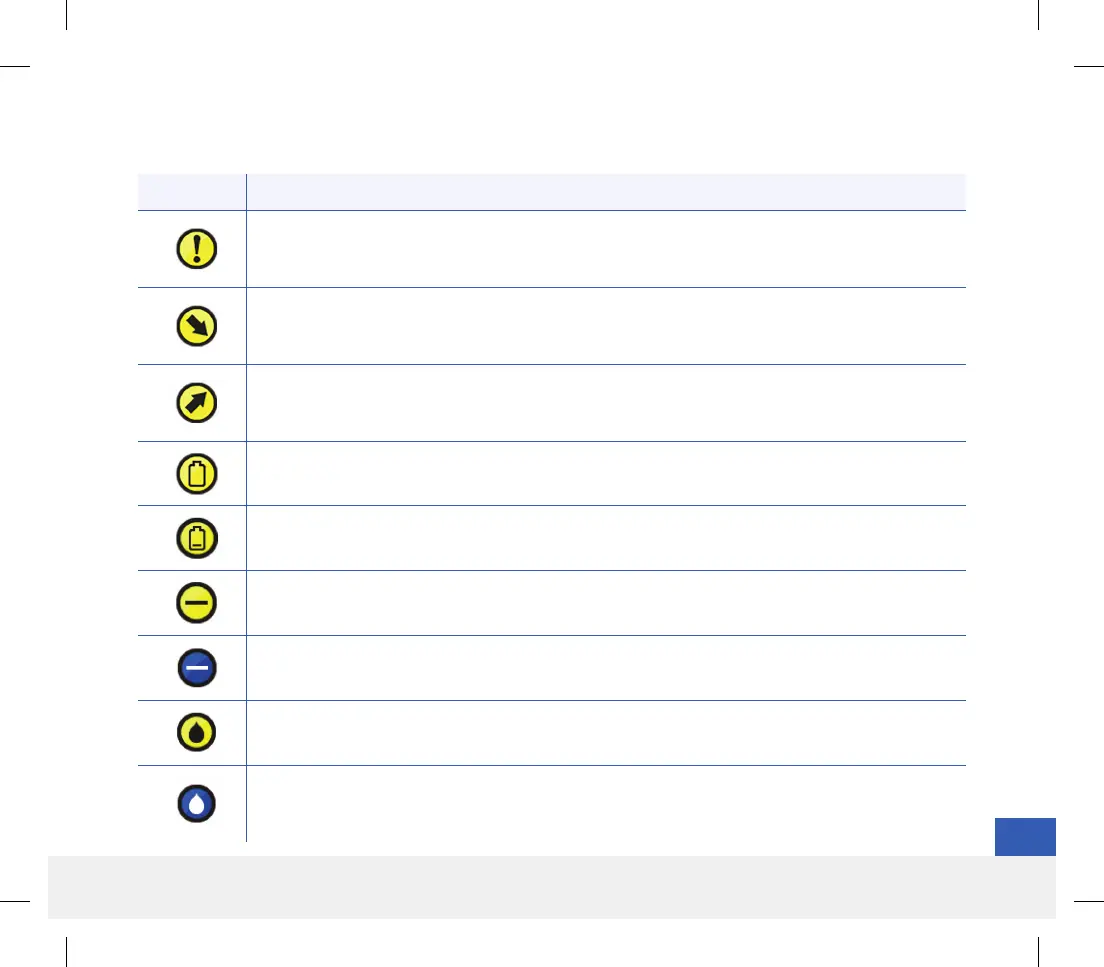
Glucose Alert
Appears when the glucose is above the high glucose alert range and below the low glucose alert
range. The icon appears in the ALERT HISTORY screen.
Predicted Low or Rate Falling Alert
Indicates a Rate Falling or Predicted Low Alert occurred. The icon appears in the ALERT
HISTORY screen and on the home screen trend line.
Predicted High or Rate Rising Alert
Indicates a Rate Rising or Predicted High Alert occurred. The icon appears in the ALERT
HISTORY screen and on the home screen trend line.
Empty Battery Alert
Appears when the smart transmitter battery is empty.
Low Battery Alert
Appears when the smart transmitter battery is less than 10% charged.
Smart Transmitter/Sensor Alert
The icon appears in the ALERT HISTORY screen.
Smart Transmitter/Sensor Notifications
Appears when there are notifications related to the smart transmitter or sensor.
Calibration Alert
Appears when there are calibration-related alerts.
Calibration Notification
Appears in ALERT HISTORY when there are calibration-related notifications. The icon also
appears on the My Glucose trend line and Event Log when a manual BG entry is logged.
LBL-1602-01-001 Rev N_Eversense User Guide_mgdL_R1.indd 197LBL-1602-01-001 Rev N_Eversense User Guide_mgdL_R1.indd 197 2/26/20 12:59 PM2/26/20 12:59 PM



 To Next Page