37
Precaution: If you have any concerns about allergic reaction to silicones, contact your health care provider
prior to use. Discard the patch after 24 hours of use.
Secure the Smart Transmitter over Inserted Sensor
The smart transmitter must be secured on the skin directly over the sensor with the disposable adhesive patch. Each
adhesive patch is designed to be replaced daily and has an adhesive side that attaches to the back of the smart
transmitter and a silicone adhesive side that attaches to the skin. Both the skin and smart transmitter surfaces should
be clean and dry to secure the adhesive surfaces of the patch.
Note: You will receive adhesive patches from your health care provider.
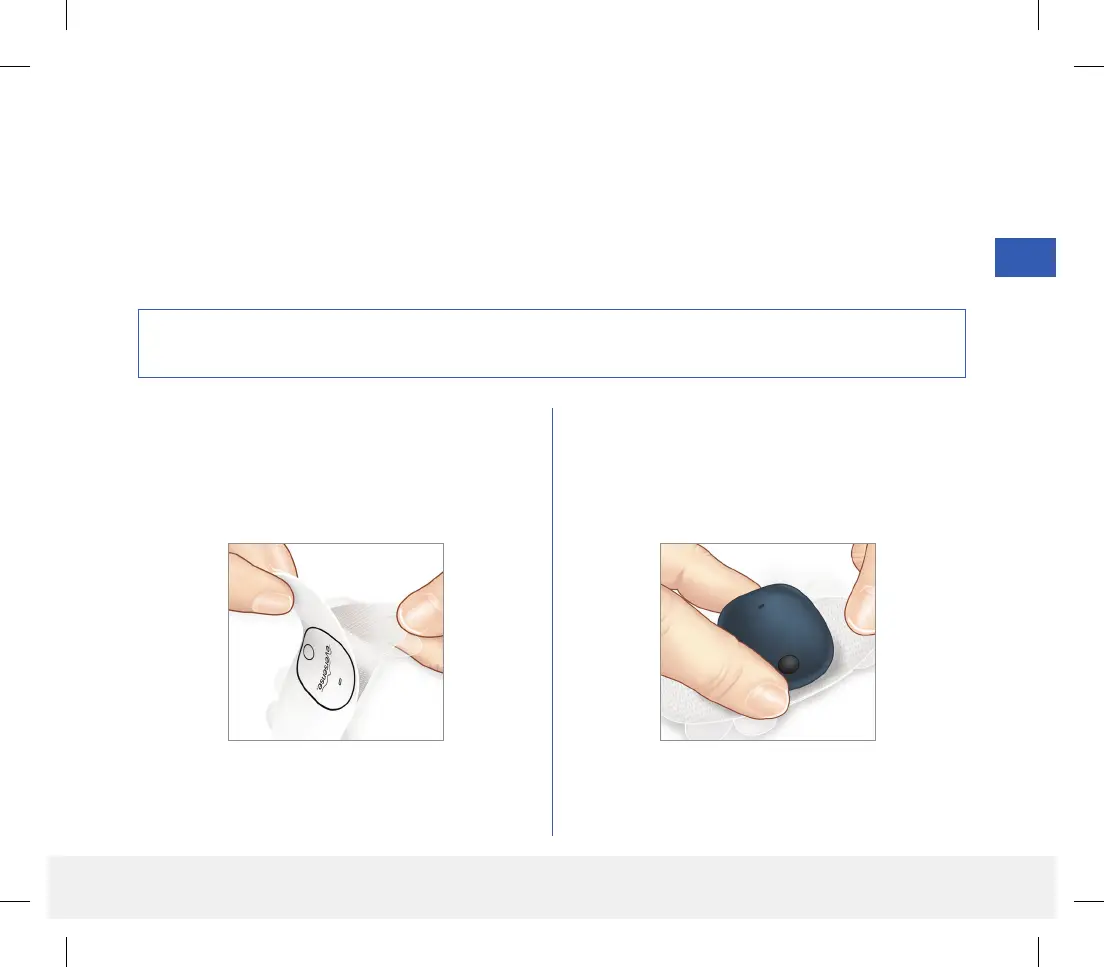
1. Peel o the paper backing with the Eversense
Smart Transmitter outline on it. Try not to touch the
sticky portion of the adhesive in the center.
2. Align the smart transmitter over the sticky side
(center) of patch and press firmly to secure.
• The smart transmitter should be placed so that its
sides face the wings of the patch (as shown).
LBL-1602-01-001 Rev N_Eversense User Guide_mgdL_R1.indd 37LBL-1602-01-001 Rev N_Eversense User Guide_mgdL_R1.indd 37 2/26/20 12:58 PM2/26/20 12:58 PM



 To Next Page