3
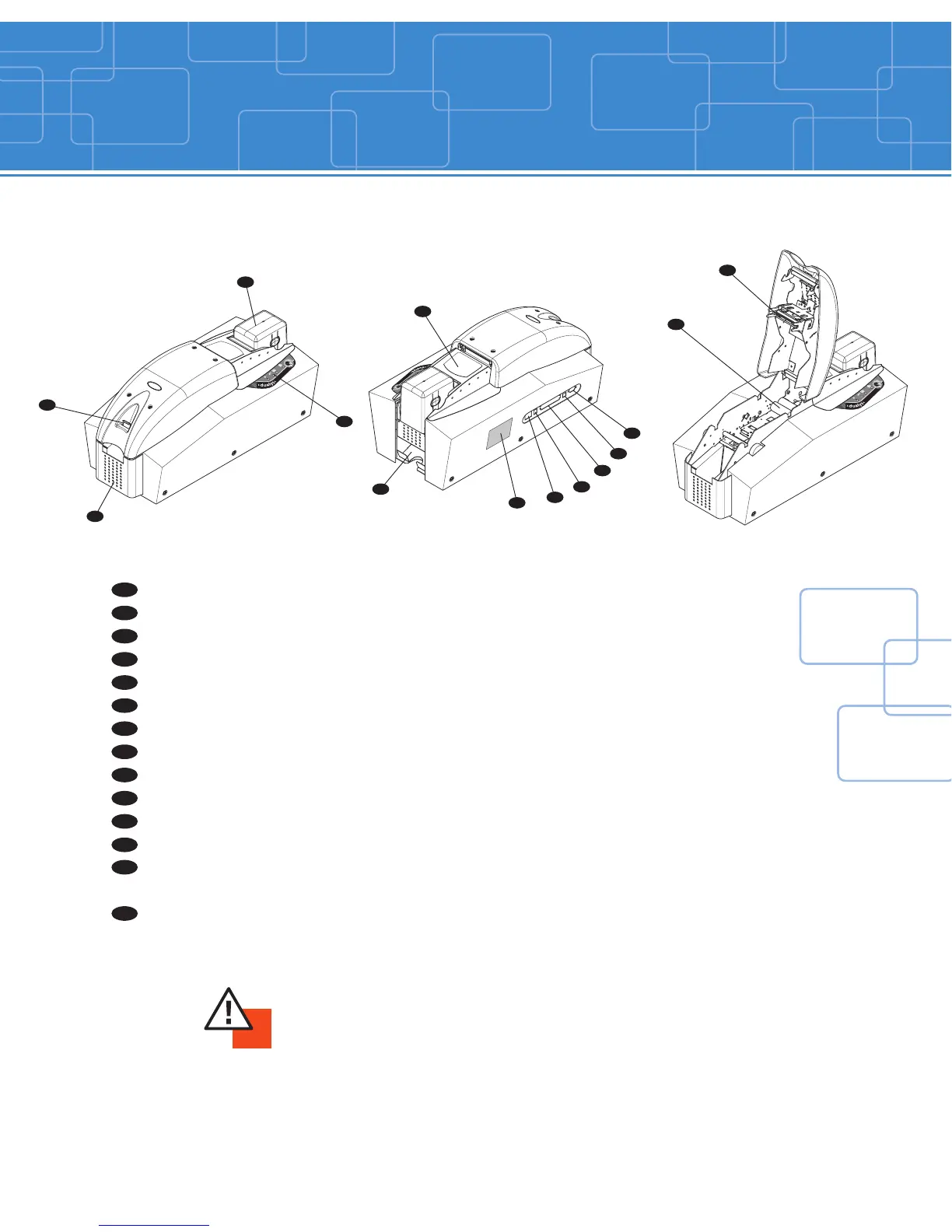
Card Output Hopper Collects the cards ejected from printer
Cover Lever Allows the printer cover to be opened and closed
Card Feeder Holds the cards before printing
Control Panel Shows the printer activity
Flip Over Module Rotates the card 180°
Reject Card Box Collects the faulty cards
Identification Label Gives the printer model and serial number
Switch On/Off switch
Electrical Connector For connecting the printer to the power supply
Parallel Port (standard) Enables data to be received and sent from and to the computer
USB Port (standard) Enables data to be received and sent from and to the computer
Serial Port (optional) Enables data to be received and sent from and to the computer or
Cleaning Rollers Remove dust before printing the cards
connection to an external smart card reader/encoder
Thermal Transfer Print Head For printing cards
Printer description
IMPORTANT !
The printer must be placed on a flat surface, in a dust free environment.
It is essential to be able to access the printer from all sides for its installation.
A
B
C
D
E
F
G
H
I
J
K
L
M
N



 To Next Page