/26
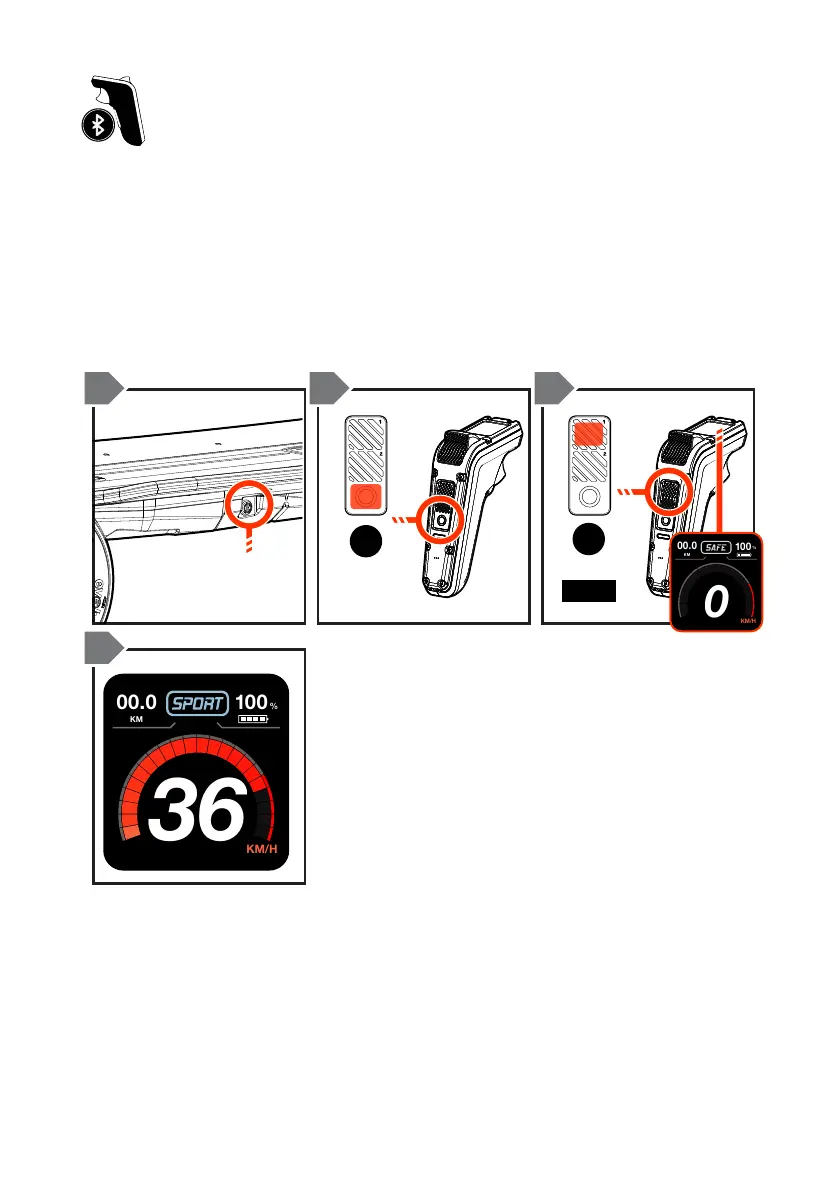
PAIRING / SYNCING THE REMOTE
PRESS TO
POWER OFF
ON/OFF
BUTTON
MODE 1
1 SEC
x1
x1
1 2 3
4
1. Turn your Evolve Skateboard ON.
2. Turn the remote ON.
3. Once the LCD screen displays ‘Pair Remote’, follow the on-screen
instructions. Press and hold the MODE 1 button on the remote for one
second or until the Bluetooth symbol begins to ash.
4. Once paired, the LCD screen will show the speed dial and be in SAFE
mode. This means you are ready to ride!
NOTE: Once the remote and board are paired, they will be automatically paired
the next time you use your board.
TIP – Make sure not to touch the accelerator or brake triggers whilst the remote
is pairing to the board. Once paired, lift the wheels o the ground and pull the
accelerate the board to check the wheels move. Then push the brake trigger to test
the wheels will stop. If there are any delays in the control responses, turn both the
board and remote OFF and repeat the process above to pair your board with the
remote.


 To Next Page