/42
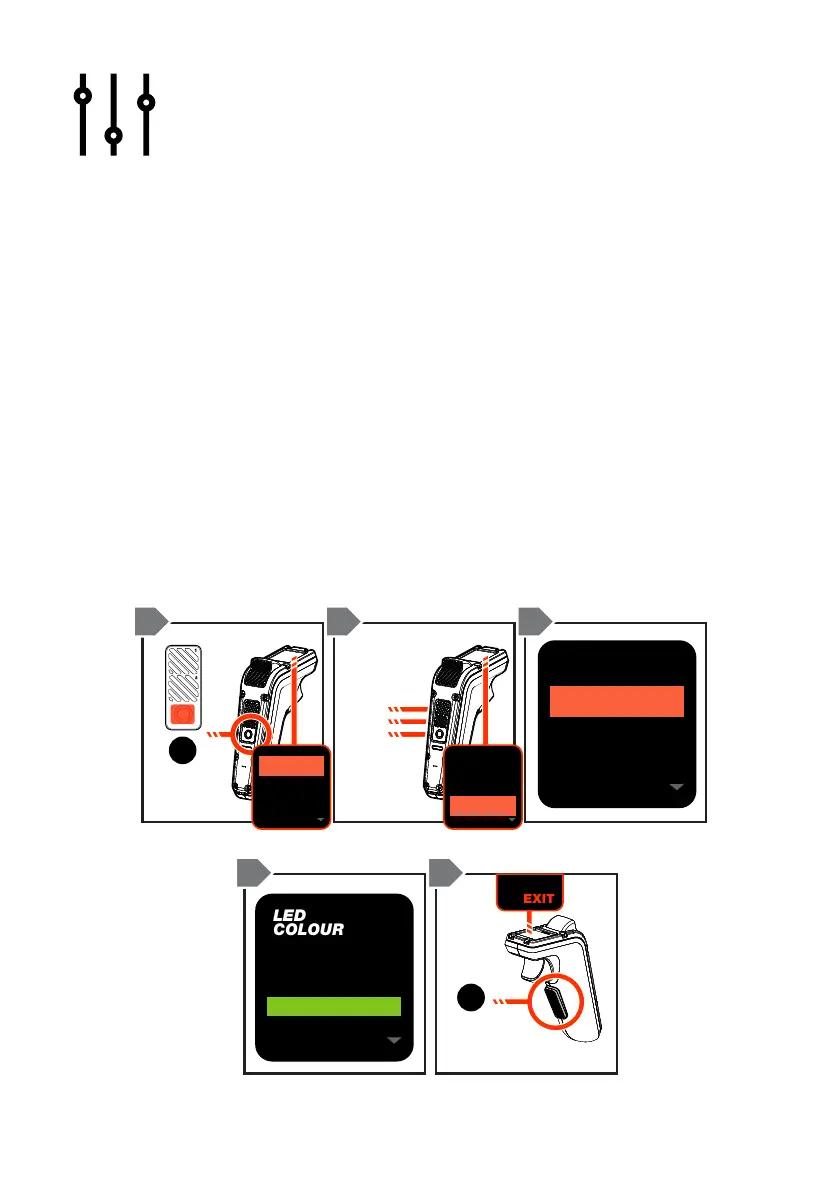
LED SETTINGS
The Hadean Series have built in LED lights that can be colour customised and
synced to the brake trigger to show a red light when applying the brake.
Note: This feature is only available on the GTR Series with the E-FOC LED
Prism Strips (sold separately).
To customise the LED colours and mode:
1. Double-tap the ON/OFF button to access the menu.
2. Scroll by pressing the Mode buttons to ‘Lights’, then press the ON/OFF
button to conrm selection.
3. Scroll through the LED options to select your preference, then press the
ON/OFF button to conrm selection.
4. Double tap the SAFETY SWITCH to go back to the previous menu
screen or scroll to the ‘EXIT’ selection and press the ON/OFF button to
return to the default ride screen.
LED
MODE
HIGH
FLASH 1
ON/OFF
BUTTON
x2
UP
DOWN
SELECT
SAFETY
SWITCH
x2
1 2 3
3 4 3
MY
BOARD



 To Next Page