EasyManua.ls Logo

Evolve hadean Series - My Board

Evolve hadean Series
56 pages
Print Icon
To Next Page IconTo Next Page
To Previous Page IconTo Previous Page
Loading...
/43
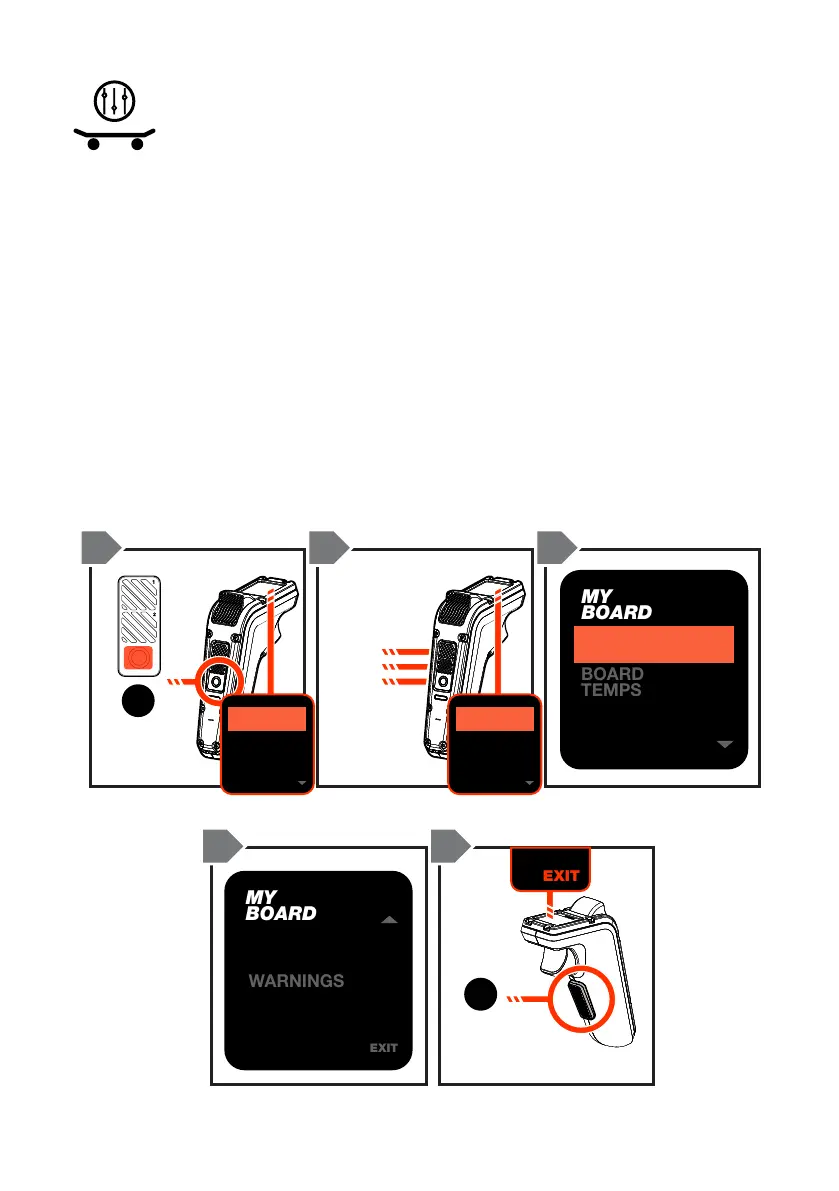
MY BOARD
Here is where you will nd specic information and data regarding your
skateboard such as board temperatures, battery cell readings, total ride
hours, warnings and rmware details:
1. Double-tap the ON/OFF button to access the menu.
2. Scroll by pressing the Mode buttons to ‘My Board’, and then press the
ON/OFF button to conrm your selection.
3. Scroll by using the Mode buttons and press the ON/OFF button for the
selection you wish to view.
4. Double tap the SAFETY SWITCH to go back to the previous menu
screen or scroll to the ‘EXIT’ selection and press the ON/OFF button to
return to the default ride screen.
EXIT
4.82
4
4.82
3
4.82
2
4.82
1
4.82
8
3.62
7
4.82
6
4.82
5
4.82
12
4.82
11
4.05
10
4.82
9
TOTAL 48.15V
BATTERY DATA
EXIT
4.82
4
4.82
3
4.82
2
4.82
1
4.82
8
3.62
7
4.82
6
4.82
5
4.82
12
4.82
11
4.05
10
4.82
9
TOTAL 48.15V
BATTERY DATA
MY
BOARD
WARNINGS
EXIT
PRODUCT
INFO
EXIT
4.82
4
4.82
3
4.82
2
4.82
1
4.82
8
3.62
7
4.82
6
4.82
5
4.82
12
4.82
11
4.05
10
4.82
9
TOTAL 48.15V
BATTERY DATA
EXIT
4.82
4
4.82
3
4.82
2
4.82
1
4.82
8
3.62
7
4.82
6
4.82
5
4.82
12
4.82
11
4.05
10
4.82
9
TOTAL 48.15V
BATTERY DATA
MY
BOARD
BATTERY
DATA
BOARD
TEMPS
WHEEL
SETUP
200
MM
66
T
ON/OFF
BUTTON
x2
UP
DOWN
SELECT
SAFETY
SWITCH
x2
1 2 3
3 4 3

LIGHTS
MY
BOARD
RIDES
LIGHTS
MY
BOARD
RIDES
EXIT