EasyManua.ls Logo

Evolve hadean Series - Select KPH or MPH

Evolve hadean Series
56 pages
Print Icon
To Next Page IconTo Next Page
To Previous Page IconTo Previous Page
Loading...
/33
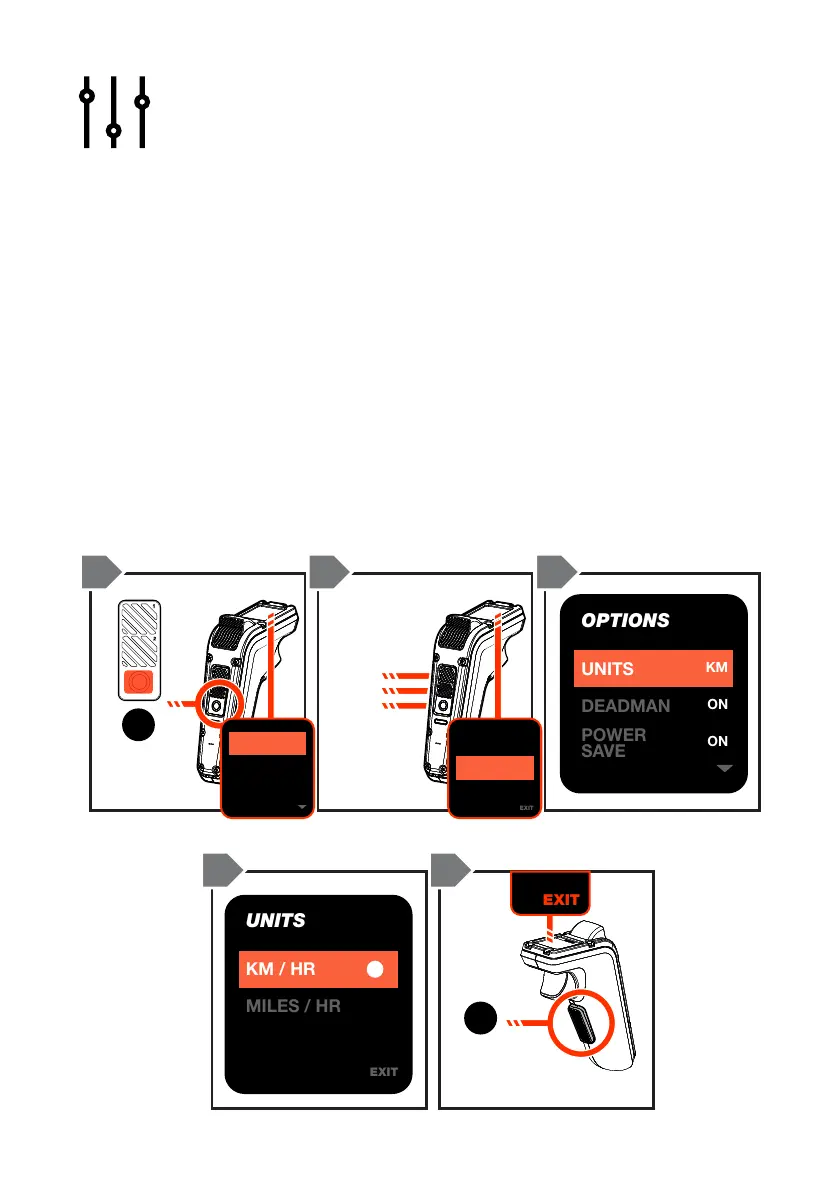
SELECT KPH OR MPH
1. Double-tap the ON/OFF button to access the menu..
2. Scroll by pressing the Mode buttons until you reach ‘Options’, then press
the ON/OFF button to conrm selection.
3. Scroll by pressing the Mode buttons until you reach ‘Units’, then press
the ON/OFF button to conrm selection.
4. Scroll by pressing the Mode buttons to select the unit of measurement for
your region (kph or mph). Press the ON/OFF button to conrm selection.
A white circle will appear next to the conrmed selection.
5. Double tap the SAFETY SWITCH to go back to the previous menu
screen or scroll to the ‘EXIT’ selection and press the ON/OFF button to
return to the default ride screen.
EXIT
4.82
4
4.82
3
4.82
2
4.82
1
4.82
8
3.62
7
4.82
6
4.82
5
4.82
12
4.82
11
4.05
10
4.82
9
TOTAL 48.15V
BATTERY DATA
EXIT
4.82
4
4.82
3
4.82
2
4.82
1
4.82
8
3.62
7
4.82
6
4.82
5
4.82
12
4.82
11
4.05
10
4.82
9
TOTAL 48.15V
BATTERY DATA
UNITS
KM / HR
MILES / HR
EXIT
EXIT
4.82
4
4.82
3
4.82
2
4.82
1
4.82
8
3.62
7
4.82
6
4.82
5
4.82
12
4.82
11
4.05
10
4.82
9
TOTAL 48.15V
BATTERY DATA
EXIT
4.82
4
4.82
3
4.82
2
4.82
1
4.82
8
3.62
7
4.82
6
4.82
5
4.82
12
4.82
11
4.05
10
4.82
9
TOTAL 48.15V
BATTERY DATA
OPTIONS
UNITS
DEADMAN
POWER
S
AVE
KM
ON
ON
ON/OFF
BUTTON
x2
UP
DOWN
SELECT
SAFETY
SWITCH
x2
1 2 3
4 5 3

LIGHTS
MY
BOARD
RIDES
TRIGGER
SETUP
OPTIONS
EXIT
EXIT