EasyManua.ls Logo

EWM Taurus 355 Basic TDM - Explanation of Icons

EWM Taurus 355 Basic TDM
59 pages
Print Icon
To Next Page IconTo Next Page
To Previous Page IconTo Previous Page
Loading...
Safety instructions
Explanation of icons
099-005221-EW501
05.09.2016
7
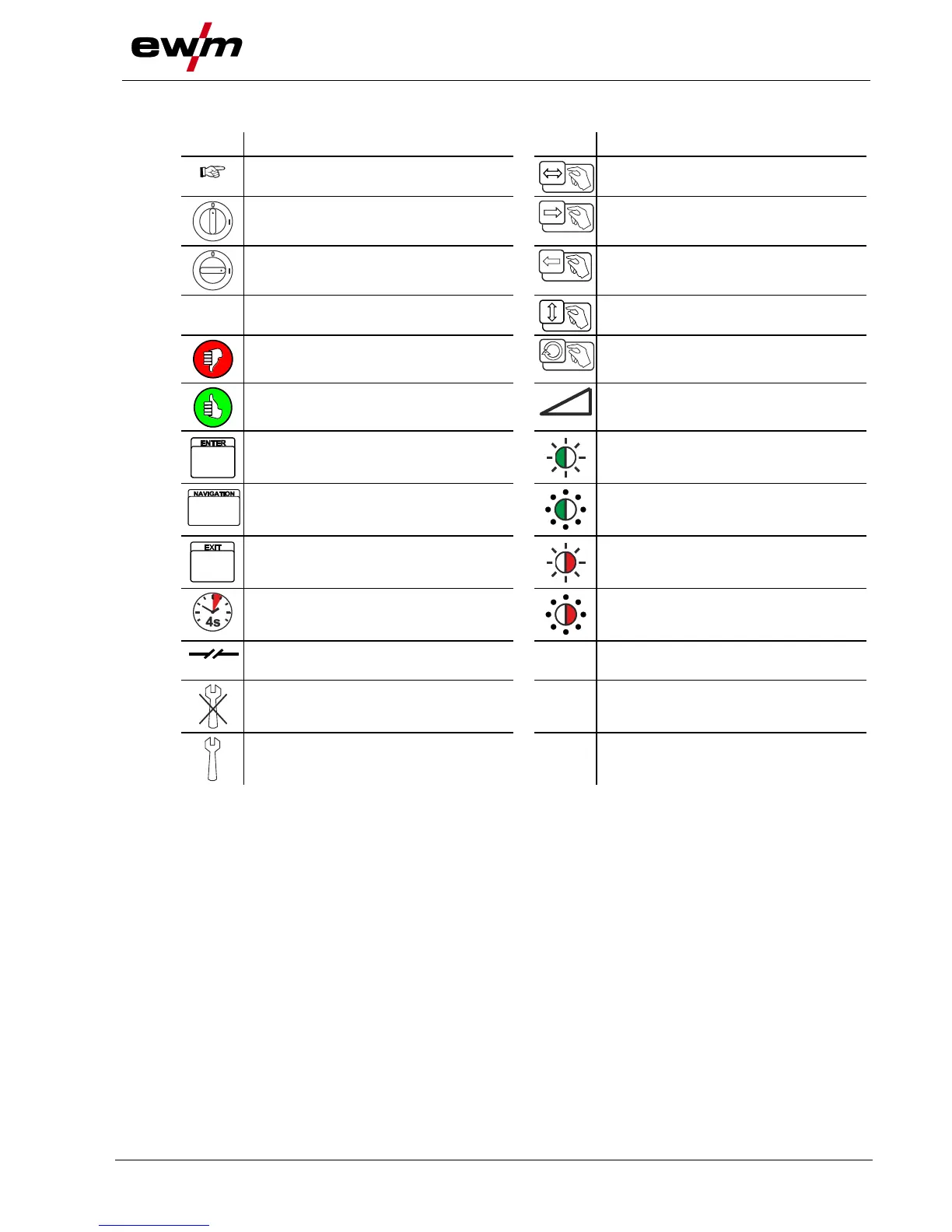
2.2 Explanation of icons
Symbol
Description
Symbol
Description
Indicates technical aspects which the
user must observe.
Activate and release/tap/tip
Switch off machine
Release
Switch on machine
Press and keep pressed
Switch
Wrong
Turn
Correct
Numerical value adjustable
Menu entry
Signal light lights up in green
Navigating the menu
Signal light flashes green
Exit menu
Signal light lights up in red
Time representation (e.g.: wait
4 s/activate)
Signal light flashes red
Interruption in the menu display (other
setting options possible)
Tool not required/do not use
Tool required/use

Table of Contents

Other manuals for EWM Taurus 355 Basic TDM

Related product manuals