EasyManua.ls Logo

eWON COSY 141 - User Manual

eWON COSY 141
20 pages
Print Icon
To Next Page IconTo Next Page
Loading...
eWON COSY 141 -
Installation Guide
Contents
This short guide explains how to install eWON COSY 141 and to get
started with the embedded configuration web site.
eWON Installation Guide
IG 010 / Rev 1.3
Question and Answer IconNeed help?

Do you have a question about the eWON COSY 141 and is the answer not in the manual?

Summary

Foreword

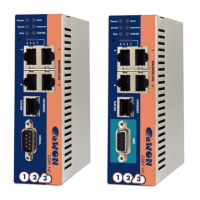
Hardware description

Housing interfaces

Describes the physical ports and connectors on the eWON COSY unit.

Markings

Details the identification label and its components on the eWON COSY.

Applicable directives, standards and compliance

Lists relevant directives, standards, and certifications for the eWON COSY.

Mechanical outline

Provides dimensions and physical layout details of the eWON COSY unit.

Mounting and environmental conditions

Covers mounting requirements and environmental operating limits for the eWON COSY.

External power supply characteristics

Specifies the electrical characteristics and requirements for the eWON COSY power supply.

Front panel status LEDs

Explains the meaning of each status LED on the front panel of the eWON COSY.

Ethernet ports

Describes the Ethernet ports, including Machine LAN and Internet ports with their status indicators.

Serial-ports

Details the serial ports, including configurable modes, polarization, termination, and pinouts.

MPI port

Describes the MPI version of the eWON COSY, its characteristics, and connector pinout.

Digital input - Digital output

Details the Digital Input (DI) and Digital Output (DO) functions, their pinouts, and operational states.

Software configuration

Factory default IP settings

Lists the default IP addresses and subnet masks for the eWON COSY machine and internet ports.

Selecting the appropriate LAN IP address

Provides guidance on selecting IP address ranges for network compatibility with Talk2M solution.

Setting the eWON COSY Machine LAN IP address

Explains how to set the Machine LAN IP address using the eBuddy utility.

eWON COSYs web interface

Covers the basic principles of accessing and navigating the eWON COSY web interface.

Accessing the eWON COSY

Guides on how to access the eWON COSY's web interface via a browser using its IP address.

Going through the 1-2-3 Setup Wizard

Explains the steps involved in the eWON COSY's Quick Launch Wizard for initial setup.

Status pages

Describes the short form Status page of the eWON COSY and how to access it.

Troubleshooting

Resetting the eWON COSY

Explains how to reset the eWON COSY using a paper clip through the front panel.

First level reset

Details the procedure and effects of a first-level reset on the eWON COSY's user file.

Second level reset

Explains the exceptional second-level reset and its factory default restoration process.

General characteristics of eWON COSY

Summary

Foreword

Hardware description

Housing interfaces

Describes the physical ports and connectors on the eWON COSY unit.

Markings

Details the identification label and its components on the eWON COSY.

Applicable directives, standards and compliance

Lists relevant directives, standards, and certifications for the eWON COSY.

Mechanical outline

Provides dimensions and physical layout details of the eWON COSY unit.

Mounting and environmental conditions

Covers mounting requirements and environmental operating limits for the eWON COSY.

External power supply characteristics

Specifies the electrical characteristics and requirements for the eWON COSY power supply.

Front panel status LEDs

Explains the meaning of each status LED on the front panel of the eWON COSY.

Ethernet ports

Describes the Ethernet ports, including Machine LAN and Internet ports with their status indicators.

Serial-ports

Details the serial ports, including configurable modes, polarization, termination, and pinouts.

MPI port

Describes the MPI version of the eWON COSY, its characteristics, and connector pinout.

Digital input - Digital output

Details the Digital Input (DI) and Digital Output (DO) functions, their pinouts, and operational states.

Software configuration

Factory default IP settings

Lists the default IP addresses and subnet masks for the eWON COSY machine and internet ports.

Selecting the appropriate LAN IP address

Provides guidance on selecting IP address ranges for network compatibility with Talk2M solution.

Setting the eWON COSY Machine LAN IP address

Explains how to set the Machine LAN IP address using the eBuddy utility.

eWON COSYs web interface

Covers the basic principles of accessing and navigating the eWON COSY web interface.

Accessing the eWON COSY

Guides on how to access the eWON COSY's web interface via a browser using its IP address.

Going through the 1-2-3 Setup Wizard

Explains the steps involved in the eWON COSY's Quick Launch Wizard for initial setup.

Status pages

Describes the short form Status page of the eWON COSY and how to access it.

Troubleshooting

Resetting the eWON COSY

Explains how to reset the eWON COSY using a paper clip through the front panel.

First level reset

Details the procedure and effects of a first-level reset on the eWON COSY's user file.

Second level reset

Explains the exceptional second-level reset and its factory default restoration process.

General characteristics of eWON COSY

eWON COSY 141 Specifications

General IconGeneral
ModelCOSY 141
TypeIndustrial VPN Router
WAN Ports1
LAN Ports4
VPN SupportYes
Remote AccessYes
WirelessNo
USB Ports1
ConnectivityEthernet
ProtocolsHTTP, HTTPS
VPNIPsec, OpenVPN
Serial Ports1
Ethernet Ports5
Operating Temperature-20°C to 60°C

Related product manuals