EasyManua.ls Logo

eWON 4005CD - User Manual

eWON 4005CD
39 pages
Print Icon
To Next Page IconTo Next Page
Loading...
support.ewon.biz
eWON 4005CD
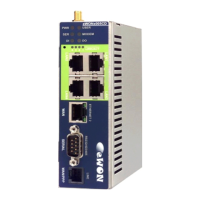
This installation guide describes the hardware of the
eWON 4005CD and explains how to get started with
it.
Installation Guide
IG 002 / Rev. 1.9

Table of Contents

Question and Answer IconNeed help?

Do you have a question about the eWON 4005CD and is the answer not in the manual?

Summary

Product Description

1.2. General Specification of the Hardware Platform

Details technical specifications like processor, memory, power requirements, ports, and environmental operating conditions.

Housing and Markings

3.2. Markings

Describes the identification label on the eWON, including device type, serial number, power, and hardware options.

3.3. Safety, Environmental & Regulatory Information

Covers compliance with directives, safety standards, FCC, battery precautions, and environmental factors.

3.6. Mounting & Environmental Conditions

Specifies operating temperature, humidity, and mounting requirements for industrial environments.

3.7. Preparing the Installation

Details recommended free space, DIN rail mounting, and grounding procedures for setup.

3.8. Specification for External Power Supply Selection

Outlines requirements for selecting a compatible external power supply, including voltage and current.

Specifications of Communication & I;Os Interfaces

5.1. Ethernet Ports

Details the two Ethernet interfaces: a LAN switch with 4 ports and a WAN port.

5.4. Embedded GPRS-EDGE [Quad-Band] Modem (optional)

Details GPRS-EDGE modem specs: bands, class, baud rate, and standards.

5.5. Embedded GPRS-EDGE [Quad-Band] Modem (optional)

Provides GPRS QB modem specs: bands, class, baud rate, and standards.

5.6. Embedded UMTS Modem (optional)

Lists UMTS Global modem specs: bands, class, baud rate, and standards.

5.7. Embedded HSUPA [Tri-Band] Modem (optional)

Details HSUPA Tri-band modem specs: bands, class, baud rate, and standards.

IP Parameters Configuration

6.1. Resets

Details user and factory reset procedures, warning about data loss and explaining LED feedback.

Summary

Product Description

1.2. General Specification of the Hardware Platform

Details technical specifications like processor, memory, power requirements, ports, and environmental operating conditions.

Housing and Markings

3.2. Markings

Describes the identification label on the eWON, including device type, serial number, power, and hardware options.

3.3. Safety, Environmental & Regulatory Information

Covers compliance with directives, safety standards, FCC, battery precautions, and environmental factors.

3.6. Mounting & Environmental Conditions

Specifies operating temperature, humidity, and mounting requirements for industrial environments.

3.7. Preparing the Installation

Details recommended free space, DIN rail mounting, and grounding procedures for setup.

3.8. Specification for External Power Supply Selection

Outlines requirements for selecting a compatible external power supply, including voltage and current.

Specifications of Communication & I;Os Interfaces

5.1. Ethernet Ports

Details the two Ethernet interfaces: a LAN switch with 4 ports and a WAN port.

5.4. Embedded GPRS-EDGE [Quad-Band] Modem (optional)

Details GPRS-EDGE modem specs: bands, class, baud rate, and standards.

5.5. Embedded GPRS-EDGE [Quad-Band] Modem (optional)

Provides GPRS QB modem specs: bands, class, baud rate, and standards.

5.6. Embedded UMTS Modem (optional)

Lists UMTS Global modem specs: bands, class, baud rate, and standards.

5.7. Embedded HSUPA [Tri-Band] Modem (optional)

Details HSUPA Tri-band modem specs: bands, class, baud rate, and standards.

IP Parameters Configuration

6.1. Resets

Details user and factory reset procedures, warning about data loss and explaining LED feedback.

eWON 4005CD Specifications

General IconGeneral
ModeleWON 4005CD
TypeIndustrial Router
WAN Ports1
LAN Ports4
Ethernet Ports5
Wi-FiNo
WirelessNo
Product TypeRouter
ConnectivityEthernet, Cellular
Cellular4G LTE
Serial Ports1
USB Ports1 (USB 2.0)
ProtocolsHTTP, HTTPS, FTP, MQTT
VPNIPsec, OpenVPN
SecurityFirewall, VPN
Power Supply Voltage12V
Operating Temperature-20°C to +60°C

Related product manuals