Chapter 5
Specifications of communication & I/Os Interfaces
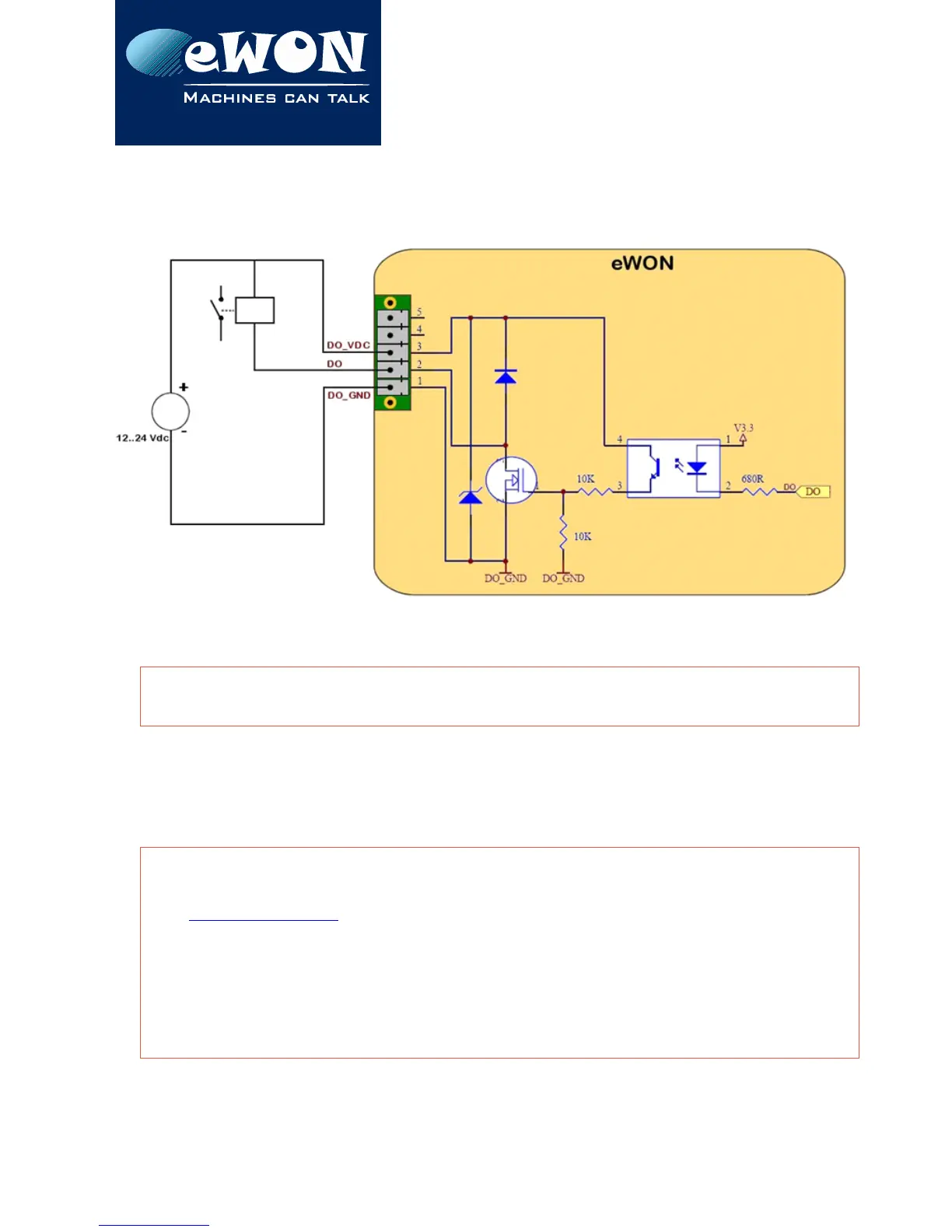
The diagram below shows the external wiring needed for correct operation of the digital
output. A relay has been chosen for this sample application but any load within the
specifications can be used instead.
- WARNING -
Note that this is a sink only output to ground (the transistor acts like a switch to ground).
6. IP parameters configuration
- WARNING -
Normally you cannot communicate with a device of which you don’t know the IP parameters.
Therefore, there is a special tool (called “eBuddy”) you can download from the eWON Internet
site http://www.ewon.biz.
Start this application once you have connected your eWON to the network. The application
will scan the whole network and will identify all eWONs that are connected, including their IP
parameters (Address and subnet mask) and their serial number. The utility allows also to edit
the IP parameters. IP parameters always have to be defined in full agreement with network
policies applicable within your organization (ask your network administrator).
Page 25 / 39 eWON 4005CD | IG 002


 To Next Page