EXCELL PRECISION CO., LTD
Safety
When the instrument is installed, connect an earth bonding conductor from FG to the earth
connection marked “ ”.
Disconnect the mains power supply before opening the instrument housing.
To install the optional interface cards, it is necessary to disconnect the mains power supply
and fit a yellow/green earth bonding cable to the rear panel.
Before turning the power on ensure the supply voltage is within the acceptable range,
AC100V ~ 240V 50/60HZ.
The operating ambient temperature range is 0
o
C ~ 40
o
C (32 °F ~ 104 °F).
Features
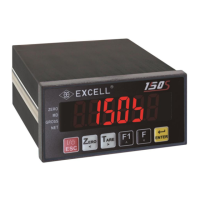
120S has a wide range of applications from batching to simple weighing.
Features:
Stand alone batching mode or connect to PLC for external system control
Built in batching / dosing functions
Manual / automatic discharge operation
Set cycle times in a batch
Totalise weight and number of cycles
Key in the signal voltage value (mV / V) directly via the keypad, no need to apply
any weight to the bottom work to calibrate the weigher
Display load cell output voltage (mV / V) for future maintenance
Adjustable filter
RS232C bi-directional and RS485 communication
Built in MODBUS
Interface options:
OP-01 RS-422 / RS-485 / RS-232 serial interface
OP-02-1 BCD parallel output interface (Open collector output)
OP-02-2 BCD parallel output interface (TTL output)
OP-03 16 Bit Analogue current/voltage output interface
(4 ~ 20 mA / 0 ~ 10 V)
OP-04 Control I/O (4 In / 4 Out) + Setpoint In (BCD code)
OP-05 Control I/O (8 In / 8 Out)



 To Next Page