EXCELL PRECISION CO., LTD
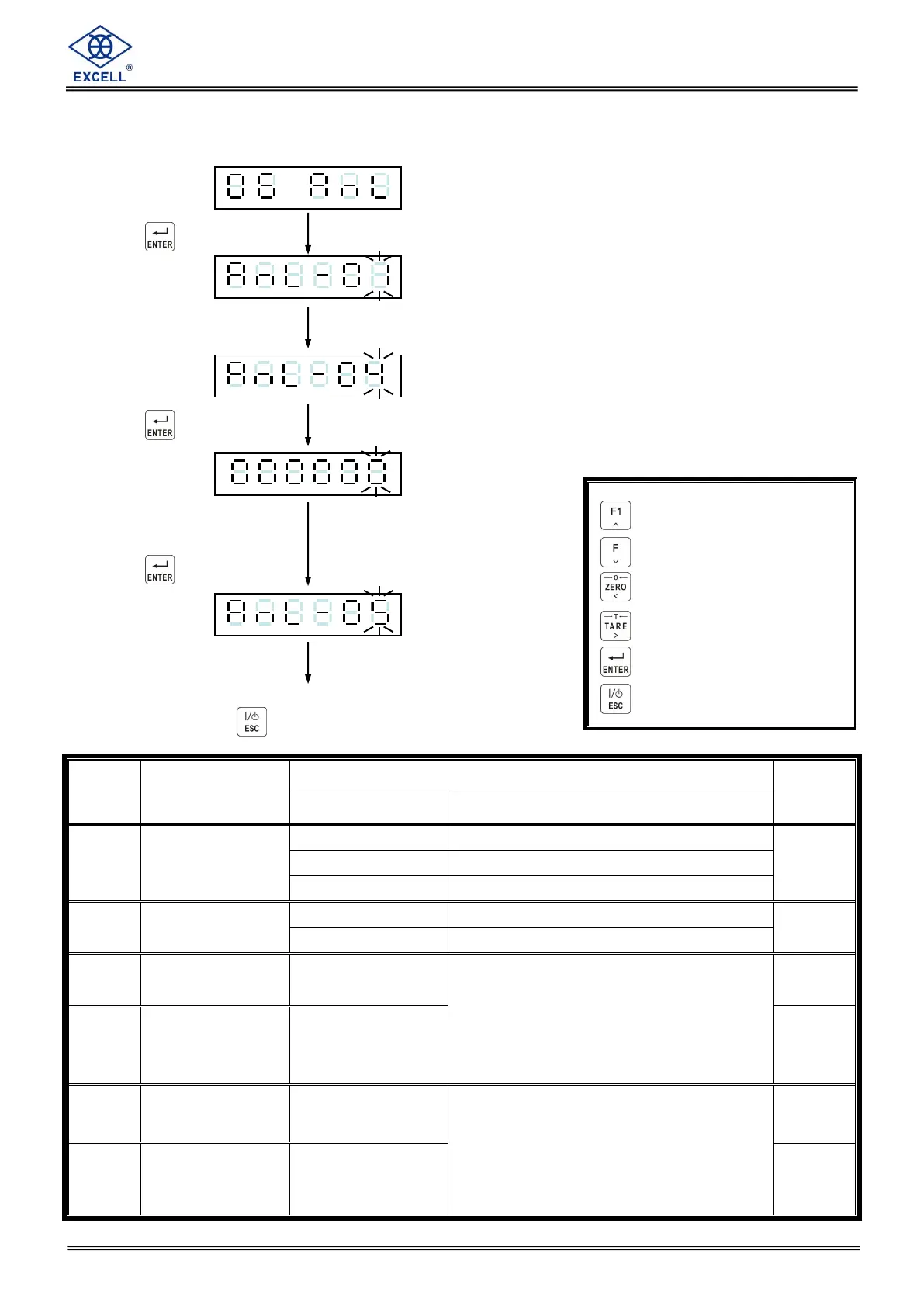
Function setting
Press the key
Input desired
Parameter code
Press the key
Display shows the existing
parameter code. Input
new code as required.
Press the key
Continue to another function setting
or press key to escape
When the weight reaches the value of
that in AnL-03(the Max. weight is the
max setting value (refer to CSP-04 ),
the current / voltage(refer to AnL-02)
output is changed to that configured in
AnL-04
4.0 mA ~ 20.0 mA
or
0.0 V ~ 10.0 V
When the weight reaches the value of
that in AnL-05(the Max. weight is the
max setting value (refer to CSP-04 ),
the current / voltage(refer to AnL-02)
output is changed to that configured in
AnL-06
4.0 mA ~ 20.0 mA
or
0.0 V ~ 10.0 V
Increment flashing digit
Decrement flashing digit
Move flashing point left
Move flashing point right
Store data in memory
Exit / Escape



 To Next Page