EXCELL PRECISION CO., LTD
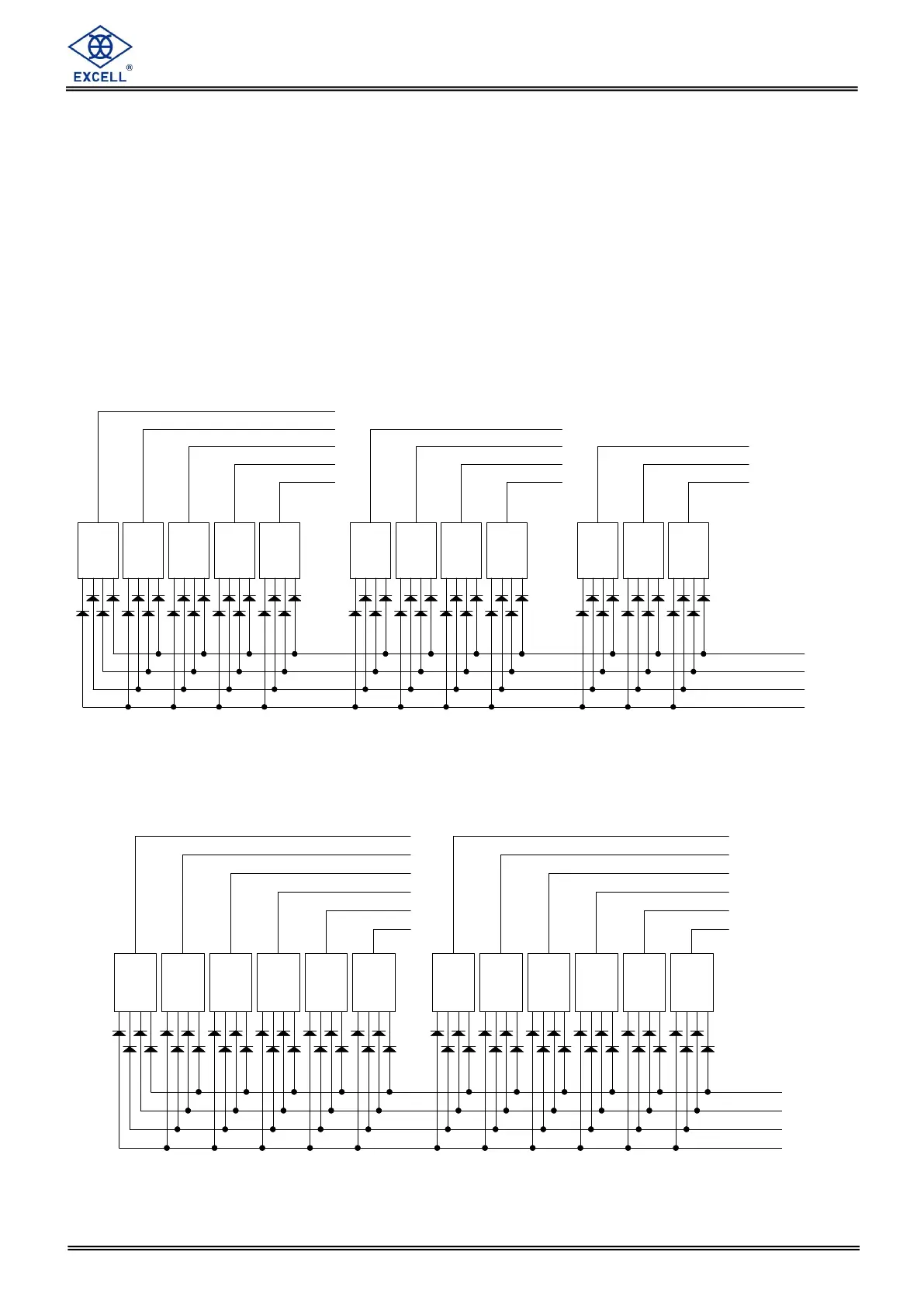
Thumbwheel Switches (for OP-04)
The interface can connect to external thumbwheel switches or a PLC to input various
parameters depending on the configuration of SQ-01.
The input variables are:
Final (5 digits), SP2 (4 digits) & Free Fall (3 digits).
or Hi (6 digits), Lo (6 digits).
When using external thumbwheel Switches, SQ-18 should be set to 1.
Connection data
SQ-01 = 1, 2, 4 or 5
8 4 12
5
C
1
4
8 4 2
C
3
8 4 12
C
2
8 4 12
C
1
8 4 12
C
1 (36)
2 (18)
4 (37)
8 (19)
7
10 (23)
10 (5)
10 (6)
10 (24)
10 (25)
8
9
11
10
CCCC
2
82 148248 1
4 3
2 1482 14
1
3
10 (22)
10 (3)
10 (21)
10 (4)
4
5
6
C C C
13 2
2
0
1
10 (20)
10 (2)
10 (1)
Final SP2
F.Fall
48 22 1 8 4 1 8 24 1
SQ-01 = 3 or 6
Hi Lo
8 4 12
5
C
1
4
8 4 2
C
3
8 4 12
C
2
8 4 12
C
1
8 4 12
C
1 (36)
2 (18)
4 (37)
8 (19)
7
10 (23)
10 (5)
10 (6)
10 (24)
10 (25)
8
9
11
10
18 4 2
C
10 (4)
6
6
10 (22)
10 (3)
10 (20)
10 (2)
10 (1)
10 (21)
1
6
8 4 2
C
3
3
C
45
88 4 12 14 2 8 4
C C
12
1812 4 2 8 4 12
C C
0
1
2
4
5



 To Next Page