55
Step2: setting all trunk lines as the Normal trunk line, into programming
status, input 0760 #;
Step3: Setting the prefix number of LCR, for example dial 0-prefix is
long-distance, then into programming status, input 08 #, 08010 #, after this
setting 0 is set as a special number (already included 00 for International
call)
Step4: Setting set Normal C.O. line IP prefix number; for example IP-prefix
number is 17909, then in Programming status input 8317909 and off hook.
Step5: Enable special C.O. line (trunk line) IP dial function, only call
special telephone number use IP prefix number.
Setting set Normal C.O. line IP prefix number, then in Programming status
input 8804#.
Step6: if you when to set all extensions to use IP-dialing function then
input 8500 # in the programming status. Also you can disable any
extensions. After above setting ,when you pick up the extension which can
use IP-dialing function ,for example pick up 11 dial 9 0757 86228930 ,9 is
outgoing code, then the system will find an available C.O. line and call
17909 075786228930.
Appendix VI Door-phone Functions
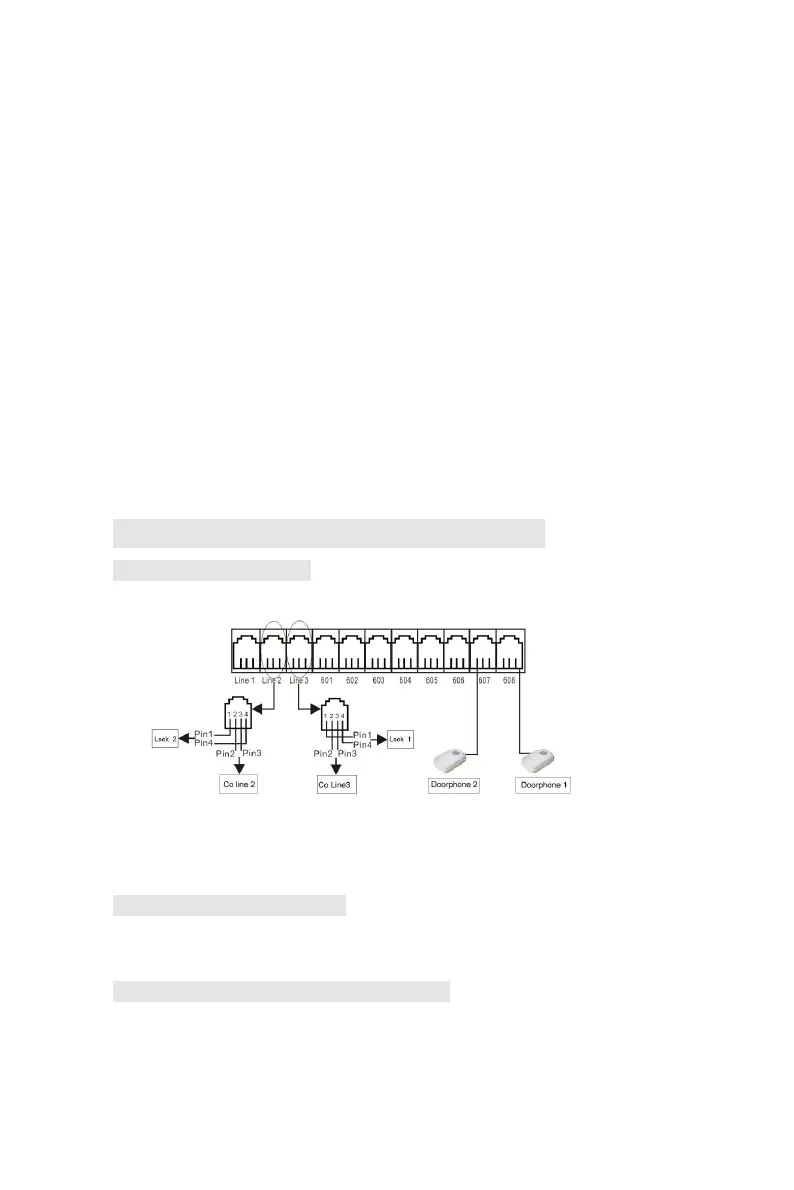
5.1 Connections instruction:
The system can be connected with two door-phone
The system offer up to two door opener (door-open switch, connect
with the wire of electron -controlled lock. ) interfaces,and the system can
define two extensions to be doorphone.
5.2 Setting Door-phone function
Below setting must in programming status,use program extension
(601-604) , refer 3.1 and 3.2.1
5.2.1 Setting the connector port for Door-phone
Format: 80N# set the first doorphone (N is ext no.1-8)
81N# set the second doorphone
8000# clear the first doorphone
8100# clear the second doorphone



 To Next Page