Maintenance
ChecktheBladeDrive
System
ServiceInterval:Aftertherst5hours
Every50hours
1.Stoptheengineandwaitforallmovingpartsto
stop.
2.Disconnectthewirefromthesparkplug.
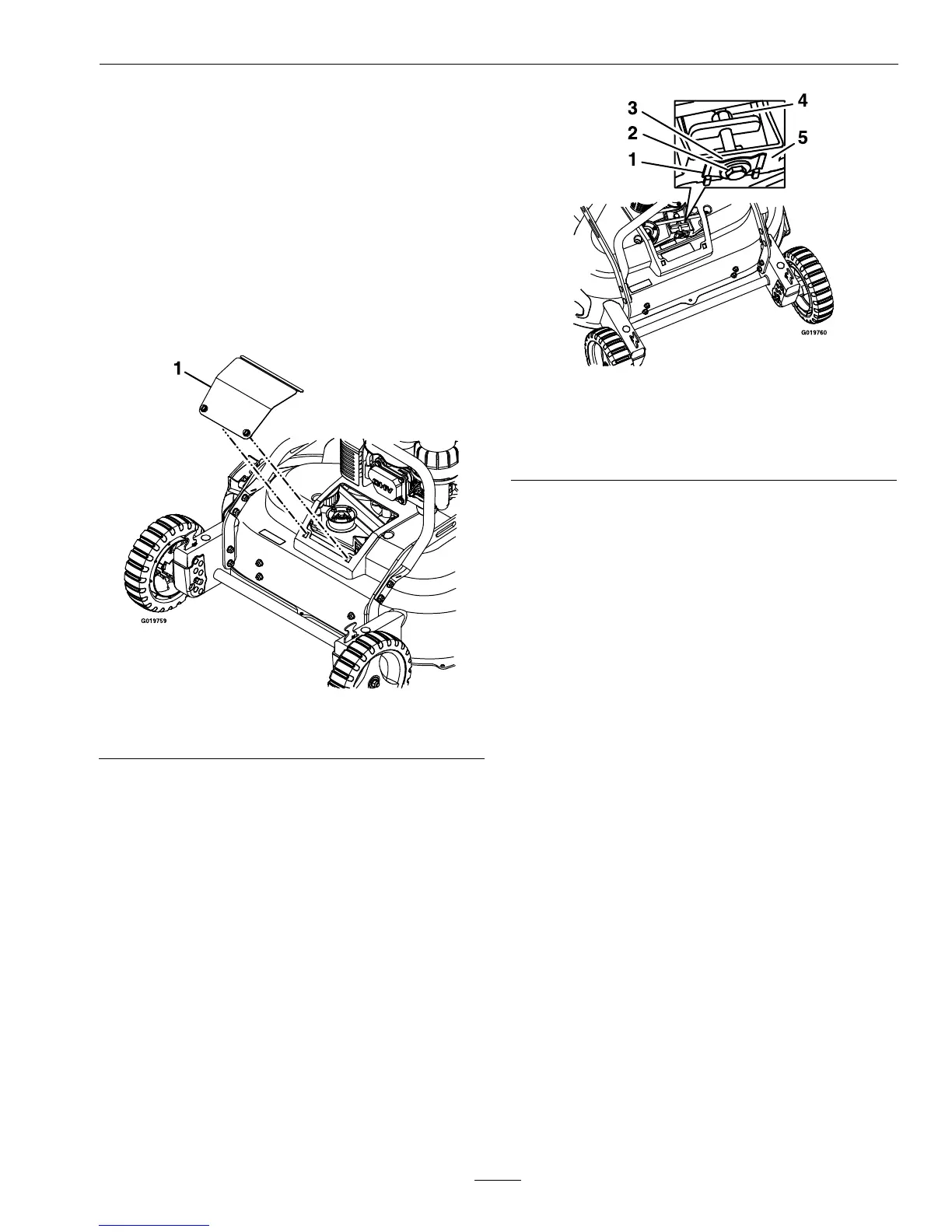
3.Removeandretainthebeltaccesspanelby
rotatingthescrewsaquarter-turn.
Figure23
1.Beltaccesspanel
4.Brushoutallthedebrisaroundthebeltarea.
5.Useafeelergauge,apieceofpaper,oranote
cardagainsttheframeandslideitdownbehind
thebelttensionspring.
Note:Thegapbetweenthegaugeandthespring
shouldbe.005-.030inch(.13-.76mm),tightenthe
adjustingboltandnutuntilthepaperbarelyslides
freelyinandoutofthegap.
Figure24
1.Belttensionspring4.Adjustingnut
2.Adjustingbolt5.Frame
3.Gap
Important:DoNotovertightentheadjusting
bolt.Thiscoulddamagethebladedrivebelt.
6.Reinstallthebeltaccesspanelandrotatethe
screwsaquarter-turntolockintoplace.
7.Connectthewiretothesparkplug.
ChangeBladeBrakeClutch
(BBC)Belt
ServiceInterval:Every250hours
1.Stoptheengineandwaitforallmovingpartsto
stop.
2.Disconnectthewirefromthesparkplug.
3.Removeandretainthefrontbeltcoverandits
fourbolts.Removeanydebrisunderthecover.
4.RemoveandretaintheBBCbracketandits
mountinghardware.
5.LoosenthecableclampscrewontheBBCcable
andremovetheoldbelt(referto
Figure29).
6.Installthenewbelt.
7.ReinstalltheBBCbracket.
8.AdjusttheBBCcableasdescribedinAdjusting
theBladeBrakeCableintheAdjustments
section.
9.Reinstallthefrontbeltcover.
25







 To Next Page