Maintenance
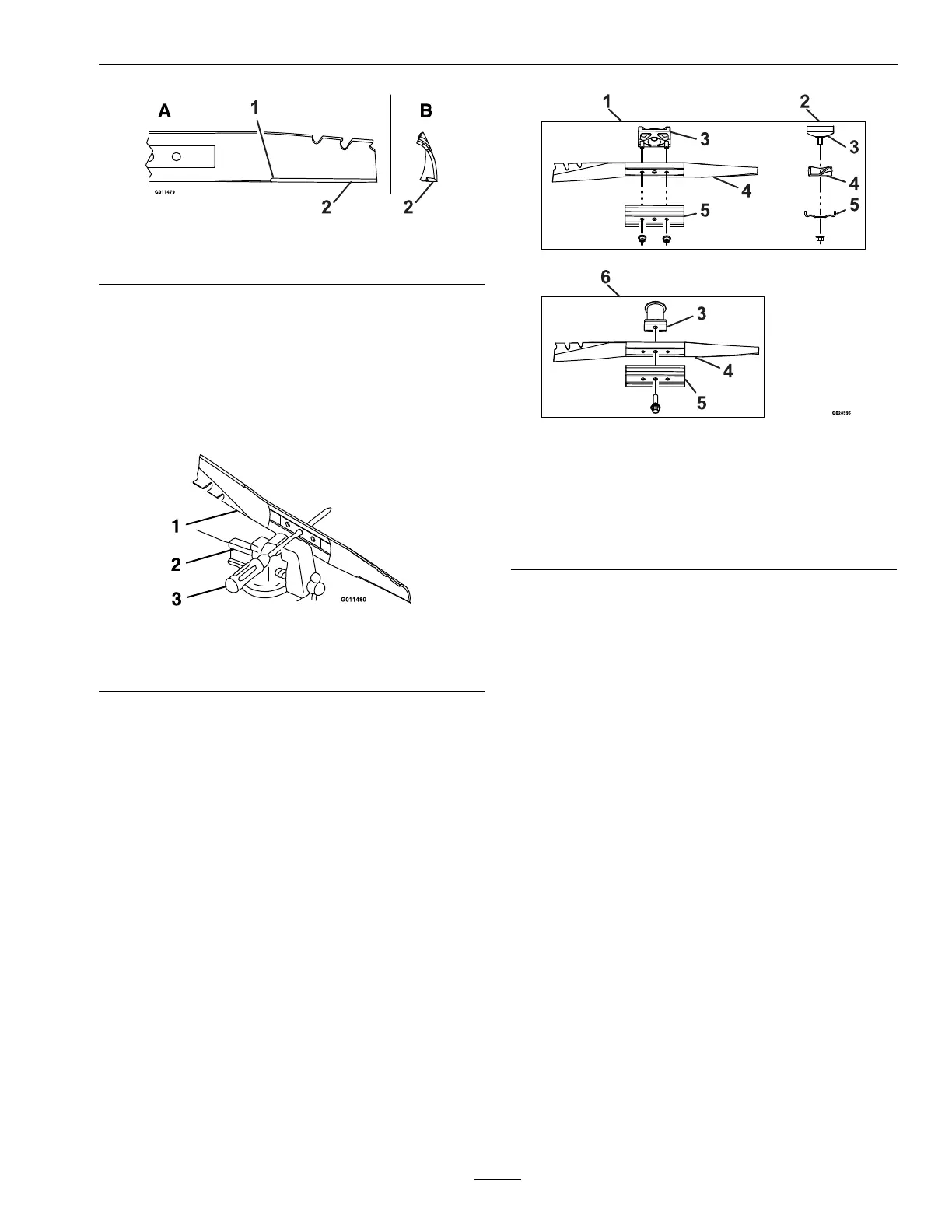
Figure20
1.Innercuttingedgeradius
2.Cuttingangle
C.Checkthebalanceofthebladebyplacing
thecenterholeofthebladeoveranailor
screwdrivershankclampedhorizontallyina
vise(Figure21).Ifeitherendoftheblade
rotatesdownward,lethatend(notthe
cuttingedge).Thebladeisproperlybalanced
whenneitherenddrops.
Figure21
1.Blade
3.Screwdriver
2.Vise
D.ForInstallation:Makesuretograsptheendof
thebladeusingaragorathicklypaddedglove.
ForBladeBrakeClutchUnits:Installasharp,
balancedExmarkblade,bladesupport,and
thebladenuts.Thesailoftheblademust
pointtowardthetopofthelawnmower
housingforproperinstallation.Torquethe
bladenutsto44-56ft-lb(60-76Nm).
ForUnitswithoutaBladeBrakeClutch:
Installasharp,balancedExmarkblade,blade
support,andbladebolt.Thesailoftheblade
mustpointtowardthetopofthelawnmower
housingforproperinstallation.Torquethe
bladeboltto35-45ft-lb(47-61Nm).
Figure22
1.BladeBrakeClutch
Units–frontview
4.Blade
2.BladeBrakeClutch
Units–sideview
5.Bladesupport
3.Bladedriver6.UnitswithoutaBlade
BrakeClutch
6.Returnthelawnmowertoitsuprightposition.
7.Connectthewiretothesparkplug.
CheckforLooseHardware
ServiceInterval:Beforeeachuseordaily
1.Stopengine,waitforallmovingpartstostop.
2.Visuallyinspectmachineforanyloosehardware
oranyotherpossibleproblem.Tightenhardware
orcorrecttheproblembeforeoperating.
ChecktheBladeBrake
ClutchBailOperation(Blade
BrakeClutchUnitsOnly)
ServiceInterval:Beforeeachuseordaily
ChecktheBladeBrakeClutch(BBC)bailoperation
foranyoperationproblemsordeteriorating
components,suchasthespring.Replacecomponents
orcorrectanyproblemsbeforeoperating.Referto
OperatingtheBladeControlLeverinOperation.
25







 To Next Page