SAIC Exploranium – GR-135 System Manual page: 72
APPENDIX F - DOCKING STATION DETAILS
1. GENERAL
The Docking Station (DS) is specially designed for ease-of-use. The DS features are :
- 4 spring-loaded electrical contacts for connection to the base of the GR135
- Integrated 0.25uCi Cesium-137 source – BELOW CONTROL LIMITS WORLD WIDE
- 3 LEDs on the front panel showing system status
- 2 connectors on the rear for external DC and RS232 connection
2. LEDs
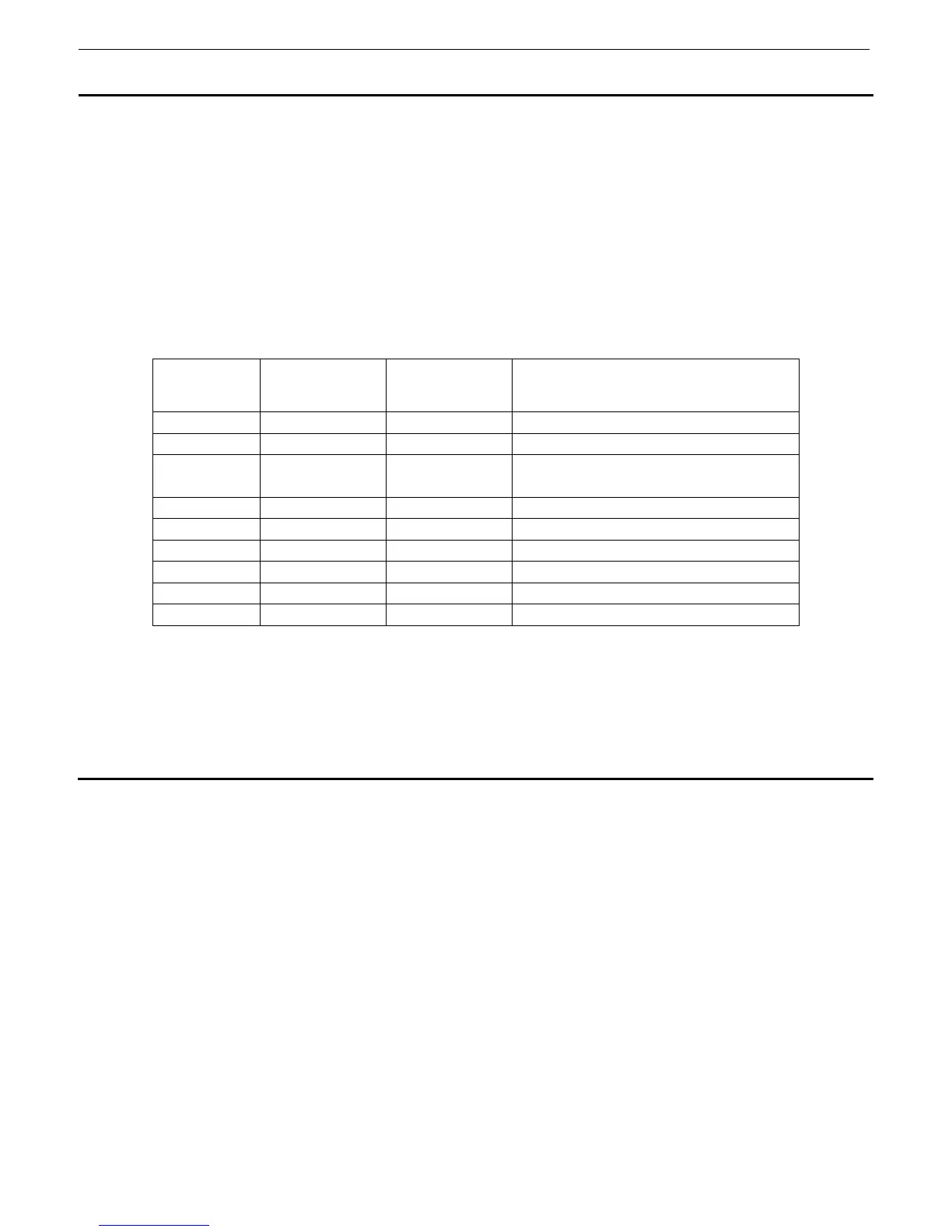
The 3 LEDs operation is as follows :
ERROR
RED
POWER
GREEN
CHARGE
YELLOW
DS STATUS
OFF ON ON CHARGING
OFF ON FLASH END OF CHARGING
OFF ON OFF ALKALINE batteries in 135
or Battery fully charged
FLASH ON OFF DOCK EMPTY
OFF FLASH OFF ERROR #1
ON ON ON ERROR #2
FLASH ON FLASH ERROR #3
OFF OFF OFF NO INPUT POWER
Error #1 – Low Input Voltage – check AC adapter or input AC line
Error #2 – High current load – Bad GR135, Maintenance required
Error #3 – Power disconnected – short circuit inside GR135, Maintenance required



 To Next Page