22
Rosetta
Capsule Group
CLEANING AND MAINTENANCE
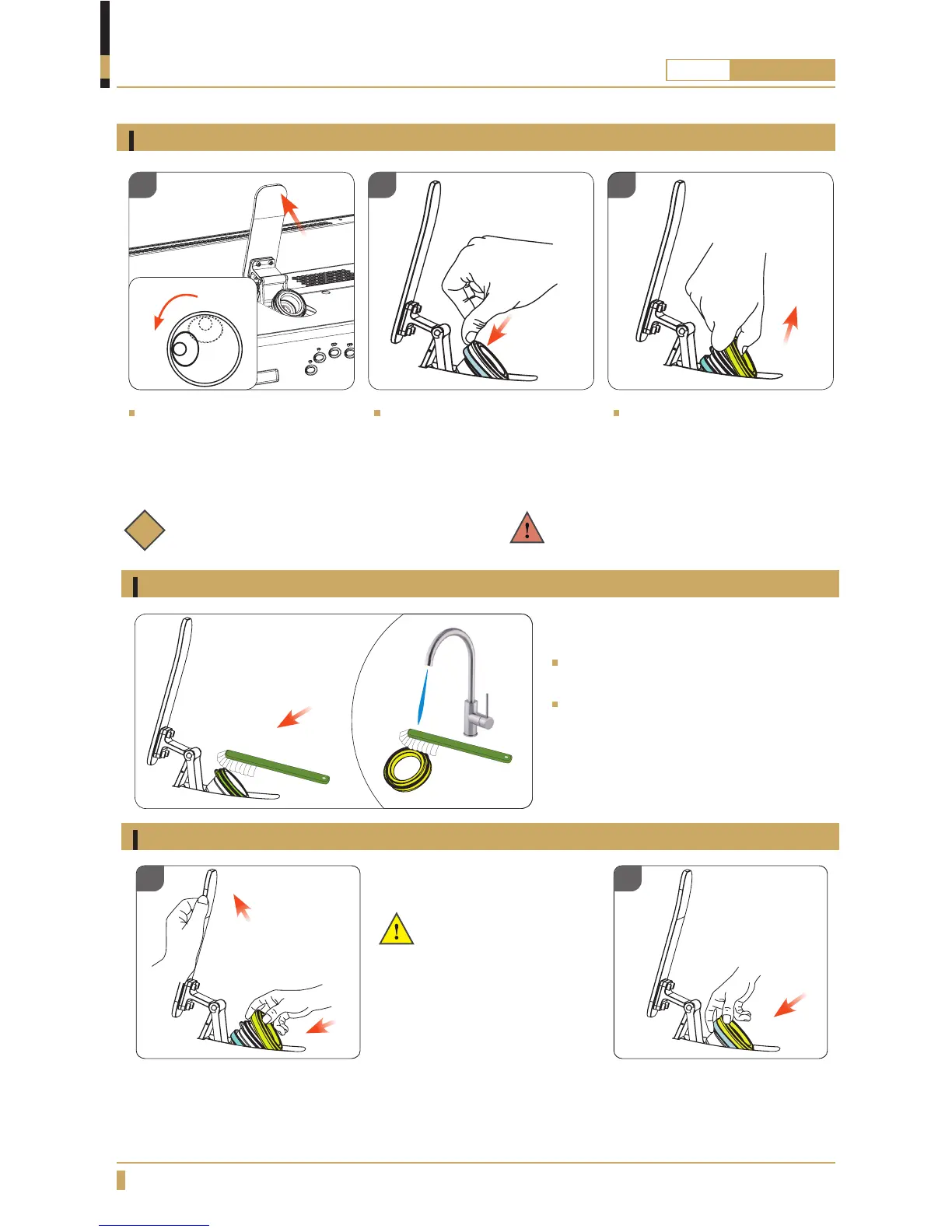
Disassemble the group gasket
Cleaning the Group Gasket and Capsule Holder
Reassembling the Group Gasket
Push the metal tension ring
(pictured in blue) back using
thumbnails or a plastic tool
until it slides off of the gasket.
After the tension ring releases,
pull the gasket forward from
one edge until it releases from
the capsule holder.
Turn the machine off at the
main power supply switch
and then open up the capsule
group.
Important:
The wider face of the
gasket must be facing out
when reassembling the
gasket onto the capsule
holder.
1. Hold the capsule group lever with one hand to keep the capsule holder stable. With the other hand
place the gasket on the capsule holder with the lip seated at the bottom first. Then press the gasket
onto the holder, working around until it is completely seated.
2. Pull the metal tension ring up onto the gasket to hold it in place. Ensure the ring is aligned evenly.
i
Note: To remove the group gasket, the
machine must cool to room temperature.
WARNING! Be aware of the sharps
inside the capsule holder to avoid injury.
Clean the capsule holder with warm
water and a brush.
Clean the gasket with water and a brush,
then rinse with clean water before
reinstalling.
01
01
02
02
03
I
O








 To Next Page