27
Rosetta
Capsule Group
i
Programming the turbo steamer
PROGRAMMING
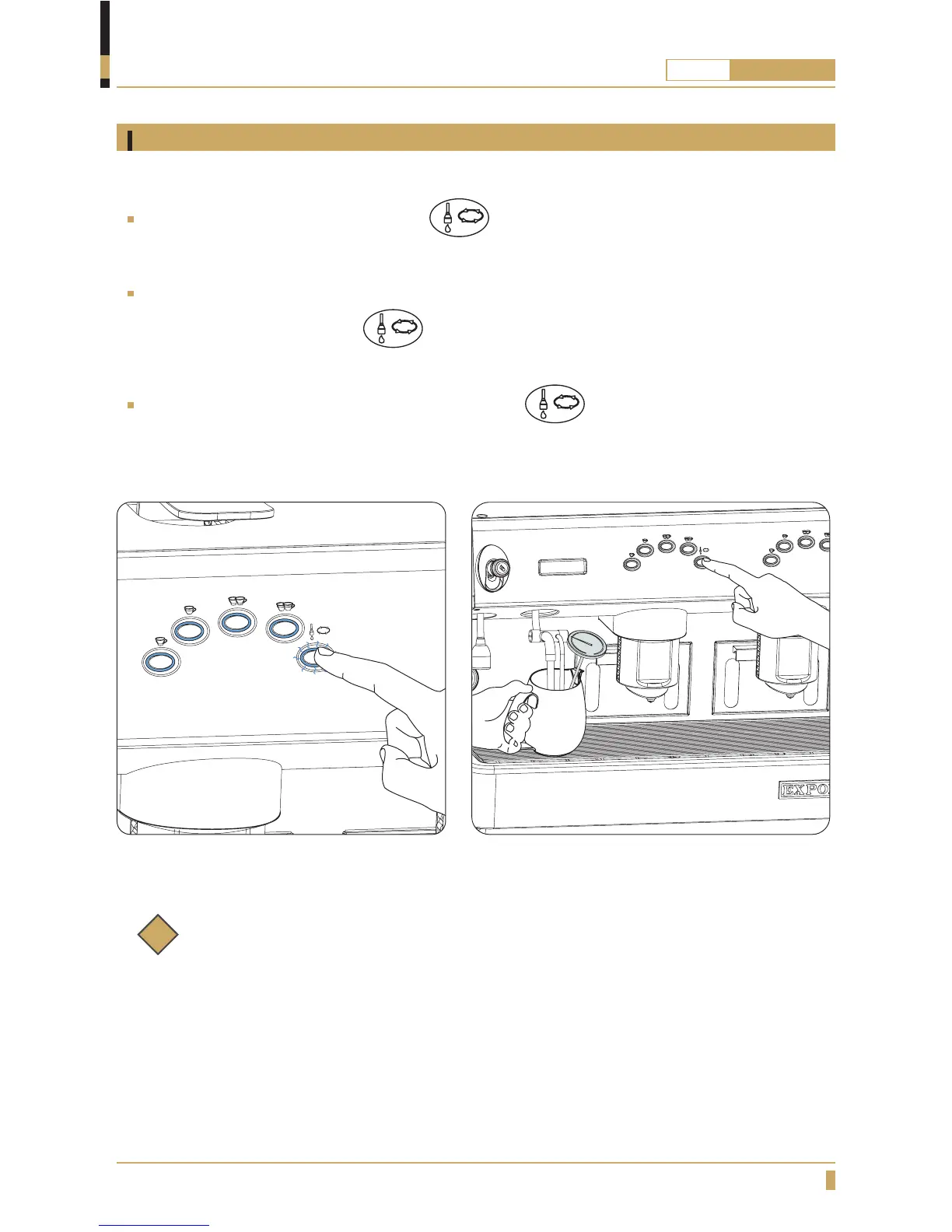
To program the temperature at which the turbo steamer will stop automatically:
Press the Continuous Dispensing button and hold it down for 8 seconds. The continuous
dispensing button light will flash and all of the button panel lights will be turned on (see fig. 02).
Insert the steam wand (with built-in temperature gauge) in the jug containing the milk and press the
Continuous Dispensing button on the left-hand button panel. The automatic steam wand
will start dispensing steam and will heat the milk in the jug (see fig. 03).
When the milk reaches the desired temperature, press again to stop dispensing.
The new heating temperature will be saved.
Fig. 02 Fig. 03
Note:
Use a thermometer to measure milk temperature when programming the turbo steamer.
To adjust the amount of air injected into the steam, and therefore the creaminess of the
steamed milk, contact service personnel.







 To Next Page