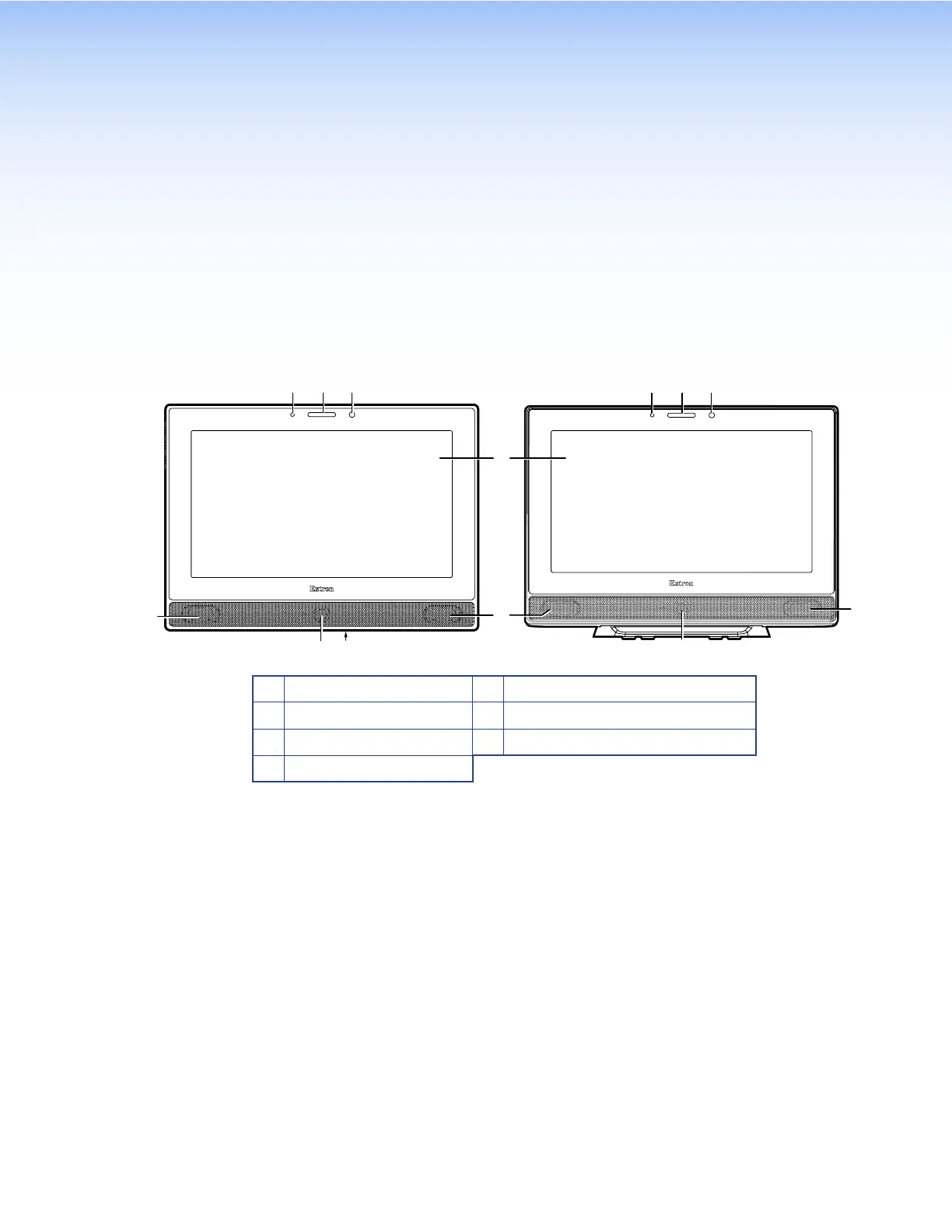
Panel Features
This section describes:
• Front Panel Features
• Rear Panel Features
Front Panel Features
D
B
E
TLP Pro 1022M TLP Pro 1022T
E
A C BA C
G
A
Communication LED
E
Speakers (2)
B
Status Light
F
Motion Sensor
C
Light Sensor
G
Menu Button (TLP Pro 1022M only)
D
Capacitive Touchscreen
Figure 2.
TLP PRO 1022 Series Front Panels
A
Communication LED — shows the configuration and connection status of the touchpanel:
• Unlit during normal operation (the touchpanel is configured and connected to an IP Link
Pro control processor).
• Blinks red if the touchpanel has been configured but is not connected to an IP Link Pro
control processor.
• Solidly lit if the touchpanel has not been configured.
The indicator can be toggled between enabled and disabled, using the Setup Menu (see
page 8).
B
Status light — can be programmed to provide system feedback.
• Light red or green
• Blink or solidly lit
For information about programming this light, see the Global Configurator Help File.
C
Light sensor — monitors ambient light level and adjusts screen brightness, based on the
settings configured using the Setup Menu (see page 8).
D
Capacitive touchscreen — 10-inch, 1024x600 resolution capacitive touchscreen with a
touch overlay.
TLP Pro 1022 Series • Panel Features 4



 To Next Page