E
Speakers (see figure 2 on the previous page) — two speakers are located below the
screen, one on each side of the panel, and provide audible feedback for the user.
F
Motion sensor — detects motion between three to five feet from the touchpanel, and at
least 15° from the center axis.
• When no motion has been detected for a user-defined period of time, the touchpanel
enters sleep mode.
• When motion is detected by the sensor, the screen display is restored and active.
G
Menu button — activates the Setup Menu (see page 8) and Calibration Screen (see
page13). Only the TLP Pro 1022M has a
Menu button that can be accessed from the front
panel. The button is recessed in a hole below the front panel (see the arrow in figure 2,
G
).
Use a screw driver with a fine blade to press the button.
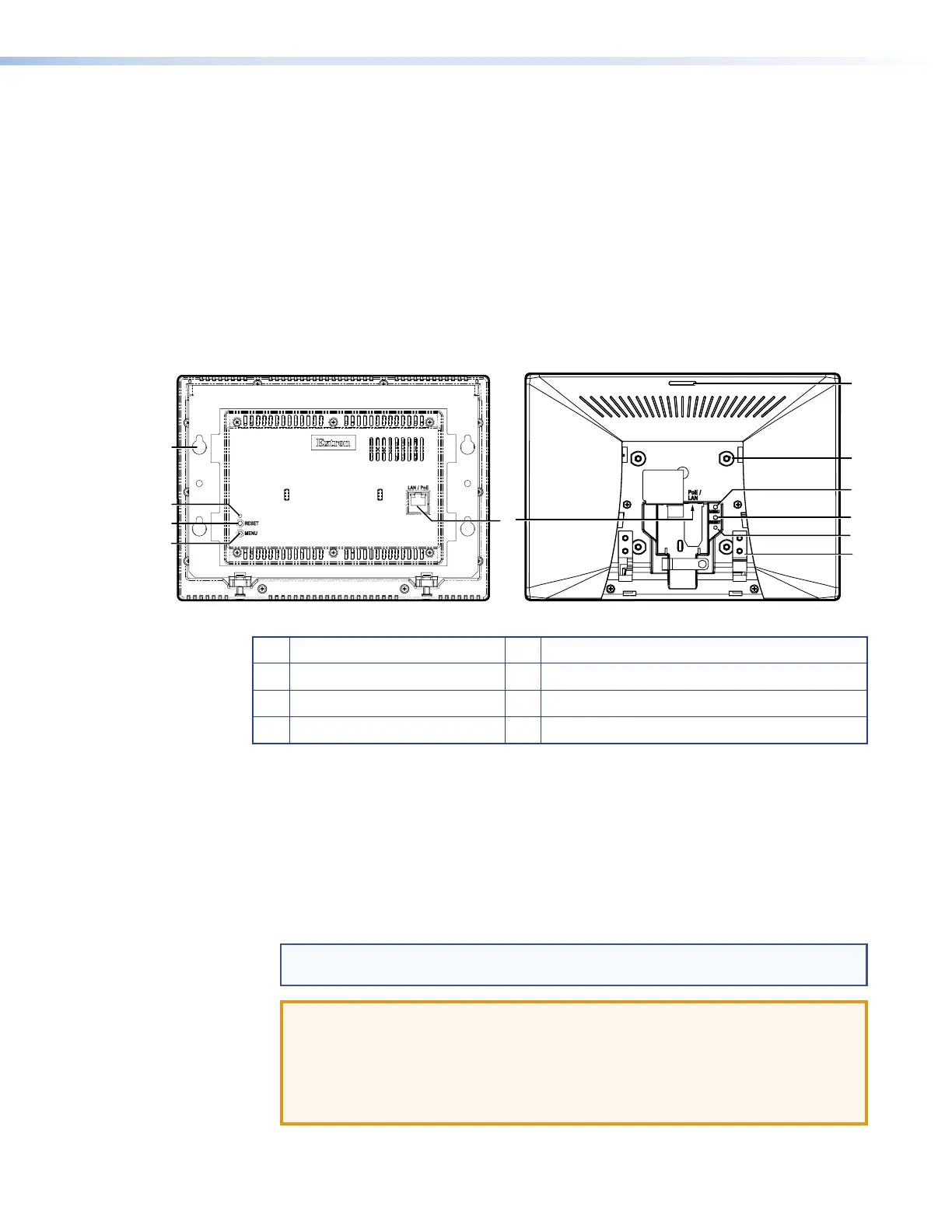
Rear Panel Features
TLP Pro 1022M TLP Pro 1022T
C
B
A
G
D
F
A
Reset LED
E
Mounting holes (TLP Pro 1022M only)
B
Reset button
F
Status light (TLP Pro 1022T only)
C
Menu button
G
VESA mounting holes (TLP Pro 1022T only)
D
LAN/PoE connector
H
Base attachment hinges (TLP Pro 1022T only)
Figure 3.
TLP Pro 1022 Series Rear Panels
A
Reset LED— indicates power status and reset status of the device (see Reset Modes on
page 23).
B
Reset button— initiates one of three reset modes for the unit (see Reset Modes on
page23).
C
Menu button— activates the Setup Menu (see page 8) and Calibration Screen (see
page13).
D
LAN/PoE Connector— is on the back of the TLP Pro 1022M. On the TLP Pro 1022T, it is
in the top of the recessed area, to the right side.
NOTE: These touchpanels are shipped without a power injector. The power injector
must be purchased separately.
ATTENTION:
• The touchpanels are Power over Ethernet (PoE 802.3af, class3) compliant. Do
not connect a power supply before reading the Attention notifications on page 6.
• Les écrans tactiles sont compatible avec l’alimentation POE via Ethernet
(PoE802.3af, classe 3). Ne branchez pas de sources d’alimentation externes
avant d’avoir lu les mises en garde sur page 6.
TLP Pro 1022 Series • Panel Features 5



 To Next Page