Mounting the TLP Pro 1022T
The TLP Pro 1022T comes with a stand that allows it to be placed on any suitable flat surface.
See www.extron.com for a range of available optional mounting kits. The kits must be
purchased separately. Follow the installation instructions provided with the kit.
Removing the Base and Back Covers
To attach cables and to mount the TLP Pro 1022T with the SMA-1 swivel mount adapter (see
following page) or by VESA Mounting (see following page), you must remove the base and back
covers:
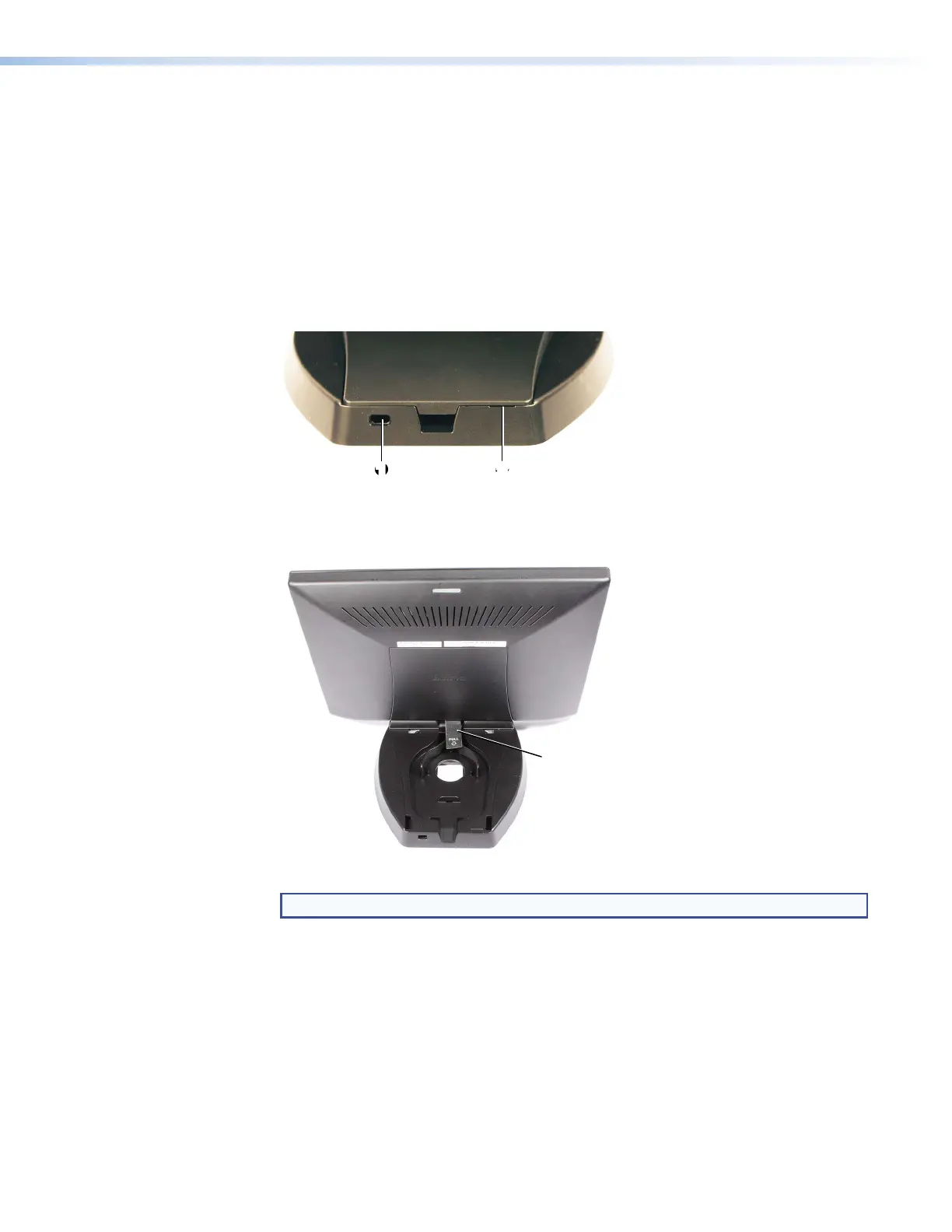
1. Remove the base cover using the provided Extron removal tool. There is a notch at the back
edge of the cover (see figure 20,
2
).
11 22
Figure 20. Rear of TLP Pro 1022T Base
2. When the base cover is removed, a pull tab can be seen (see figure 21). Use this to remove
the back cover.
Pull Tab
(to Remove
Back Cover)
Figure 21. TLP Pro 1022T with Base Cover Removed
NOTE: When replacing the covers, attach the back cover before the base cover.
Kensington
®
Security Lock
For added security, attach a Kensington Security Lock (not provided) to the metal-reinforced slot
on the rear edge of the base (see figure 20,
1
). Follow the instructions that are provided by the
manufacturer to install the lock.
TLP Pro 1022 Series • Mounting 21



 To Next Page