Colon Insufflator User Manual
L™ Colon Insufflator may differ slightly from the units
shown in the illustrations and photographs. (Example: buttons may be round or square).
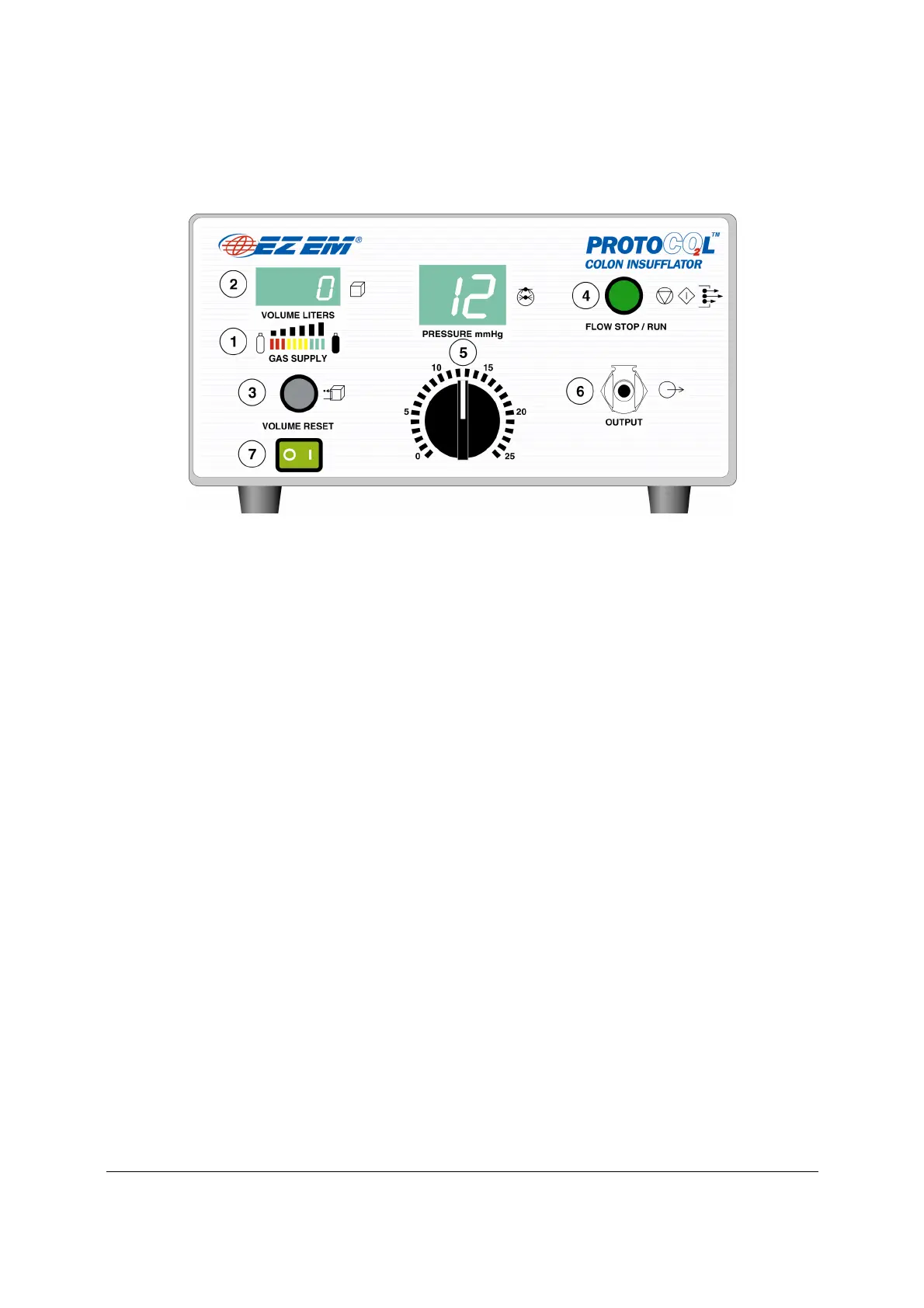
Three colors of LED’s to indicate the relative amount of gas available in a "D/E"
Indicates the total amount of gas used.
Clears the volume display to zero.
Depression starts flow. Unit will flow at 1 to 3 LPM based on volume delivered.
Flow is incrementally delive
red during first Liter: delivery volume from 0 to 0.5
Liter at 1 LPM maximum, delivery volume greater than 0.5 to 1 Liter at 2 LPM
maximum and delivery volume greater than 1 Liter at 3 LPM.
Upon pressing the FLOW STOP/RUN button at the start of the proce
unit will remain in run mode until 4 Liters of CO
have been delivered. Once 4
Liters have been delivered, the unit automatically returns to stop mode.
Thereafter pressing the FLOW STOP/RUN button a second time will resume the
an additional 2 Liters of CO
. Once an additional 2 Liters
have been delivered, the unit automatically returns to stop mode.
Subsequent presses of the FLOW STOP/RUN button will deliver additional
can always depress the STOP/RUN button during any of these volume
increments to stop delivery of CO


 To Next Page