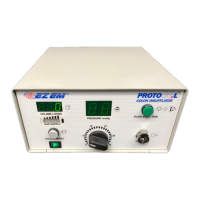
Colon Insufflator User Manual
Begin insufflation in the lateral decubitus position by p
ressing the FLOW STOP/RUN button
to initiate gas flow. Gently roll the patient into the supine position. Allow the pressure and
Within approximately 1 to 3 minutes, the volume will stabilize between 2 and 3 L, and the
point. If after 3 to 5 minutes, the actual volume stabilizes at
less than 2 Liters, the pressure remains less than the set
point, or the volume fails to stabilize,
see OBSERVATIONS DURING INSUFFLATION below.
hes 4 Liters at any point during the procedure, the flow of CO
automatically pause. This will be evident by the light on the FLOW STOP/RUN button
going out. Pressing the FLOW STOP/RUN button again will reinitiate the flow for an
s. Each subsequent restarting of the flow will reinstate the flow for an
Take the scout image. Evaluate the quality of insufflation. If insufflation is insufficient, see
OBSERVATIONS DURING INSUFFLATION below.
Following the supine scan, roll the patient to the prone position. Immediately take the scout
Occasionally, the patient may feel some abdominal
initial stages of insufflation, which is primarily due to the
distention of the colon. To minimize patient discomfort, the following steps may
Instruct the patient to breathe through his/her mouth.
Instruct the patient to relax his/her abdominal
If the unit is in RUN mode, the flow of CO
may be paused by pressing
the FLOW STOP/RUN button to allow time for the colon to relax. Once
the patient is comfortable, the flow can be re
For patients who require more gradual insufflation, the pressure of CO
may be lowered (15 to 20 mm Hg) by using the Pressure Adjust Dial, to
allow for a more gradual distention of the colon. When the patient is
comfortable, the pressure shoul


 To Next Page