Colon Insufflator User Manual
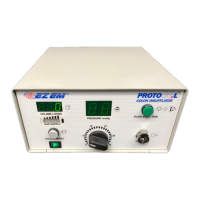
To set patient pressure, rotate the Pressure Se
lect dial to the desired pre
Once flow has been initiated, the pressure display will indicate the current pressure
An initial insufflation pressure of 20 mm Hg is recommended. If necessary, the
pressure may be increased up to 25 mm H
g during the procedure to obtain adequate
Assure that the Volume Display reads zero prior to beginning insufflation. To reset
the Volume Liters Display, press the Volume Reset.
NOTE: Do not press Volume Reset button once pr
Place the patient in the lateral decubitus position, and insert the Administration Set into the patient,
following the instructions included with the Administration Set.
It is important to use only
EM, Inc. manufactured high flow tubing with a 0.1 micron
hydrophobic filter to prevent cross contamination of the patient or PROTOCO
EM, Inc. manufactures an Administration Set (that includes the filter) designed
to provide optimum insufflator performance. It is recommended that this Administration Set be
used. Always inspect every Administration Set to make su
re there are no signs of damage. If such
a condition exists, do not use the Administration Set. See Administration Set instructions for use.
The use of unauthorized administration sets may cause damage of your insufflator, and result in
Insert the connector on the Administration Set to the Gas Output connection on the insufflator’s


 To Next Page