
 Need help?
Do you have a question about the EZ EM PROTOCO2L 6400 and is the answer not in the manual?
Specifies when the device should be used and when it is prohibited.
Outlines features designed to ensure safe operation of the machine.
Lists critical safety warnings for operating the device and potential hazards.
Provides important cautionary notes for proper usage and maintenance.
Details the physical and operational specifications of the insufflator.
Outlines the voltage, power, and safety standards for electrical connections.
Specifies the classification and standards compliance for the equipment.
Lists the recommended environmental conditions for operation and storage.
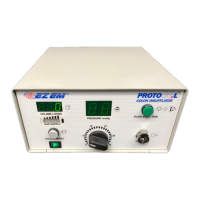
Indicates the relative amount of gas available in the CO2 supply tank via LEDs.
Shows the total amount of gas used during the procedure.
Clears the volume display to zero, typically before starting a procedure.
Controls the initiation and pausing of CO2 gas flow to the patient.
Allows setting and viewing the colonic pressure from 0 to 25 mm Hg.
The port where the patient tubing set is connected.
Turns the main power of the insufflator unit on and off.
Connects the CO2 supply tank using the high-pressure hose and yoke assembly.
Details the universal AC power input and line cord requirements.
Steps for preparing the insufflator unit before use.
Instructions for safely connecting the power cord to the unit.
Detailed steps for connecting the high-pressure hose and yoke to the CO2 tank and unit.
Instructions for powering on the unit and checking the gas supply status.
Procedures to verify proper operation of the unit before use.
How to set the desired pressure for colonic insufflation.
Instructions for resetting the volume display to zero before starting.
How to position the patient and connect the administration set.
Steps for connecting the administration set to the insufflator's output.
Guides the user through the process of insufflating the patient's colon.
Information on monitoring the patient and managing discomfort or issues.
Explains the digital display for tracking the total volume of CO2 delivered.
Steps for safely stopping gas flow and shutting down the unit.
Contact details for customer support and ordering parts.
Details the warranty coverage and exclusions for the insufflator.
Requirements for returning products, including a Certificate of Non-Contamination.
 General
| Compliance | CE, ISO 13485 |
|---|---|
| Operating Temperature | 0°C to 50°C |
| Storage Temperature | -20°C to 60°C |
| Humidity Range | 10% to 90% RH (non-condensing) |
| Power Supply | AC adapter |
| Display | LCD |
| Interface | USB |

 To Next Page