Colon Insufflator User Manual
supply tank approximately 1 turn. Turn on the Power
Switch. Upon turn on, all lights and indicators will be illuminated for a brief
The Gas Supply indicator should display red
oding in the bar graph is a guide to determine whether there is sufficient gas in
supply tank to finish a procedure, as indicated below:
Tank Pressure is greater than 175 PSI.
Tank Pressure is 75 to 17
Tank Pressure is less than 75 PSI. Change Tank!
supply tank pressure is less than 25 PSI (red), flow cannot be
There is always the possibility that delicate equipment can be damaged in
or storage. Therefore it is important to verify proper operation of the
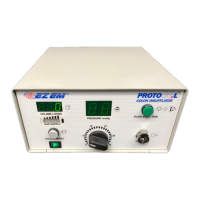
After power is applied to the unit, verify that the front panel lights are enabled.
If the output pressure is negative or in an alarm state, the Pressure Dis
will indicate the actual pressure.
To verify that flow control is functioning properly, depress the FLOW
STOP/RUN button. When pressed, the light in the switch should light, and gas
may be heard exiting from the unit. If gas does not begin flowing,
supply tank valve is in the open position (see
To verify that the Pressure Adjust and Display are functioning properly, block
off the Output connector, and rotate the Pressure select di
range of 0 to 25 mm Hg. Verify a pressure increase on the Pressure Display.
When the FLOW RUN/STOP button is pressed initially, 4 Liters of CO
delivered and the unit automatically returns to STOP mode. Thereafter,
resses of the FLOW STOP/RUN button will resume the delivery of
for an additional 2 Liters before automatically returning to STOP mode.
However, you can stop the flow using the FLOW STOP/RUN button while the
unit is in RUN mode, as evidenced by the illu
If the unit does not perform properly, do not use. Inspect the unit using the
Troubleshooting guide (Section 14.0) before returning for service.


 To Next Page