4. Setting menu
Before using our watch, you must setup it base on
the specific situations or your habit. All of setting can
be setup in the setting mode.
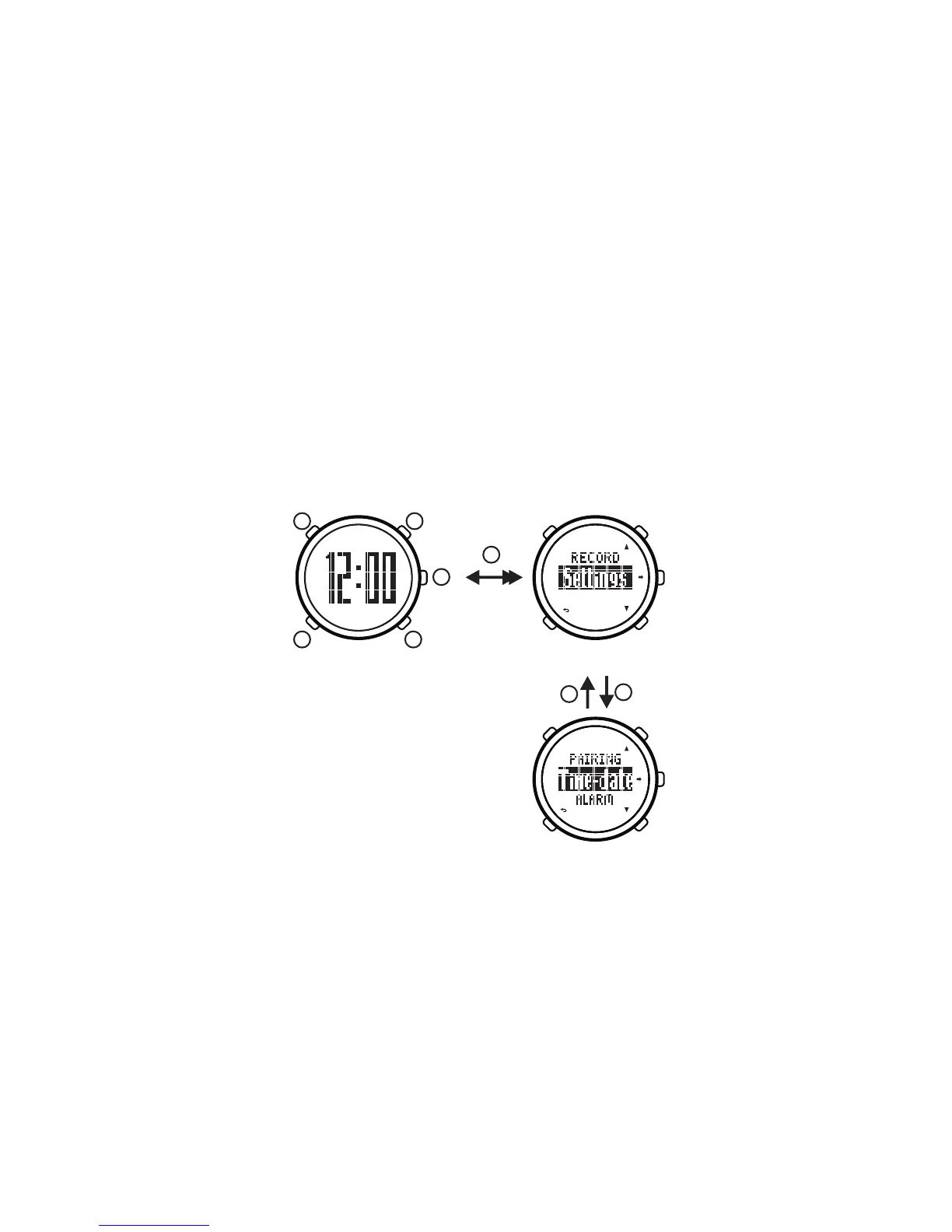
1) In the time mode, hold on button[B]to enter into setting
mode,
2) Press button[C]/[D]to select “Setting” (setting mode),
press button[E]to confirm and enter into setting menu:
time-date, alarm, timer, user information, exercise plan
and target, pairing.
3) Press button[C]/[D]to select menu, press button[E]
to confirm and enter into setting status.
4) Press button[B]to exit setting menu and back to the
mode menu.
5) Press button[B]to back to time mode.
Time Mode Mode Menu
Setting Menu
B
E
B C
D
A
E
B
5. Time
5.1. Setting time-date
1) In the time mode, hold on button[B]for 2 seconds to
enter into mode menu.
2) Press button[C]/[D]to select “Setting” (setting mode),
press button[E]to confirm and enter into setting menu.
3) In the setting menu, press button[C]/[D]to select
“Time-Date” (setting time-date), press button[ E] to
Conform.
3


 To Next Page