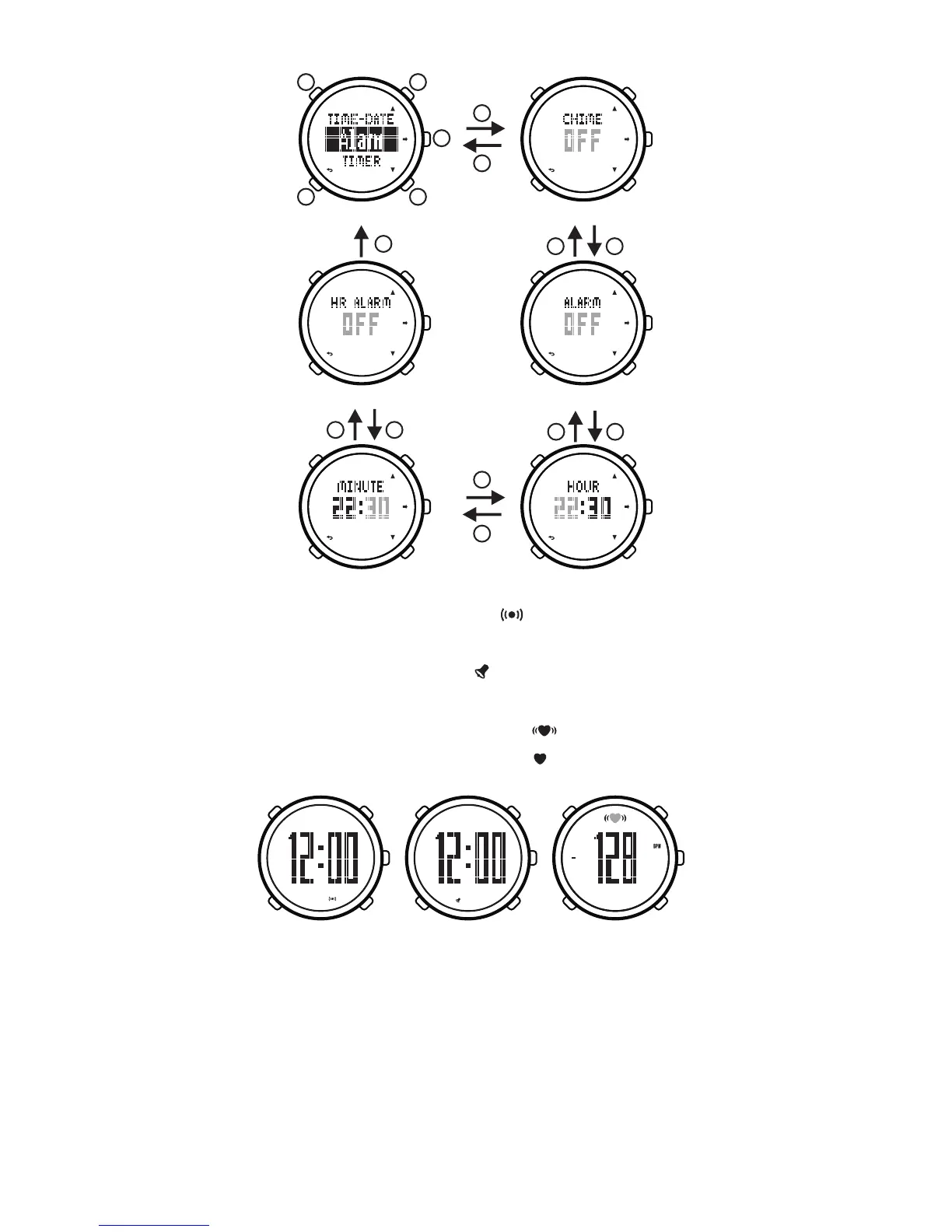
In the time mode, display means turn on the
alarm; not displaymeans turn off the alarm.
In the time mode, display means turn on the hourly
chime; not display means turn off the hourly chime.
In the exercise mode, display means turn on
the heart-rate warning; display means turn off
the heart-rate warning.
Turn on/off Hourly Chime
Turn on/off Alarm
Alarm Hour
Alarm Minute
Turn on/off Heart-rate Warning
Setting Alarm
7. Exercise plan
7.1. Setting exercise plan
Our watch can setup every day's exercise plan
within a week. The operating methods are as following:
1) In the time mode, hold on button[B]for 2 seconds
to enter into mode menu.
PM
PM
PM
PM
PM
PM
PM
PM
B
E
E
B C
D
A
B E
B
E
E
BE
B E
Turn on Hourly Chime
Turn on Alarm
Turn on Heart-rate Warning
7


 To Next Page