8.9. Review and delete the exercise record
Our watch can record up to 10 times exercise data,
and the methods of review and delete exercise record
are as following:
Record Mode
Time Mode
Exercise Mode
1) I n the time mode, hold on button [B]to
enter into mode menu, press button
[C]/[D]]to select “Record” (record mode),
press button[E]to review the record
of hitsogram of calories burned.
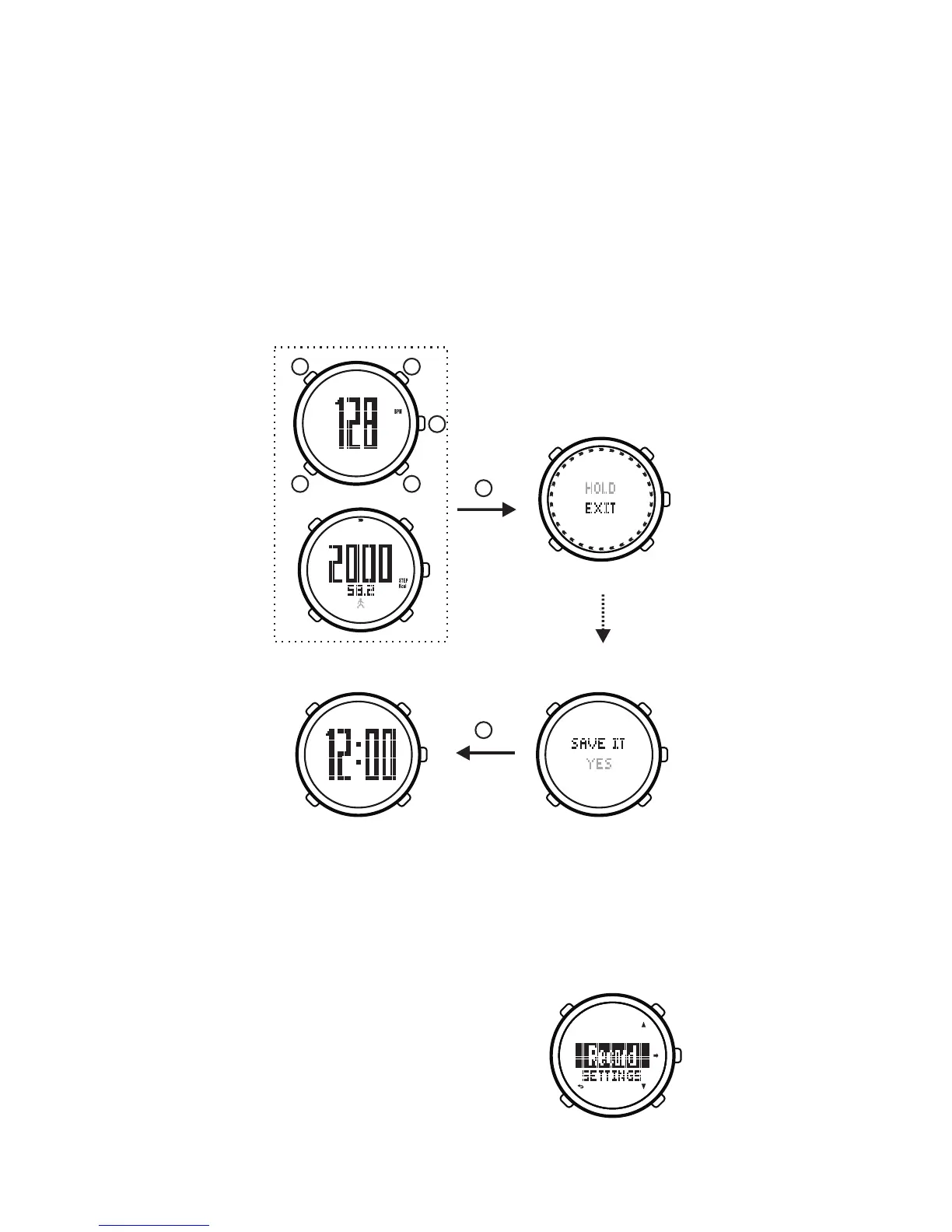
8.8. Exit exercise mode
After exercise, in the exercise mode, hold on button
[ E ] for 2 to 3 seconds, the watch will display whether to
save the training data or not, press button[C]/[D]to select “
YES” or “NO”, press button[ E ]to confirm and back to the
time mode.
Take off the heart-rate belt, to remove stains from
the electrode surface, then place it in a place where cool
and dry; take off and turn off pedometer.
19
E
E
E
B C
D
A
PM
PM


 To Next Page