[ ]
.
In the exercise mode, press button C can review
pedometer information at real-time ( Flashing,displaying
step data)
[ ]
In the status of making sure the heart-rate belt is
wet and wearing in a right way and turn on the pedometer,
press button E can connect signal again.
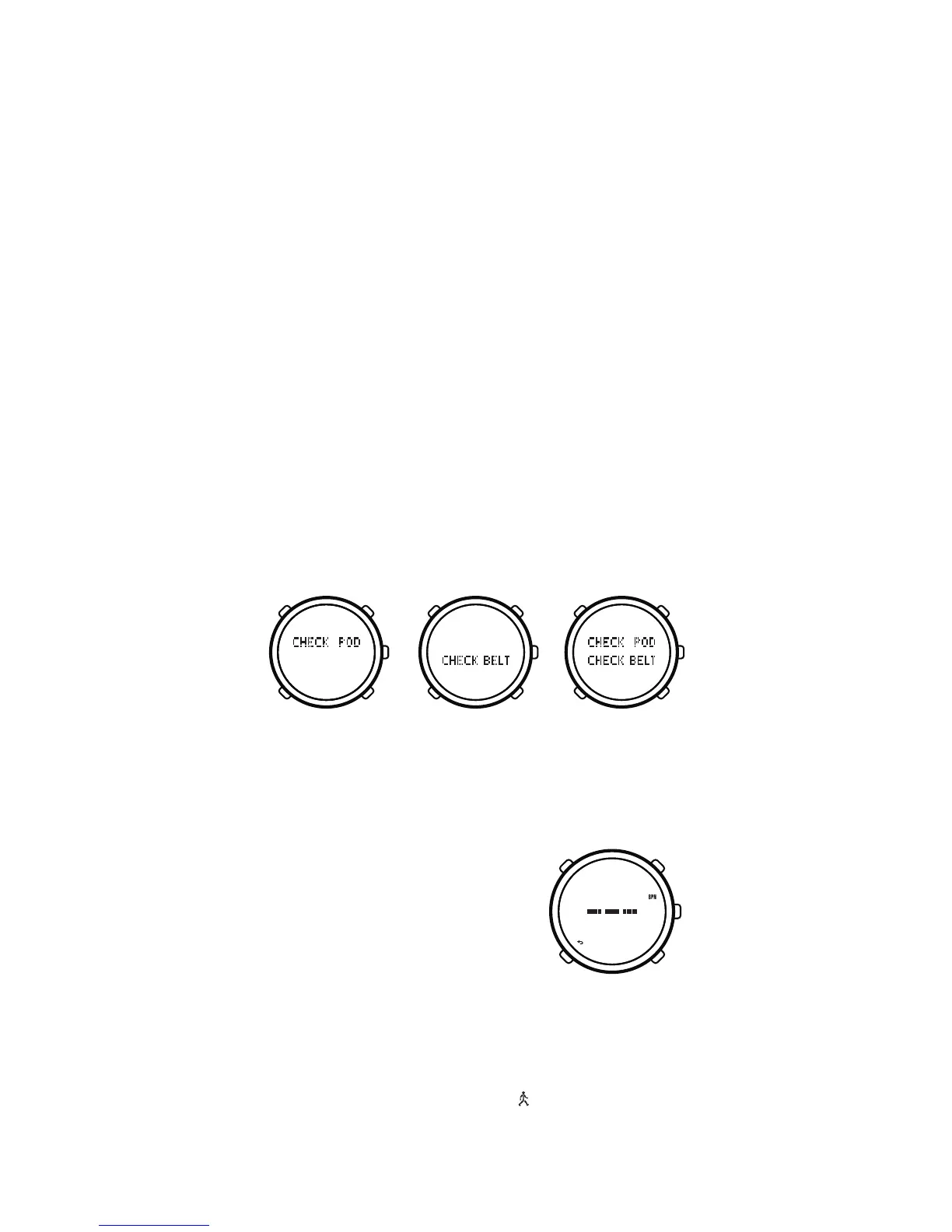
No Signal for Pedometer
No Signal for Heart-rate Belt
No Signal for Pedometer and Heart-rate Belt
After pairing the sensor, you can operate it. If both
of sensors are failed to pair, our watch will back to the
time mode automatically.
In the status of making sure the heart-rate belt
is wet and wearing in a right way and turn on the pedometer,
press button[E]can connect signal again.
If our watch display neither “CHECK POD” nor
“FOUND POD”, it means pedometer failed to pair with
the watch; if our watch display neither “CHECK BELT”
nor “FOUND BELT”, it means heart-rate belt failed
to pair with the watch, you must pair them again. (see
chapter 8.3)
During the process of exercising, there may be many
reasons (such as the skin is too dry, heart-rate belt drop
off, pedometer has been turn off due to a long time
pause exercise, the interference of the environment)
may cause a interruption of the sensor. At this moment,
our watch will display as the following pictures:
As the picture on the right side,
means the interruption of signal,
you should wear the heart-rate belt
in the right way (see chapter 8.2.1).
8.5. Review pedometer rate information at real-time
15


 To Next Page