10.2. Using timer
In the time mode, press button [C] to enter into
timer mode (to display the title " Timer " for 2 seconds,
then entered the countdown mode).
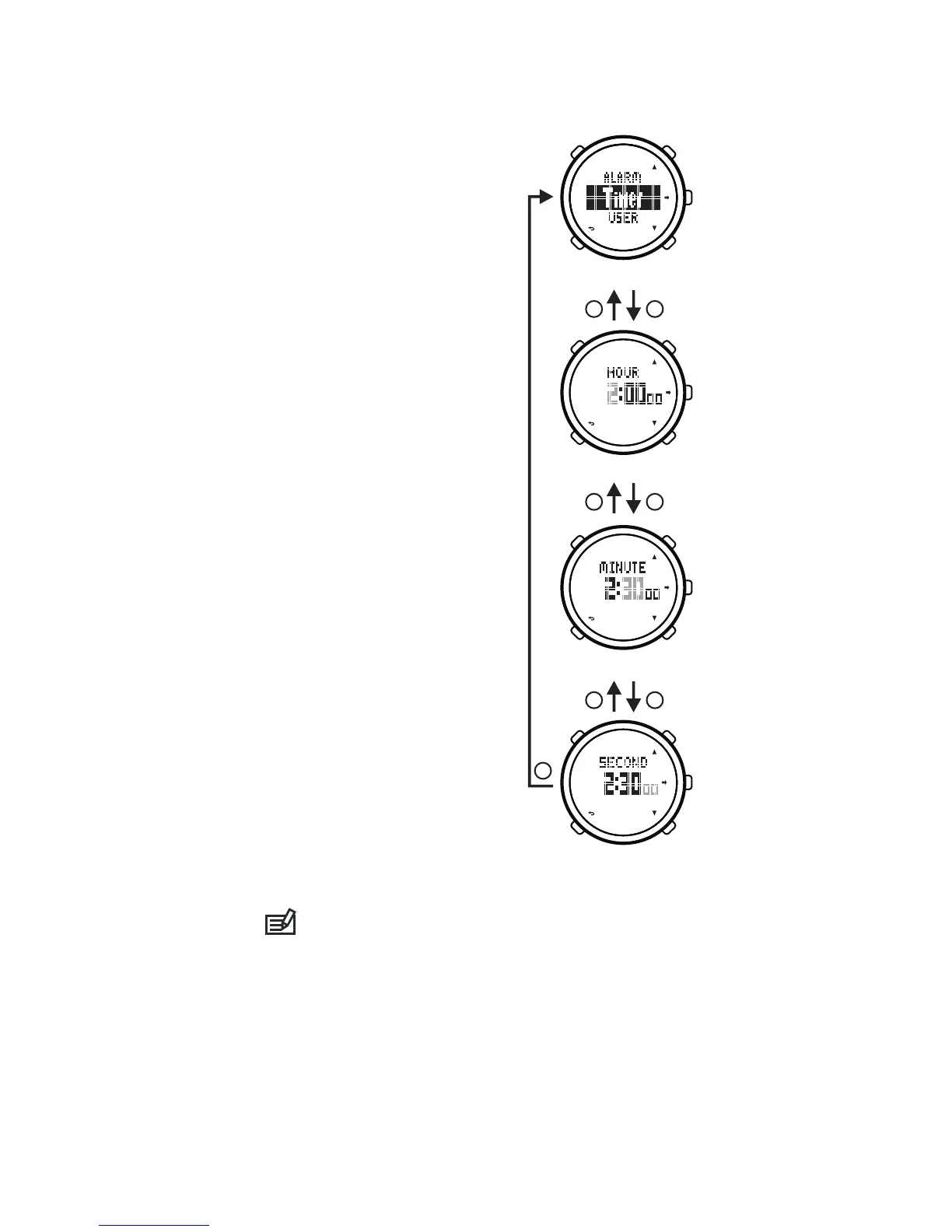
10.1. Setting initial countdown time
1) In the time mode, hold on
button[B]for 2 second to enter
into mode menu.
2) Pr e s s b u t to n [ C]/ [ D]t o
se l e ct “S e t tin g ” (s et t i ng
mode), press button[E]to
confirm and enter into setting
menu.
3) Pr e s s b u t to n [ C]/ [ D]t o
select “Timer”(setting timer),
press button[E]to confirm.
4) The setting items are:
hour, minute, second.
5) Pr e s s b u t to n [ C]/ [ D]t o
re v i se se t t ing or p lu s or
minus the number, hold on
button[C]/[D]to plus or minus
the number quickly.
6) Press button[E]to confirm
setting and enter into the
next setting item, press button
[B]to confirm settingand back
to the former setting item.
7) P ress button[ B]to exit
setting menu and back to the
mode menu.
8) Press button[B]to back
to the time mode.
You can not set initial countdown time while the
timer running. You can set it after stopping timer.
26
PM
PM
PM
PM
PM
PM
B E
E
B E
B E
Setting Minute
Setting Timer
Setting Hour
Setting Second


 To Next Page