Sex
BMI Index Age
Imperial/Metric
PM
PM
PM
PM
PM
PM
PM
PM
PM
PM
Step
Tall
B
E
B
B
E
Setting User Information
Weight
E
B C
D
A
E
B E
B E
BE
BE
E
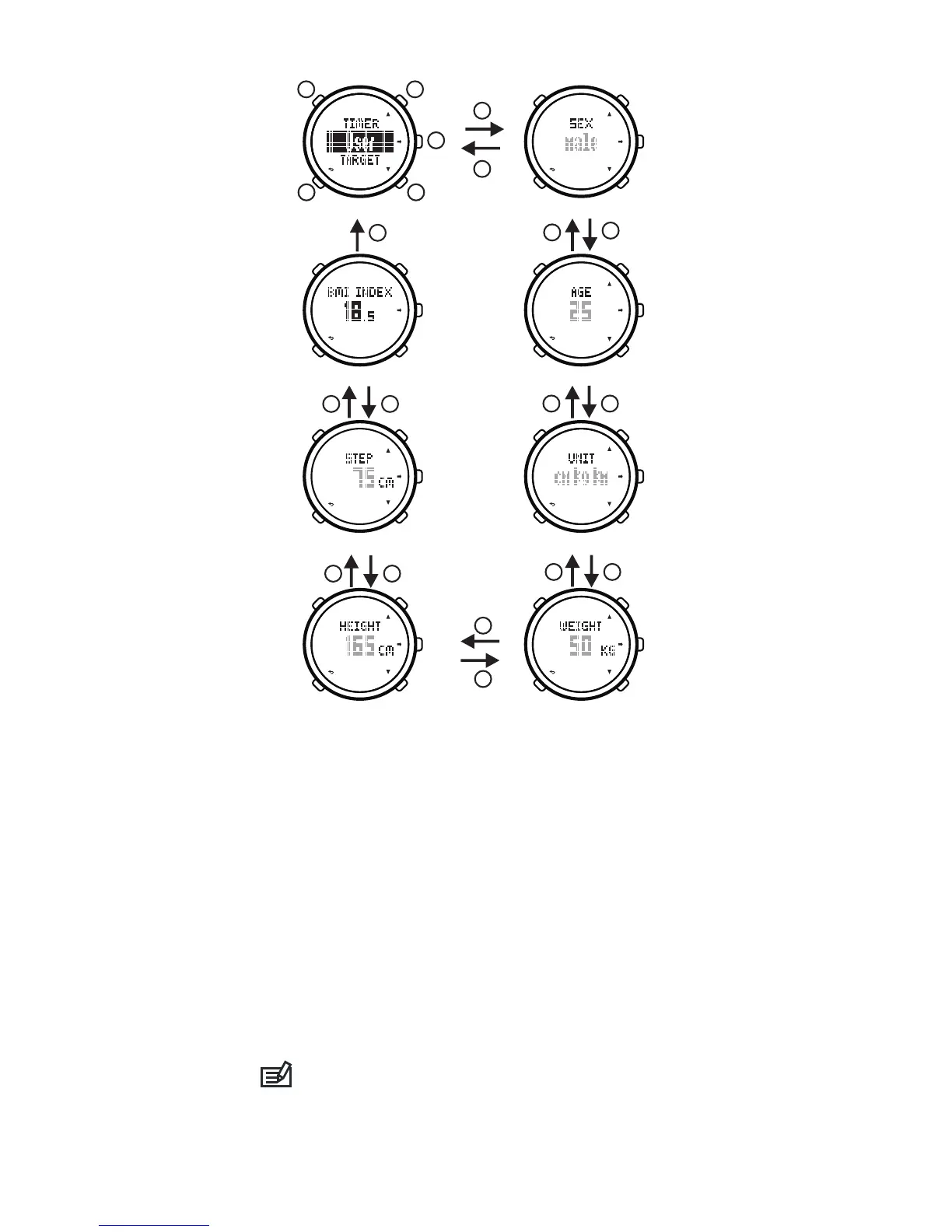
4) The setting items are: sex, age, imperial/metric
units, weight, tall, step.
5) Press button[C]/[D]to revise setting or minus/plus
the number, hold on button[C]/[D]to minus/plus the
number quickly.
6) Press button[E]to confirm setting and enter into
the next setting item, press butto n[B]to confirm
setting and back to the former setting item.
7) You can review user BMI (bady mass index) after
finishing setting.
8) Press button [B]to exit setting menu and back to
the mode menu.
9) Press button[B]to back to the time mode.
Normal person's BMI is between 18.5 and 24.0.
If the BMI is smaller than 18.5 means a little bit thin,
bigger than 24.0 means a little bit fat, bigger than 30.0
means obesity.
10


 To Next Page