Chapter 4
4 - 8
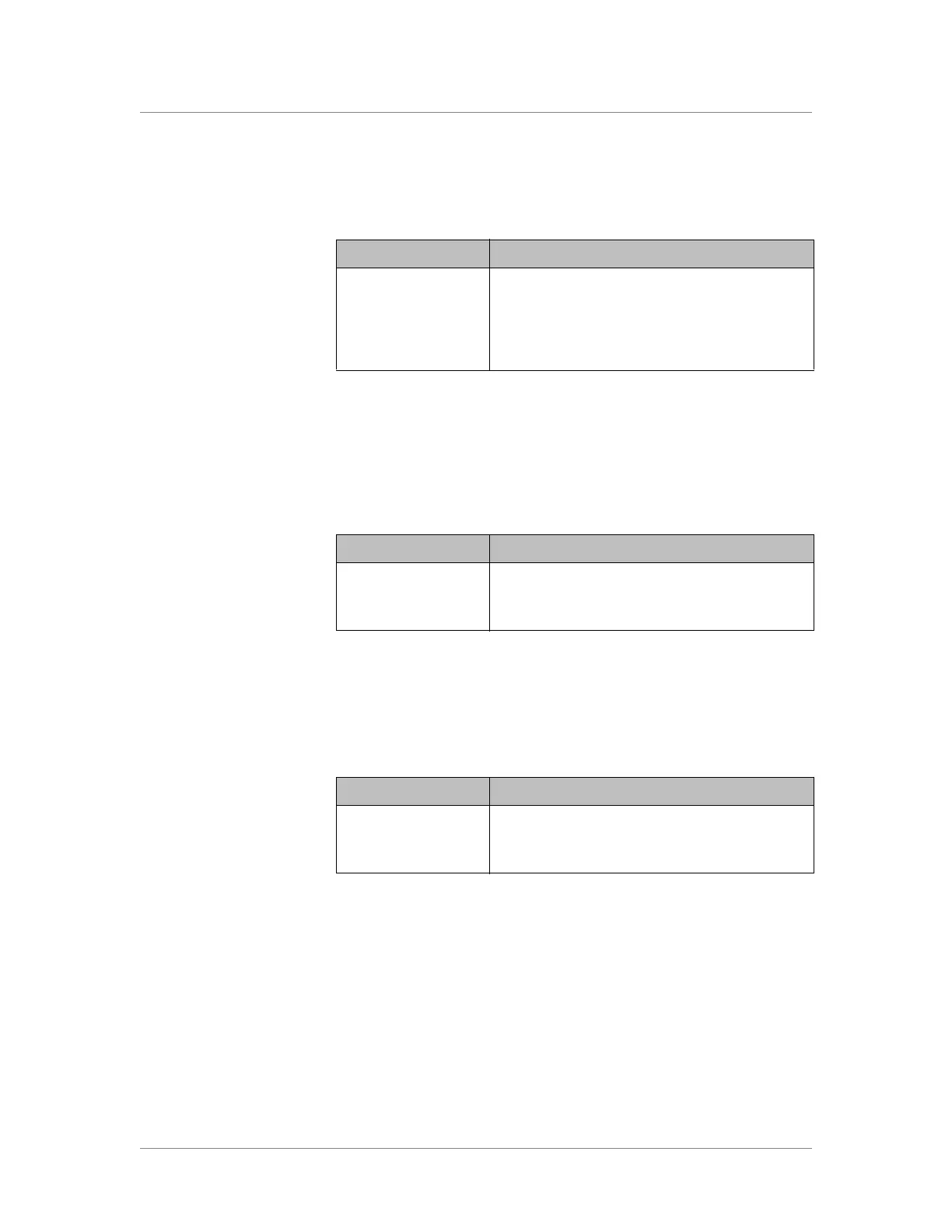
The appearance and behavior of the LEDs for the SFP ports correspond with
traffic activity. The SFP port interface status LED behavior is defined in
Table 4.9.
SFP+ port LED behavior
The appearance and behavior of each SFP+ port LED indicate network
traffic activity. The SFP+ port speed LED behavior is defined in Table 4.10.
The appearance and behavior of the LEDs for the SFP+ ports correspond
with traffic activity. The SFP+ port interface status LED behavior is defined
in Table 4.11.
Interface Status LED Appearance
Idle The LED is not lit and does not display any color.
Full duplex The LED blinks green.
Half duplex The LED blinks yellow.
Table 4.9 SFP port status LED behavior
Speed LED Appearance
No Link The LED is not lit and does not display any color.
Link The LED is lit green.
Table 4.10 SFP+ port speed LED behavior
Interface Status LED Appearance
Idle The LED is not lit and does not display any color.
Receive/Transmit The LED blinks green.
Table 4.11 SFP+ port status LED behavior


 To Next Page