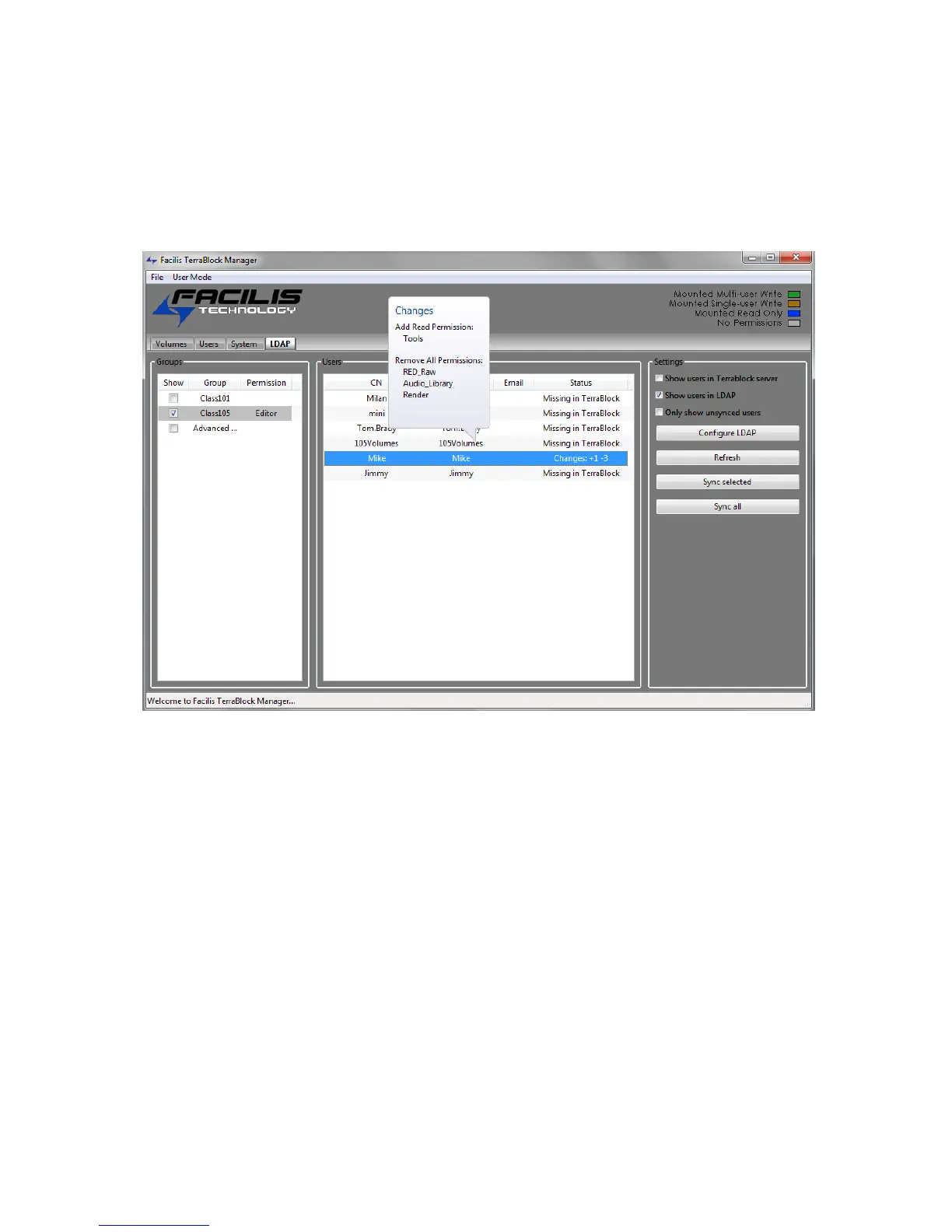
LDAP/Active Directory User Feature
Once connection to an LDAP or Active Directory (AD) server has been established,
the User Groups will be listed in the TerraBlock Manager. A specific user or multiple
users can then be selected and synced or pulled from the LDAP/AD server and will
become a new TerraBlock user. It is recommended to disable the TerraBlock
User/Password feature if logging into clients using an LDAP/AD user.
Groups
Once a connection has successfully been established to the domain component or
organizational unit groups of the Active Directory (AD) server, the user groups will
be displayed. There can be multiple user groups listed depending on how the AD
server is configured.
Please consult your Systems (IT) Administrator for LDAP/AD setup and
groups.
In the case where multiple groups are displayed, you can show specific groups,
filtering out all others, by selecting the box to the left of the group. Multiple groups
can be displayed as well, simply check which groups to display. Groups displayed
can or may be within multiple nested Organizational Units.
Right clicking directly to the right of the displayed group under the Permission
column will produce an interactive list box. This lists all of the TerraBlock users
currently active on the TerraBlock server. The user selected from this list will then
be displayed under the Permission column. The volumes and permissions for the
TerraBlock user (“Editor” in the example above) will be applied to any LDAP/AD user
that is synced. This applies to any LDAP/AD user in the selected group (all users in
the Class105 group in the example above).



 To Next Page